
RawBytes Practical Guide
This guide introduces the role, the advantages and the usage of RawBytes.
1 Introduction to RawBytes
1.1 Role
RawBytes is a feature for handling raw byte data. It can pack, unpack, copy and clear binary data, and fits scenarios such as Socket communication, protocol frame parsing and byte array conversion. With RawBytes you can write integers, floating-point values and byte blocks into a frame in a given format, or read business variables back out of a frame, which makes binary protocols easy to handle.
Data processing capabilities
- Packing: converts integers, floating-point values and other numbers into binary bytes of a given type and writes them at a given position in the buffer.
- Unpacking: reads bytes at a given position in the buffer and parses them into an integer, a floating-point value or a byte block of a given type.
- Byte copy: copies a given number of bytes from a source to a given position in the target.
- Clearing: clears a given buffer, which is handy before rebuilding a frame or running a test.
1.2 Advantages
When you assemble binary bytes by hand in a script, field widths, byte order and offsets all have to be computed manually. RawBytes turns that work into explicit interface calls, with the following advantages:
| Advantage | Description |
|---|---|
| Flexible protocol mapping | Integers, floating-point values and byte blocks can be combined freely according to the protocol; adding or removing a field only means changing a type name and a position argument. |
| Explicit positions | Reads and writes take a start position; start_pos appears right at the call site and maps one-to-one to the protocol table. |
| Easy debugging | Hexadecimal output lets you check packing and unpacking directly and compare the result with the protocol document byte by byte. |
| Suited to Socket communication | Frames can be received, parsed, modified and sent back. |
| Strict validation | Value range, position and type name are validated on every call; anything invalid raises an error and stops the script. Hand-written code passes silently and sends the bad frame anyway. |
Validation covers the arguments only. If the return value is discarded (see 1.5), the module does not raise an error either; that mistake is still up to the developer to avoid.
1.3 Supported data types
| Data type | Bytes | Description |
|---|---|---|
Bytes | Given by the length argument | Raw byte block |
USINT | 1 | 1-byte unsigned integer |
UINT | 2 | 2-byte unsigned integer |
UDINT | 4 | 4-byte unsigned integer |
ULINT | 8 | 8-byte unsigned integer |
SINT | 1 | 1-byte signed integer |
INT | 2 | 2-byte signed integer |
DINT | 4 | 4-byte signed integer |
LINT | 8 | 8-byte signed integer |
Float4 | 4 | 4-byte floating-point value |
Note
Positions are 1-based: start_pos = 1 is the first byte of the frame. All examples in this guide use little-endian byte order.
1.4 Core interfaces
| Interface | Description |
|---|---|
packRawBytes | Packs a value into the buffer using the given type |
unpackRawBytes | Unpacks data from the buffer using the given type |
copyRawBytes | Copies a range of bytes from a source to a target |
clearRawBytes | Clears buffer data |
toHex | Renders data as a hexadecimal string, for logging |
local rawBytes = require("aubo.rawbytes")

rawBytes.packRawBytes(value, data, start_pos, "UINT")
rawBytes.unpackRawBytes(data, start_pos, "UINT")
rawBytes.copyRawBytes(source, src_pos, dest, dest_pos, length)
rawBytes.clearRawBytes(data)
1.5 Usage notes
Always keep the return value
Lua strings are immutable. packRawBytes, unpackRawBytes and copyRawBytes do not modify the buffer in place; they return a new string. If the return value is discarded, the buffer stays unchanged and no error is raised.
rawBytes.packRawBytes(0x5A, out, 1, "USINT")        -- wrong: the return value is dropped, out stays empty
out = rawBytes.packRawBytes(0x5A, out, 1, "USINT")  -- correct
Other rules
start_posmust be at least 1 and must not exceed the writable range of the buffer.- When unpacking, the source must be long enough for the requested type.
- Length mode requires an explicit length.
- When comparing
Float4and other floating-point values, allow a reasonable tolerance. - If the protocol changes its byte order, update the sample scripts and the expected results as well.
1.6 Calling scripts in AuboStudio
For the full workflow of creating, editing and running a script in AuboStudio, see Using Scripts in AuboStudio.
2 Basic Interface Examples
The six examples below cover five kinds of operation: packing (twice), unpacking, byte extraction, byte copy and clearing. All of them involve a single field; the full use of start_pos is shown in 3.1.
2.1 Packing a UINT
Pack the value 1025 as a UINT:
local rawBytes = require("aubo.rawbytes")

local out = ""
local pos = 1
out = rawBytes.packRawBytes(1025, out, pos, "UINT")
pos = pos + 2
textmsg("out = " .. rawBytes.toHex(out))  -- out = 01 04
break
2.2 Packing a Float4
Pack the value 3.14 as a Float4:
local rawBytes = require("aubo.rawbytes")

local out = ""
local pos = 1
out = rawBytes.packRawBytes(3.14, out, pos, "Float4")
pos = pos + 4
textmsg("out = " .. rawBytes.toHex(out))  -- out = c3 f5 48 40
break
2.3 Unpacking a UINT
Unpack a UINT from the bytes 01 04:
local rawBytes = require("aubo.rawbytes")

local data = string.char(0x01, 0x04)
local value = rawBytes.unpackRawBytes(data, 1, "UINT")
textmsg("value = " .. tostring(value))  -- value = 1025
break
2.4 Byte extraction
The third argument of unpackRawBytes can be a type name (as in 2.3) or a length (this example). In length mode it returns a Bytes value, a raw byte string, which is useful for variable-length fields:
local rawBytes = require("aubo.rawbytes")

local data = string.char(0x01, 0x02, 0x03, 0x04, 0x05, 0x06, 0x07, 0x08)
local bytes = rawBytes.unpackRawBytes(data, 2, 4)
textmsg("bytes = " .. rawBytes.toHex(bytes))  -- bytes = 02 03 04 05
break
2.5 Byte copy
Copy 2 bytes starting at byte 3 of the source into byte 5 of the target:
local rawBytes = require("aubo.rawbytes")

local source = string.char(0x01, 0x02, 0x03, 0x04, 0x05, 0x06, 0x07, 0x08)
local dest = string.char(0x01, 0x02, 0x03, 0x04, 0x05, 0x06, 0x07, 0x08)
dest = rawBytes.copyRawBytes(source, 3, dest, 5, 2)
textmsg("dest = " .. rawBytes.toHex(dest))  -- dest = 01 02 03 04 03 04 07 08
break
2.6 Clearing data
Clear the buffer before assembling a new frame:
local rawBytes = require("aubo.rawbytes")

local data = string.char(0x01, 0x02, 0x03, 0x04)
textmsg("before = " .. rawBytes.toHex(data))   -- before = 01 02 03 04

data = rawBytes.clearRawBytes(data)
textmsg("after  = " .. rawBytes.toHex(data))   -- after  = empty string
break
3 Working with a Complete Frame
3.1 Frame layout and offsets
This chapter uses an 11-byte control frame laid out as follows (little-endian):
| Offset | Field | Type | Bytes | Description |
|---|---|---|---|---|
| 1 | set | USINT | 1 | fixed 0x5A |
| 2~5 | id | UDINT | 4 | device ID |
| 6~7 | cmd | UINT | 2 | command word, max 65535 |
| 8~11 | val | Float4 | 4 | float parameter |
How offsets are computed: the offset of a field is the offset of the previous field plus the width of the previous field.
set : 1                -- first field, starts at 1
id  : 1 + 1 = 2
cmd : 2 + 4 = 6
val : 6 + 2 = 8
last byte : 8 + 4 - 1 = 11  -- last byte offset = start of current field + width of current field - 1
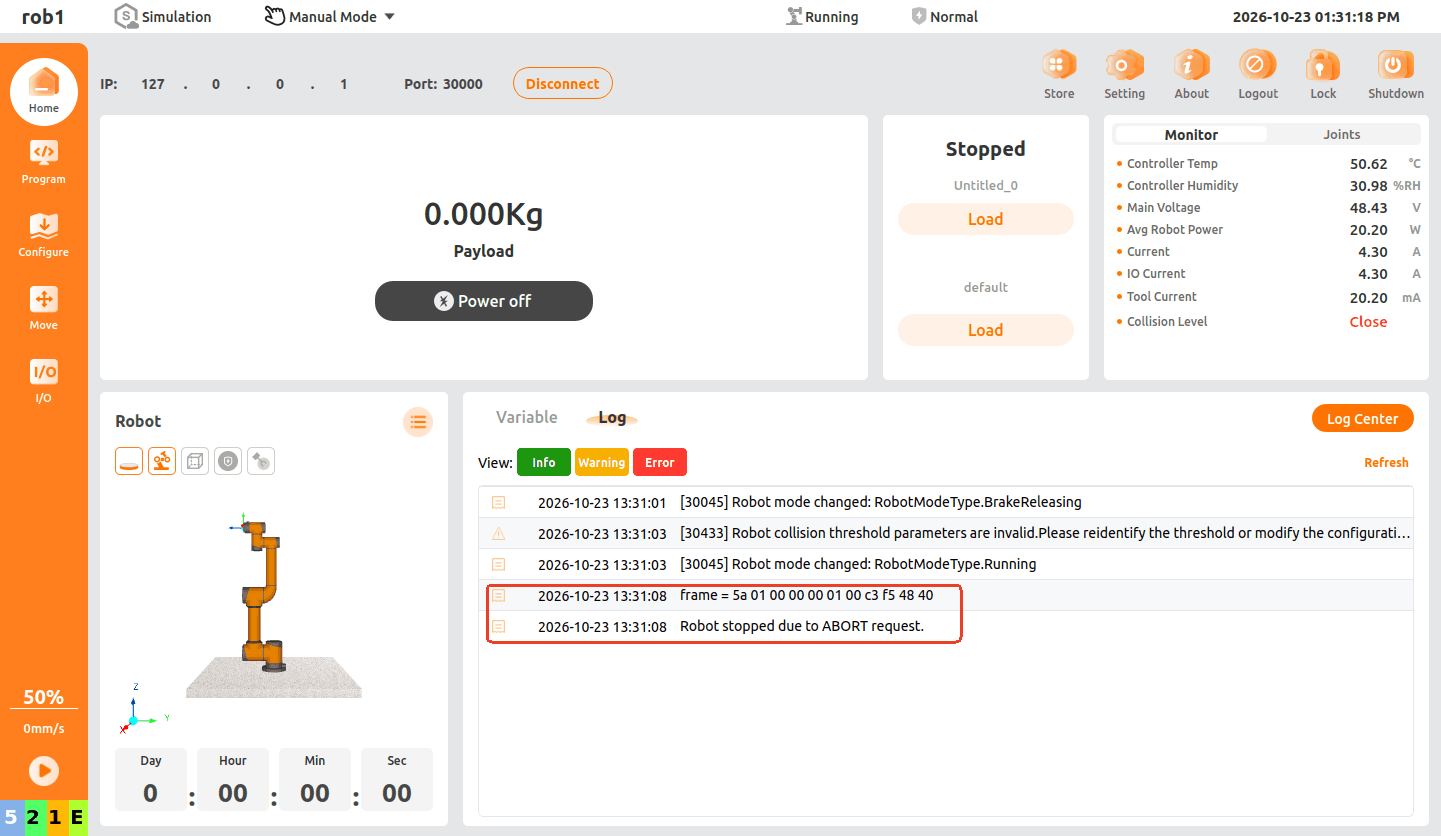
Assembling the frame from the table above with id = 1, cmd = 1 and val = 3.14 gives:
5a 01 00 00 00 01 00 c3 f5 48 40Note
Packing converts each field value into bytes according to its type. Multi-byte fields are laid out little-endian internally, and the fields are concatenated in order into the complete 11-byte frame. toHex only renders those bytes in hexadecimal, so you can compare them with the protocol table byte by byte.
3.2 Building a frame correctly
Packing the fields in the order and at the offsets from 3.1 produces exactly the byte string above:
local rawBytes = require("aubo.rawbytes")

local function buildFrame(set, id, cmd, val)
    local d, p = "", 1
    d = rawBytes.packRawBytes(set, d, p, "USINT"); p = p + 1
    d = rawBytes.packRawBytes(id,  d, p, "UDINT"); p = p + 4
    d = rawBytes.packRawBytes(cmd, d, p, "UINT");  p = p + 2
    d = rawBytes.packRawBytes(val, d, p, "Float4")
    return d
end

local frame = buildFrame(0x5A, 1, 1, 3.14)
textmsg("frame = " .. rawBytes.toHex(frame))
-- frame = 5a 01 00 00 00 01 00 c3 f5 48 40
break
The output matches the correct frame from 3.1 byte for byte: the field width comes from the type name, the offset comes from incrementing
p, and nothing has to be computed by hand.
3.3 Parsing a frame back
Once a frame arrives, parse it in the reverse direction with the same offsets to recover each field:
local rawBytes = require("aubo.rawbytes")

-- a simulated 11-byte reply frame received over a Socket
local rx = string.char(
    0x5A,                     -- set : USINT
    0x01, 0x00, 0x00, 0x00,   -- id  : UDINT
    0x01, 0x00,               -- cmd : UINT
    0xC3, 0xF5, 0x48, 0x40    -- val : Float4
)

local set = rawBytes.unpackRawBytes(rx, 1, "USINT")
local id  = rawBytes.unpackRawBytes(rx, 2, "UDINT")
local cmd = rawBytes.unpackRawBytes(rx, 6, "UINT")
local val = rawBytes.unpackRawBytes(rx, 8, "Float4")

textmsg("set = " .. tostring(set))  -- set = 90
textmsg("id  = " .. tostring(id))   -- id  = 1
textmsg("cmd = " .. tostring(cmd))  -- cmd = 1
textmsg("val = " .. tostring(val))  -- val = 3.1400001049042 (Float4 precision)
break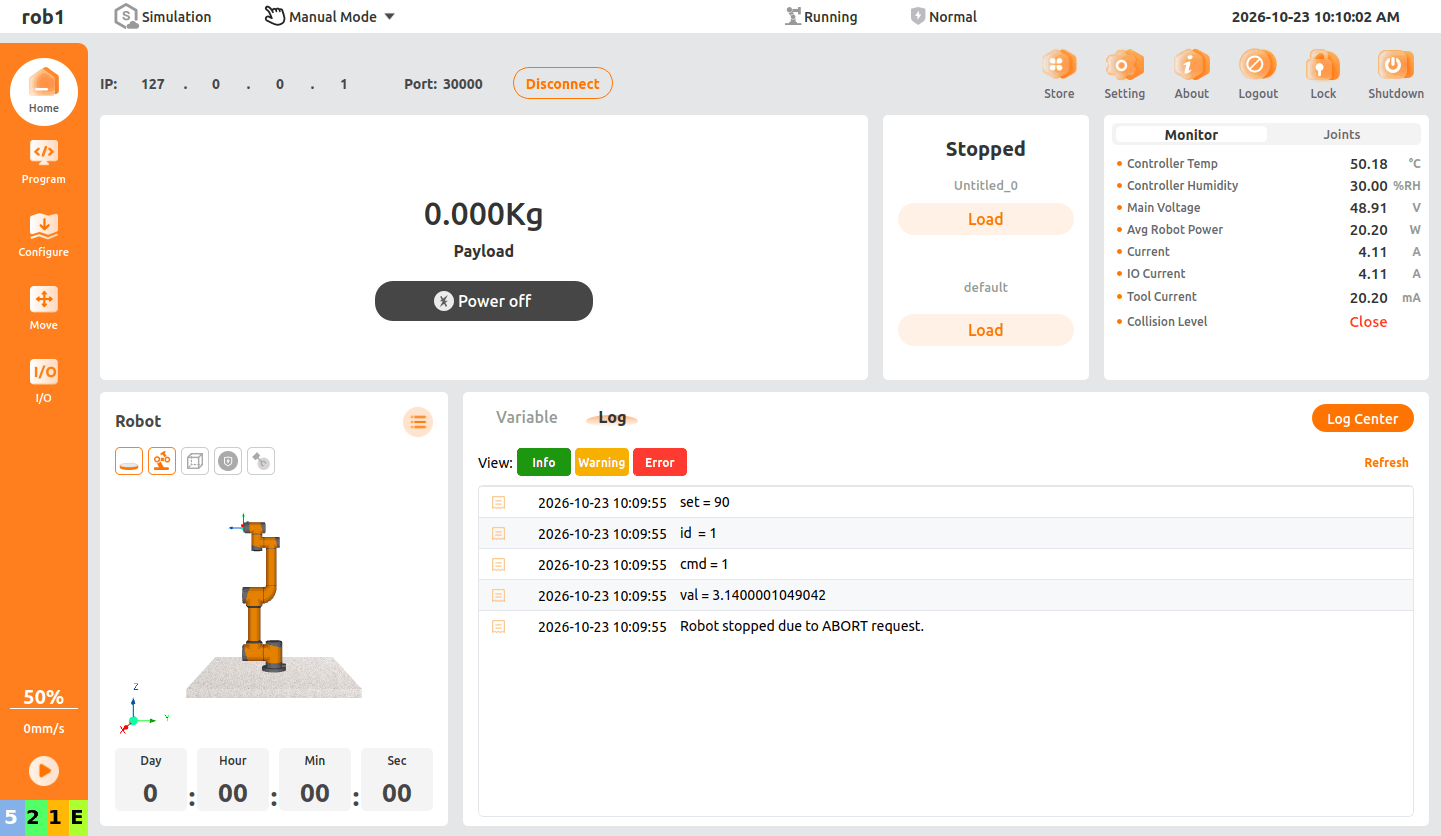
3.4 Three typical mistakes
The three most common mistakes when handling frames, each shown once against the frame from 3.1, comparing hand-written code with the RawBytes interfaces.
3.4.1 Value outside the type range
cmd is a UINT by protocol spec (max 65535), but the business layer computes 70000.
Hand-written: the high bits are silently dropped by
>> 8and& 0xFF, and the frame is sent anyway.Example code:
lualocal rawBytes = require("aubo.rawbytes") local function udint_le(v) return string.char(v & 0xFF, (v >> 8) & 0xFF, (v >> 16) & 0xFF, (v >> 24) & 0xFF) end local function uint_le(v) return string.char(v & 0xFF, (v >> 8) & 0xFF) end local WANT = 70000 -- cmd is a UINT, max 65535 local frame = string.char(0x5A) .. udint_le(1) .. uint_le(WANT) -- the overflow is silently truncated here .. string.pack("<f", 3.14) textmsg(rawBytes.toHex(frame)) -- only output: the 11-byte frame actually sent breakAuboStudio screenshot:
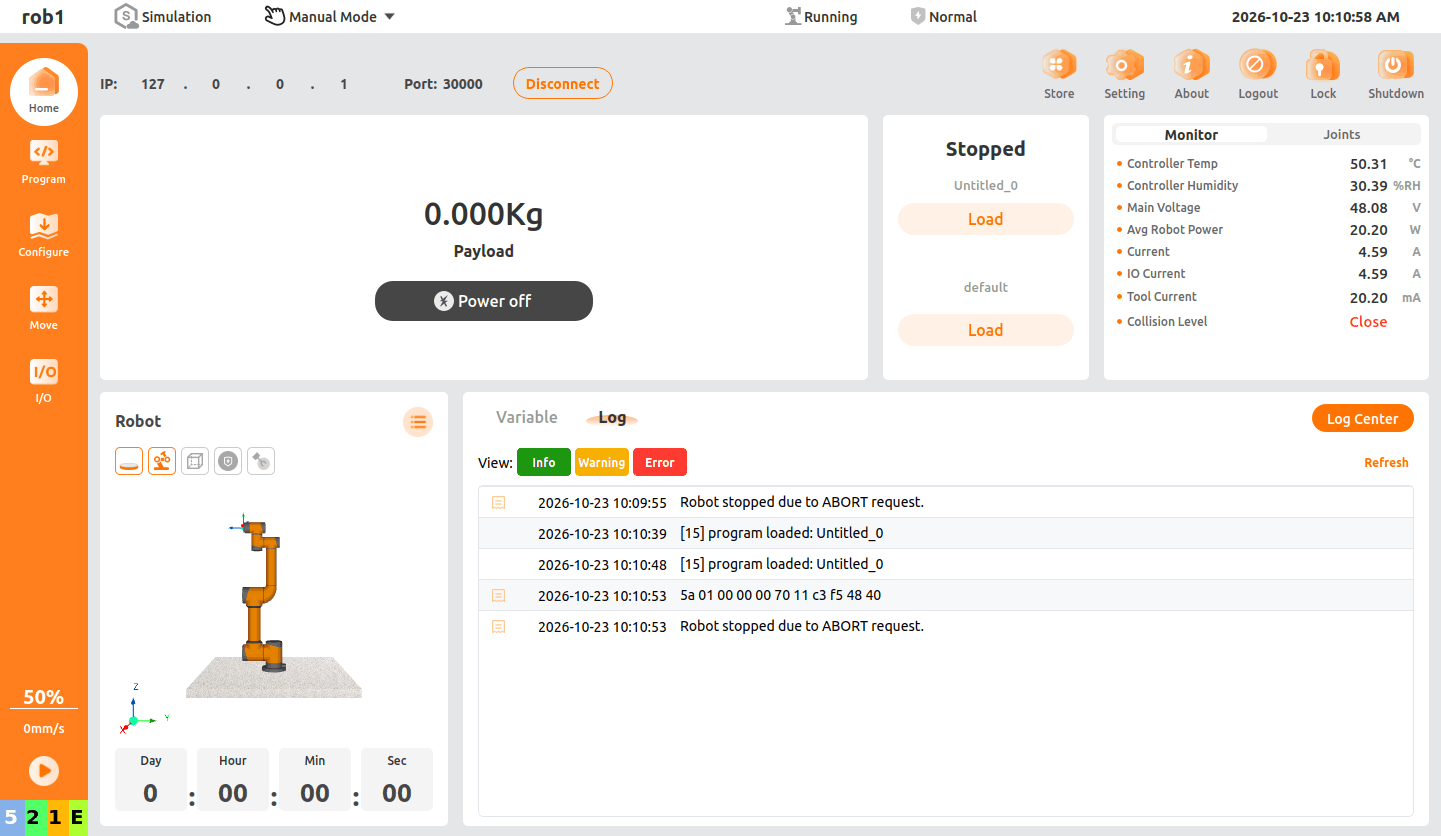
Hand-written code prints
5a 01 00 00 00 70 11 c3 f5 48 40with no error, but it is already wrong compared with the correct frame from 3.1 (5a 01 00 00 00 01 00 c3 f5 48 40): only the twocmdbytes differ, and70 11is70000truncated to0x1170= 4464.
RawBytes:
packRawBytesraises an error immediately, and the bad frame is never sent.Example code:
lualocal rawBytes = require("aubo.rawbytes") local data = "" local pos = 1 data = rawBytes.packRawBytes(0x5A, data, pos, "USINT"); pos = pos + 1 data = rawBytes.packRawBytes(1, data, pos, "UDINT"); pos = pos + 4 textmsg(rawBytes.toHex(data)) -- only output: the 5 bytes packed before the error data = rawBytes.packRawBytes(70000, data, pos, "UINT") -- failing line breakAuboStudio screenshot:
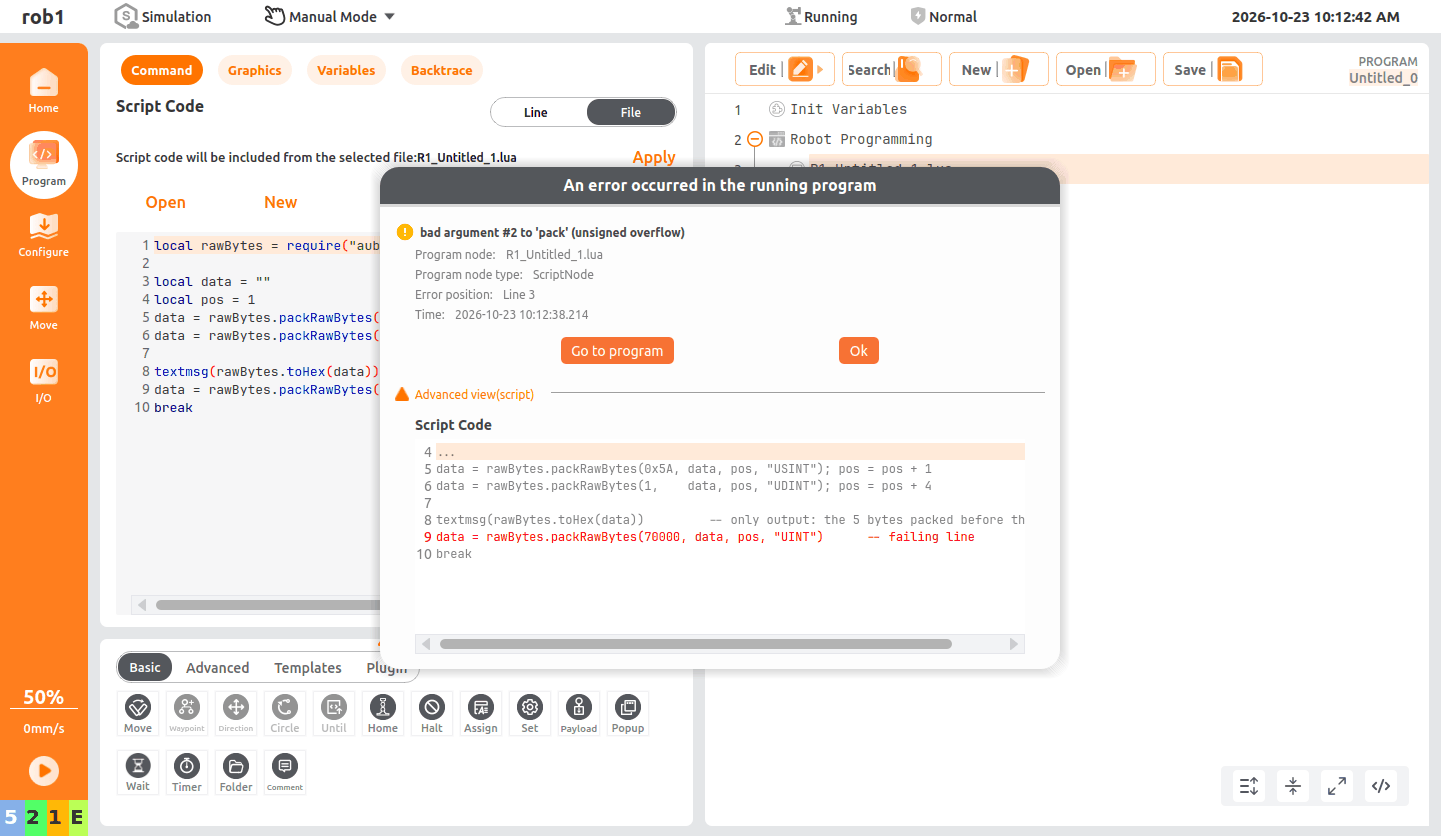
The log window shows only
5a 01 00 00 00, and the error comes from a dialog:bad argument #2 to 'pack' (unsigned overflow), meaning packing70000overflowed the unsigned range (#2is an argument position in the underlyingstring.pack; it has nothing to do with the argument order ofpackRawBytes).
3.4.2 Wrong position when patching an existing frame
Change cmd (bytes 6~7) to 0x00FF.
Hand-written:
frame:sub(1, 4)is one byte short, so the last byte ofidand the wholecmdfield are corrupted.Example code:
lualocal rawBytes = require("aubo.rawbytes") local function udint_le(v) return string.char(v & 0xFF, (v >> 8) & 0xFF, (v >> 16) & 0xFF, (v >> 24) & 0xFF) end local function uint_le(v) return string.char(v & 0xFF, (v >> 8) & 0xFF) end local frame = string.char(0x5A) .. udint_le(1) .. uint_le(0x0001) .. string.pack("<f", 3.14) local patched = frame:sub(1, 4) .. string.char(0xFF, 0x00) .. frame:sub(7) textmsg(rawBytes.toHex(patched)) -- only output: the 11-byte frame after patching the wrong offset breakAuboStudio screenshot:
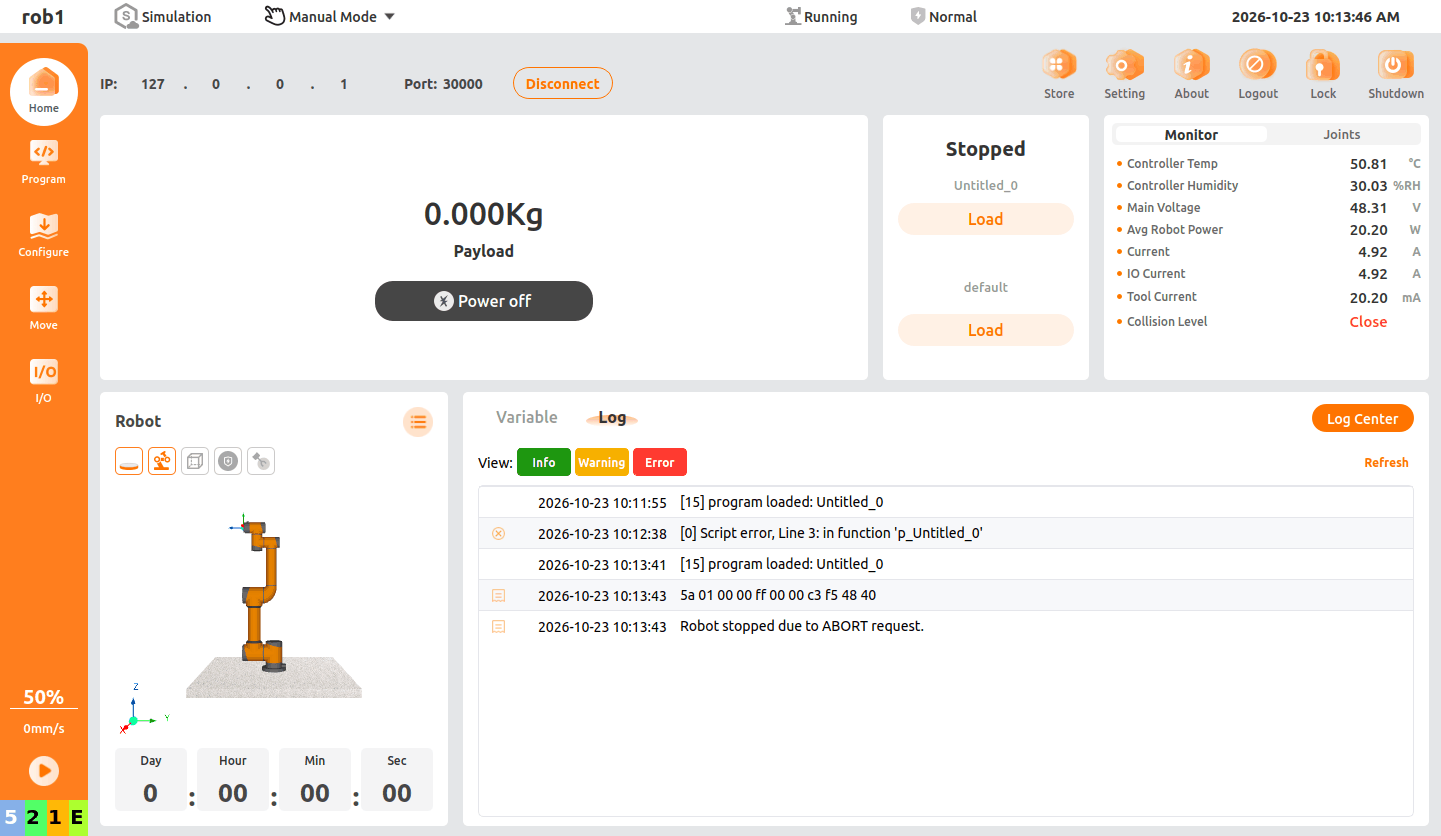
Hand-written code prints
5a 01 00 00 ff 00 00 c3 f5 48 40with no error. Compared with the correct frame,idhas become01 00 00 ffandcmdhas become00 00: one offset mistake corrupts two fields at once.
RawBytes: the position is an explicit argument, and
6is exactly the offset in the frame table.Example code:
lualocal rawBytes = require("aubo.rawbytes") local function build() local d, p = "", 1 d = rawBytes.packRawBytes(0x5A, d, p, "USINT"); p = p + 1 d = rawBytes.packRawBytes(1, d, p, "UDINT"); p = p + 4 d = rawBytes.packRawBytes(1, d, p, "UINT"); p = p + 2 d = rawBytes.packRawBytes(3.14, d, p, "Float4") return d end local frame = build() local fixed = rawBytes.packRawBytes(255, frame, 6, "UINT") textmsg(rawBytes.toHex(fixed)) -- only output: the 11-byte frame after patching the correct offset local bad = rawBytes.packRawBytes(255, frame, 0, "UINT") -- failing line: positions must start at 1 breakAuboStudio screenshot:
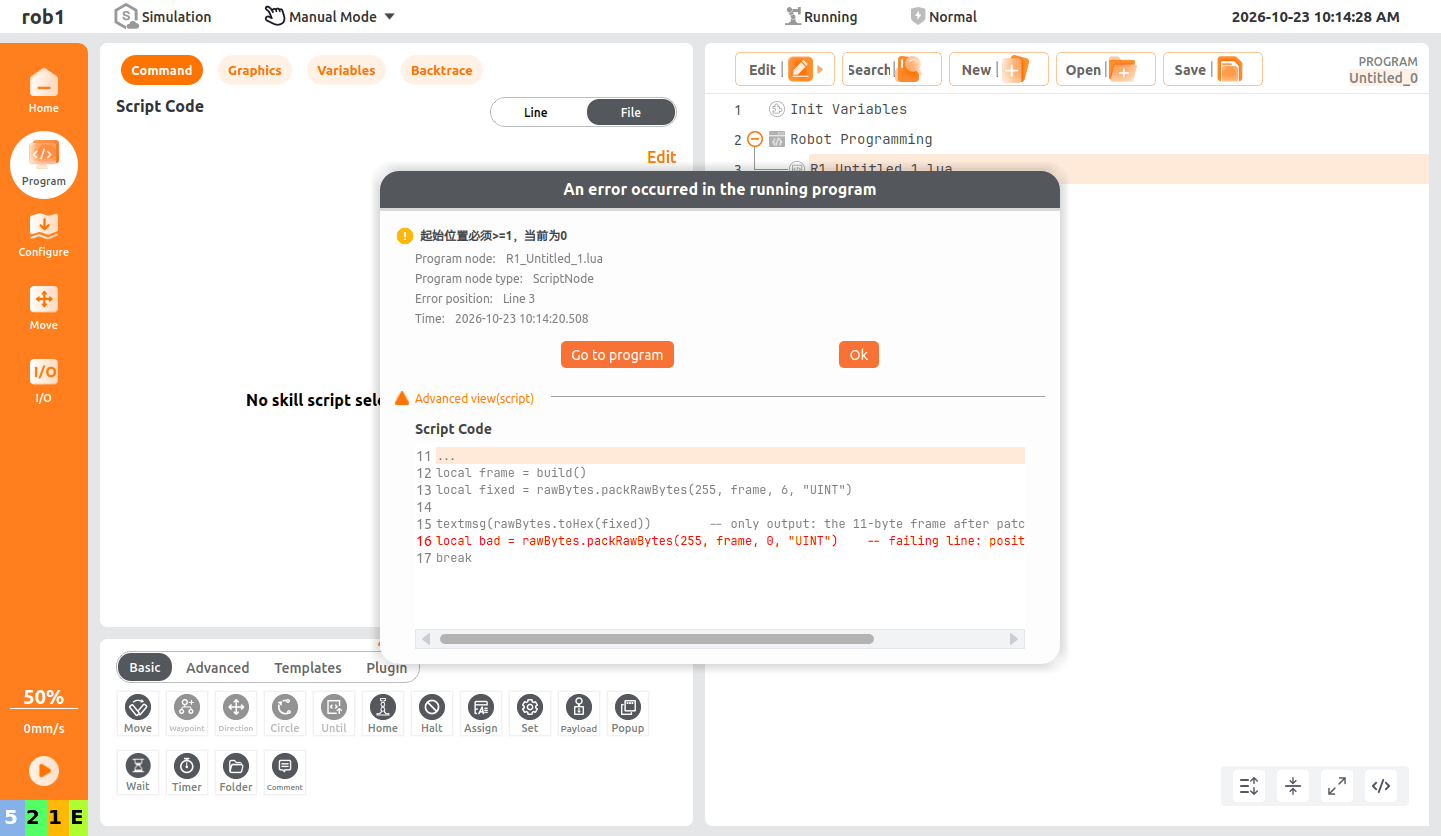
The log window prints
5a 01 00 00 00 ff 00 c3 f5 48 40(the correct result with position6), then aborts and shows the dialog起始位置必须>=1,当前为0(the start position must be at least 1, but it is 0).
3.4.3 Wrong field type (length)
id should be a UDINT (4 bytes), but the hand-written code reuses uint_le and writes only 2 bytes.
Hand-written: the whole frame is only 9 bytes, so every field shifts when the receiver parses it as 11.
Example code:
lualocal rawBytes = require("aubo.rawbytes") local function uint_le(v) -- written from memory, treating UDINT as 2 bytes return string.char(v & 0xFF, (v >> 8) & 0xFF) end local frame = string.char(0x5A) .. uint_le(1) .. uint_le(0x0001) .. string.pack("<f", 3.14) textmsg(rawBytes.toHex(frame)) -- only output: the short frame actually sent (9 bytes) breakAuboStudio screenshot:
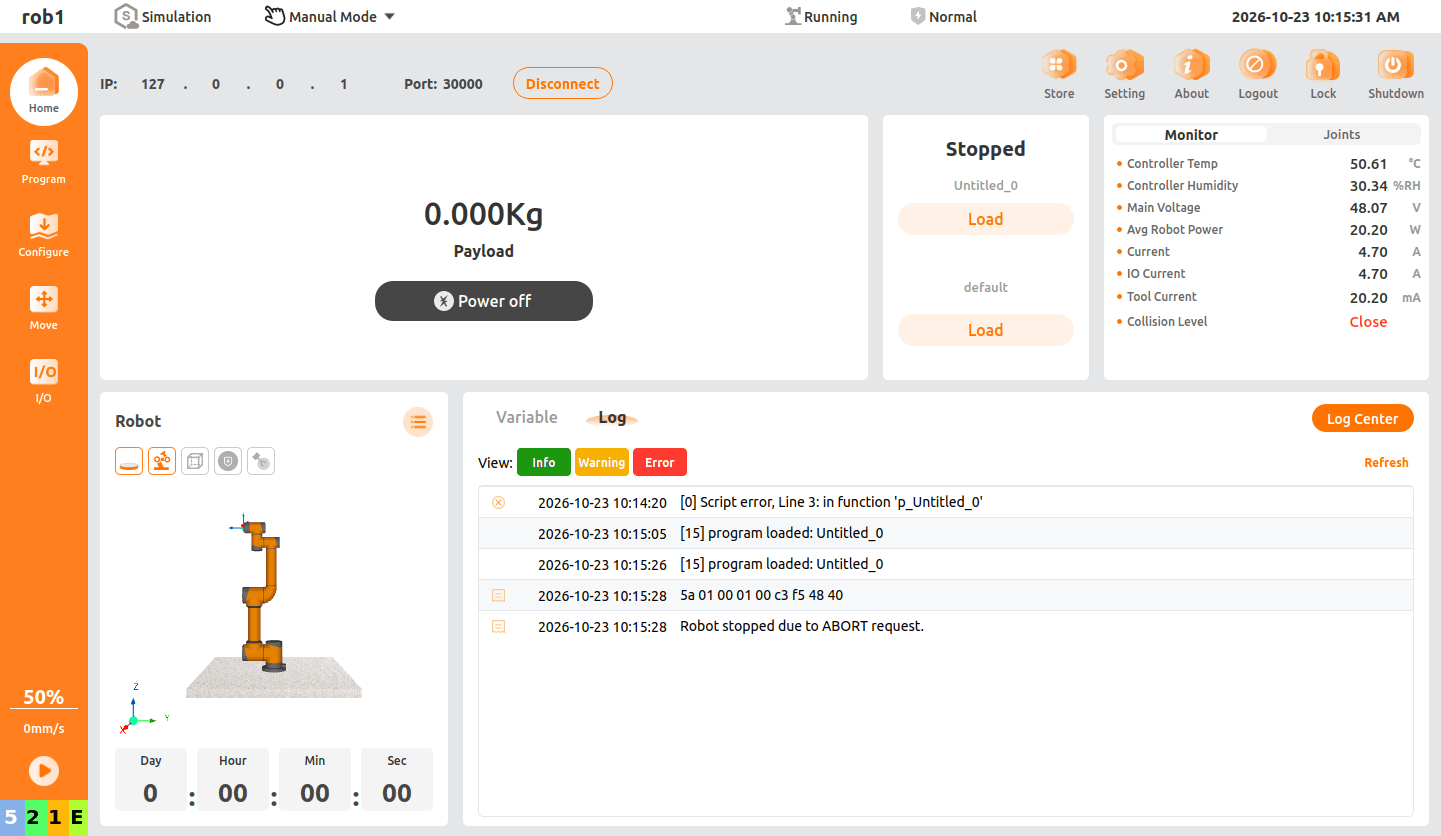
Hand-written code prints
5a 01 00 01 00 c3 f5 48 40with no error, but it is only 9 bytes, 2 bytes short of the spec. Parsed as an 11-byte frame, every field shifts.
RawBytes: an unsupported type name is rejected by the module immediately, but a valid type name used with the wrong width is not checked — see the note below the screenshot.
Example code:
lualocal rawBytes = require("aubo.rawbytes") local data = "" local pos = 1 data = rawBytes.packRawBytes(0x5A, data, pos, "USINT"); pos = pos + 1 data = rawBytes.packRawBytes(1, data, pos, "UDINT"); pos = pos + 4 textmsg(rawBytes.toHex(data)) -- only output: the 5 bytes packed before the error data = rawBytes.packRawBytes(0x0001, data, pos, "UINT32") -- failing line: unsupported type breakAuboStudio screenshot:
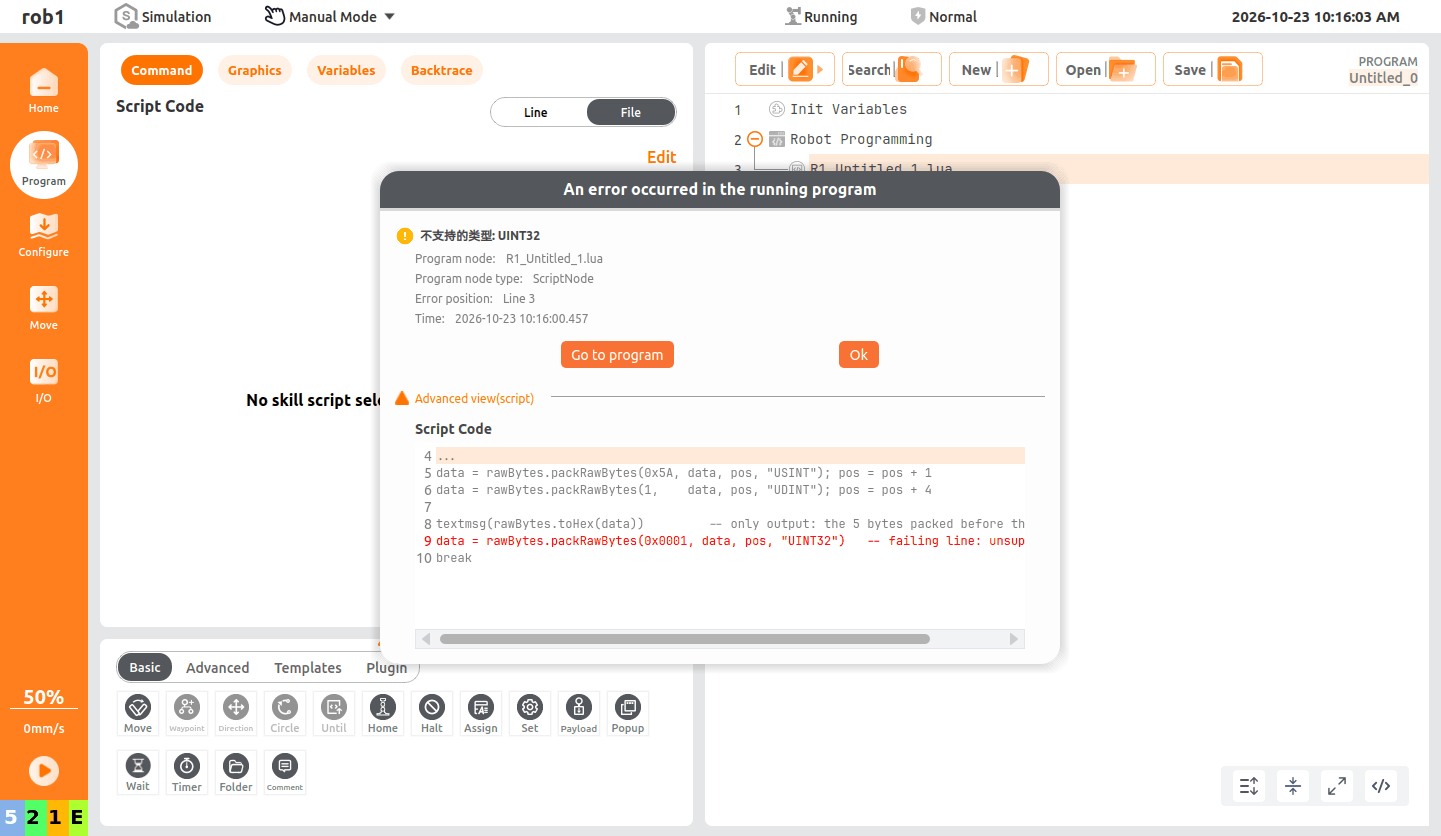
The log window shows only
5a 01 00 00 00, and the error comes from a dialog:不支持的类型: UINT32(unsupported type: UINT32).
UINT32is rejected because it is not a supported type name. Writing"UINT"there instead — a valid name, but only 2 bytes wide — would pack without any error and produce the same 9-byte frame as the hand-written version above.packRawBytesvalidates the type name and the value range, not whether that width matches the protocol; field widths still have to be checked against the protocol table.
3.4.4 Summary of the three mistakes
| Mistake | Hand-written | RawBytes |
|---|---|---|
| Value out of range | Silently truncated, 70000 → 4464, bad frame sent anyway | unsigned overflow at frame assembly time, bad frame not sent |
| Wrong position | id and cmd both corrupted, no warning | Position 0 rejected immediately |
| Wrong type or length | Frame is 2 bytes short, every field shifts | Unsupported type name rejected immediately; a valid name with the wrong width (e.g. UINT for a UDINT field) is not detected |
What the three have in common: the hand-written versions pass silently and can only be traced after the device misbehaves, while the RawBytes versions abort during frame assembly — except the valid-name/wrong-width case in 3.4.3, which still goes out silently.