
AUBO-CB-M Controller User Manual
1 About this Manual
1.1 Version Information
| Item | Content |
|---|---|
| Manual Name | AUBO-CB-M Controller User Manual |
| Manual Version | v1.0.2* |
| Release Date | 2026-09-22 |
| Applicable Product | AUBO-CB-M Controller |
This User Manual will be regularly reviewed and revised, and updated in the form of a new version. The content or information in this manual is subject to change without prior notice.
Please read this manual before installing or using the product, and keep it in a safe place for easy reading and reference.
All pictures in this manual are for reference only; please refer to the actual product received.
1.2 Copyright and Disclaimer
This manual is the exclusive property of AUBO (Beijing) Intelligent Technology Co., Ltd. Without the written permission of AUBO (Beijing) Intelligent Technology Co., Ltd., this manual may not be copied, reproduced in whole or in part, or transformed into any other form of use.
AUBO (Beijing) Intelligent Technology Co., Ltd. is not responsible for any errors or omissions that may occur in this manual, or for any incidental or consequential damages arising from the use of this manual and the products described herein.
Copyright © 2015-2026 AUBO. All rights reserved.
1.3 Purpose of This Manual
This manual is intended to guide the installation, commissioning, pre-operation inspection, maintenance, repair, handling, storage, and disposal of the AUBO-CB-M controller.
This manual does not replace the system integrator's risk assessment, on-site safety design, work instructions, or the laws, regulations, and safety standards applicable in the country or region of use.
1.4 Intended Use of the Controller
The AUBO-CB-M controller may be used with general industrial equipment and general commercial equipment, and is only permitted to be used under the specified environmental conditions. For specific information about the operating environment and operating conditions, refer to the Specifications table.
The AUBO-CB-M controller has special safety-grade characteristics. The use of sharp end effectors or tool connectors may be hazardous.
Prohibited uses include, but are not limited to, the following:
- Use in hazardous environments such as flammable and explosive environments.
- Use in devices that move or carry people or other animals.
- Use in devices that involve human life, such as medical equipment.
- Use in devices that have a significant impact on social and public interests.
- Use in environments subject to vibration, such as on vehicles and ships.
- Use as a climbing tool.
1.5 Intended Readers
This manual is intended for the following professionals:
- Installation personnel
- Commissioning and operating personnel
- Maintenance and repair personnel
- Safety management personnel
1.6 Operating Prerequisites
Personnel reading and using this manual shall meet the following requirements:
- Have received relevant training provided by AUBO (or a dealer authorized by AUBO).
- Possess the basic knowledge required for the installation and maintenance of mechanical, electrical, and automation equipment.
- Be familiar with on-site safety management requirements, and have basic awareness of risk identification and safe operation.
- Have read and understood the safety instructions in this manual and related documents.
1.7 Related Documents
When using this manual, it is recommended to also read the following documents:
1.8 More Information
For more information on products, services, training, or technical support, visit https://www.aubo-robotics.cn.
2 Safety
2.1 Safety Instructions
This chapter introduces the basic safety principles to be followed when operating the controller or the robot system. Integrators, users, and operators must read this chapter carefully and strictly follow the instructions marked with safety warning signs.
Due to the complexity and potential hazards of the robot system, this manual cannot list all possible hazardous scenarios. Users and integrators shall carry out a risk assessment based on the actual application, end tooling, peripheral equipment, working environment, and personnel movement range, and take appropriate risk reduction measures.
2.2 Safety Warning Signs
This manual uses the following safety warning signs to describe important safety information. When you see the relevant signs, be sure to read and follow the corresponding instructions.
| Sign | Level | Description |
|---|---|---|
 | DANGER | Indicates a situation that may cause hazards and, if not avoided, may result in death or serious injury. |
 | WARNING | Indicates a situation that may cause hazards and, if not avoided, may result in personal injury or serious damage to equipment. |
 | CAUTION | Indicates a situation that may cause hazards and, if not avoided, may result in minor personal injury or equipment damage. Depending on the specific circumstances, matters marked with this symbol may sometimes have the possibility of serious consequences. |
 | NOTICE | Indicates a situation that, if not avoided, may result in personal injury or equipment damage. Depending on the specific circumstances, matters marked with this symbol may sometimes have the possibility of serious consequences. |
2.3 General Safety Rules
When operating the controller and its related equipment, the following basic safety guidelines must always be followed. The requirements listed in this section are general safety requirements; safety instructions for specific scenarios are described in detail in the relevant chapters of this manual.
Install the machine and all electrical equipment in accordance with the requirements and specifications in this manual.
Before using the machine for the first time and putting it into production, preliminary testing and inspection of the machine and its protection system are required.
Before starting the machine and system for the first time, check that the machine and system are complete, that operation is safe, and whether any damage is detected. During this inspection, observe whether the machine conforms to the effective national or regional safety production rules and regulations, and all safety functions must be tested.
The user must check and ensure that all safety parameters and user programs are correct and that all safety functions are working properly. Personnel qualified to operate the robot are required to check each safety function. The robot can be started only after comprehensive and careful safety testing and after the safety level is reached.
Professional personnel are required to install and commission the machine in accordance with the installation standards.
After the machine installation and construction are completed, a comprehensive risk assessment must be carried out again and the documentation must be kept.
Authorized personnel shall set and change safety parameters, and passwords or isolation measures shall be used to prevent unauthorized personnel from changing or setting safety parameters. After safety parameters are modified, the related safety functions need to be analyzed.
In case of an accident or abnormal operation of the robot, the emergency stop switch can be used to stop the robot.
The robot arm has a collision detection function. When the robot is powered on and running, if the external force exceeds the normal force range set by the user safety parameters, the robot automatically stops to prevent machine damage or operator collision injury.
This function requires the robot system to be within the normal operating range and to use a controller of the AUBO series. If the user develops a controller by themselves, the robot does not have the above functions. The user shall bear the resulting hazardous consequences.
Connecting different machines may aggravate hazards or introduce new hazards. Always carry out a comprehensive risk assessment of the entire installation. When different safety and emergency stop performance levels are required, always select the highest performance level.
AUBO (Beijing) Intelligent Technology Co., Ltd. shall not be liable for any damage to the machine or personal injury caused by improper operation of the machine.
Prohibited items:
| Sign | Description |
|---|---|
| 1. Do not start the robot system before completing safety inspection and risk assessment. Before the first startup, system integrity inspection, all safety function tests, safety parameter correctness verification, and risk assessment documentation review must be completed. 2. Do not power on the controller without connecting the protective grounding wire (PE wire). Poor grounding may cause electric shock, equipment damage, or electromagnetic interference. 3. Do not use the controller in a humid environment or an environment with conductive dust, as it may cause personal injury or death. 4. Do not artificially and frequently switch the power supply system on and off. Brakes are installed in the robot arm joint modules to hold the robot posture when power is off. Never artificially and frequently switch the power supply system on and off. It is recommended that the interval between each power-on and power-off be greater than 10 s. 5. Do not touch hot parts while the equipment is running. Do not operate or touch the equipment while the robot is working or just stopped working. Disconnect the power supply and wait for one hour for the equipment to cool down. 6. Do not modify safety parameters or bypass safety functions without authorization. |
Operating specifications:
| Sign | Description |
|---|---|
| 1. Ensure that the controller and related equipment are installed firmly. Loose installation may cause equipment to fall off or operate abnormally. 2. Ensure that the working space of the robot system is sufficient, free of obstacles, sharp corners, or crushing points. The operator's head and face shall be outside the reachable range of the robot arm. 3. Do not connect safety devices to general I/O interfaces; only dedicated safety-type interfaces may be used. 4. Configure installation parameters correctly, including installation angle, TCP weight and offset, safety parameters, etc. 5. Do not continue using the controller or robot system if it is damaged. Stop the machine immediately and contact AUBO or an authorized service provider. 6. A safety assessment must be carried out after each installation to confirm that all safety functions are normal. |
| 1. Check the insulation and protective measures before transporting the controller, and handle it carefully during transportation to avoid collisions. 2. Do not expose the controller to a strong magnetic field for a long time, as a strong magnetic field may cause equipment damage. 3. Do not modify the controller without authorization. Any unauthorized modification will void the warranty, and AUBO shall not bear any responsibility arising therefrom. |
2.4 Personnel Safety
When operating the robot system, personnel safety shall be given priority. Users and integrators shall at least take the following measures:
- Ensure that all relevant personnel have received training from AUBO (or a dealer authorized by AUBO) and fully understand the safe and standardized operating procedures. For training inquiries: support@aubo-robotics.cn.
- Tie up hair, do not wear loose clothing or jewelry during operation. The robot may be in a standby state when stationary and shall be regarded as continuously running; do not approach it casually.
- In an emergency such as a person being pinched or trapped, the joint can be forced to move by pushing or pulling the robot arm forcefully. Manually moving the robot arm without electric drive is only for emergencies and may damage the robot arm joints.
- Personnel shall not place their head, face, neck, fingers, or other body parts in areas where they may be hit, pinched, or drawn in.
2.5 Responsibilities and Regulations
The controller is a component of a complete robot system and does not constitute a complete machine by itself. Therefore, this manual does not cover the full set of design, installation, and operation solutions for a complete robot, nor does it list all the risk conditions that may affect the safety of peripheral equipment of the entire integrated system. The installation safety performance of the complete robot equipment depends on the design and construction of the whole-machine integration solution. The equipment integrator shall carry out a full-process risk assessment of the design and installation of the entire integrated system in accordance with applicable local laws and regulations, safety specifications, and industry standards.
None of the safety information contained in this manual shall be regarded as a guarantee by AUBO (Beijing) Intelligent Technology Co., Ltd. Even if operators strictly follow all the safety instructions in this manual, there is still a potential risk of personal injury or equipment damage.
AUBO (Beijing) Intelligent Technology Co., Ltd. continuously optimizes product performance and reliability and reserves the right to iterate and upgrade products without further notice. We have made every effort to ensure that the content of this manual is accurate and reliable, but we shall not be liable for any omissions or errors in the document.
2.5.1 Responsibilities of the Integrator
The integrator shall bear the following key responsibilities:
- Carry out a comprehensive risk assessment of the complete robot system.
- Ensure that the design, installation, and commissioning of the entire system meet the safety requirements.
- Provide necessary training to users and relevant operators.
- Formulate complete system operating specifications and emergency plans.
- Establish and maintain appropriate safety protection measures.
- Use appropriate methods in the final installation to eliminate hazards or reduce all hazards to an acceptable level.
- Inform the end user of the residual risks.
- Mark the integrator information on the robot.
- Archive all relevant technical documents and risk assessment reports.
2.5.2 Reference Standards
Integrators may refer to the following international standards to carry out the risk assessment process:
| Standard No. | Name | Description |
|---|---|---|
| ISO 12100:2010 | Safety of machinery — General principles for design — Risk assessment and risk reduction | Basic framework for risk assessment |
| ISO 10218-2:2025 | Robots and robotic devices — Safety requirements — Part 2: Industrial robot systems and robot applications | Safety requirements for industrial robot integration |
| RIA TR R15.306-2014 | Technical Report for Industrial Robots and Robot Systems — Safety Requirements, Task-based Risk Assessment Methodology | Guidelines for task-based risk assessment |
| ANSI B11.0-2010 | Safety of machinery — General requirements and risk assessment | American machine safety standard |
For the applicable standards and regulatory guidelines, visit the AUBO official website www.aubo-robotics.cn or consult local regulatory agencies.
2.6 Hazard Identification
The risk assessment shall consider potential hazards during normal use, commissioning, maintenance, cleaning, abnormal recovery, and reasonably foreseeable misuse. Without peripheral safety protection devices, the use of a collaborative robot arm may involve the following potential hazards:
- Risk of puncture or cuts caused by the use of sharp end effectors or tool connectors.
- Risk of exposure when handling toxic, corrosive, or other hazardous substances.
- Risk of the operator's fingers or limbs being pinched by the robot arm joints or base.
- Risk of collision with personnel during robot arm movement.
- Risk of falling objects caused by improper fixation of end tooling.
- Hazards caused by the impact between the robot payload and a solid surface. The integrator must measure such hazards and their related risk levels through risk assessment, and determine and implement corresponding measures to reduce the risk to an acceptable level. Note that specific robot equipment may also have other significant hazards.
Combined with the inherent safety design of AUBO robots and the safety specifications and risk assessment formulated by the integrator and end user, the risks related to collaborative operation of the robot arm can be reduced to a reasonably feasible range. This document aims to convey the residual risks existing before robot installation to the integrator and the end user. If the integrator determines, after a risk assessment, that the corresponding application scenario has hazards that may cause unacceptable risks to operators, the integrator must take appropriate risk reduction measures to eliminate or minimize these hazards until the risk level reaches an acceptable standard. Use of the machine is prohibited before the necessary risk reduction measures are completed.
If the robot adopts a non-collaborative operation deployment solution (such as carrying hazardous work tools), the risk assessment result may require the integrator to add safety equipment (such as a safety start device) during the program development stage to ensure the safety of personnel and equipment operation.
2.7 Emergency Handling
When recovering from an emergency state, all push-button emergency stop devices have a "latching" function. This "latch" must be released to end the emergency stop state of the device.
| Sign | Description |
|---|---|
| Recovering from an emergency stop state is a simple but very important step. This step can only be performed after ensuring that the hazards of the robot system are completely eliminated. |
3 Handling and Precautions
When packing for transportation, the product shall be packed in accordance with the packing standards, and the required marks shall be printed on the outside of the packing box.
During transportation, ensure that the equipment is stable and remains fixed in an appropriate position.
The controller shall be lifted by its handle. When handling, appropriate measures shall be taken to position the moving parts so that they do not produce unexpected movement during handling and transportation, causing hazards.
When moving the AUBO-CB-M controller from the packing material to the installation position, hold the equipment firmly and avoid collisions.
After fixing, power on the equipment and observe whether it is normal.
Keep the original packaging after transportation. Store the packing material in a dry place for future repacking and moving of the equipment.
| Sign | Description |
|---|---|
| 1. Ensure that your back or other body parts are not overstrained when lifting the equipment. 2. All regional and national guidelines shall be followed. AUBO (Beijing) Intelligent Technology Co., Ltd. is not liable for any damage caused during the transportation of the equipment. 3. Ensure that the installation instructions in this manual are strictly followed when installing the equipment. |
4 Maintenance, Repair and Disposal
4.1 Maintenance and Repair
When carrying out various maintenance and repair operations, all safety specifications in this manual must be strictly followed.
Equipment maintenance, calibration, and repair operations must be carried out in accordance with the latest version of the service manual, which can be obtained from the official technical support website www.aubo-robotics.cn. All dealers authorized by AUBO (Beijing) Intelligent Technology Co., Ltd. can log in to this website.
Equipment repair can only be carried out by authorized system integrators or AUBO factory personnel. If parts need to be returned to AUBO (Beijing) Intelligent Technology Co., Ltd., the relevant procedures in the service manual must be strictly followed.
During the operation, the safety level requirements corresponding to maintenance and repair shall be met, and the current local safety production regulations shall be observed. After the operation is completed, all safety functions shall be tested one by one to confirm that they are operating normally.
Maintenance and repair work is used to ensure stable operation of the equipment, or to restore normal working conditions after an equipment failure, covering two types of operations: fault diagnosis and physical repair.
When operating the controller or robot system, strictly follow the following safety procedures and warning requirements:
| Sign | Description |
|---|---|
| 1. Remove the main input cable from the rear of the controller to ensure that it is completely powered off. Take necessary precautions to prevent others from reconnecting the system energy during maintenance. After powering off, re-check the system to ensure that it is powered off. 2. Check the grounding connection before restarting the system. 3. Observe ESD (electrostatic discharge) regulations when disassembling the robot arm or controller. 4. Avoid disassembling the power supply system of the controller. After the controller is turned off, its power supply system may retain high voltage for several hours. 5. Prevent water or dust from entering the robot arm or controller. |
| 1. Replace faulty parts with new parts with the same part number or corresponding parts approved by AUBO (Beijing) Intelligent Technology Co., Ltd. 2. Immediately reactivate all disabled safety measures after the work is completed. 3. Record all repair operations in writing and keep them in the technical documentation related to the entire robot system. 4. The controller has no parts that can be repaired by the end user. If maintenance or repair service is required, contact your dealer or AUBO (Beijing) Intelligent Technology Co., Ltd. |
4.2 Disposal
The AUBO-CB-M controller must be disposed of in accordance with applicable national laws, regulations, and national standards.
5 Quality Assurance
5.1 Product Warranty
The AUBO-CB-M robot has a limited warranty period of 18 months.
If new equipment and its components exhibit defects caused by poor manufacturing or materials within 18 months of being put into use, AUBO (Beijing) Intelligent Technology Co., Ltd. shall provide necessary spare parts to replace or repair the relevant parts.
Ownership of the equipment or components that are replaced or returned to AUBO (Beijing) Intelligent Technology Co., Ltd. belongs to AUBO (Beijing) Intelligent Technology Co., Ltd.
If the product is no longer within the warranty period, AUBO (Beijing) Intelligent Technology Co., Ltd. reserves the right to charge the customer for replacement or repair.
Outside the warranty period, if the equipment exhibits defects, AUBO (Beijing) Intelligent Technology Co., Ltd. shall not bear any damage or loss caused thereby, such as production loss or damage to other production equipment.
5.2 Disclaimer
If the equipment defect is caused by improper handling or failure to follow the relevant information described in the User Manual, the "Product Warranty" shall become invalid.
Failures caused by the following circumstances are not covered by this warranty:
- Products purchased through channels not recognized by AUBO.
- Failure to install, wire, or connect to other control equipment in accordance with industrial standards or the requirements of the User Manual.
- Use beyond the specification conditions or standards stated for the product.
- Use of this product for purposes other than those specified.
- Use under environmental conditions beyond the product's specifications.
- Use in a grinding environment or special use environment without product protection.
- Product damage caused by improper transportation.
- Failures, damage, or indirect damage caused by accidents or human factors.
- Failures, damage, or indirect damage caused by modification.
- Installation of non-genuine parts and accessories.
- Damage caused by a third party other than AUBO (Beijing) Intelligent Technology Co., Ltd. or its designated integrators modifying, debugging, or repairing original parts.
- Failures, damage, or indirect damage caused by natural disasters or other force majeure.
- In addition to the above, failures not caused by AUBO (Beijing) Intelligent Technology Co., Ltd.
The following circumstances are not covered by the warranty:
- The product traceability number cannot be identified.
- The production date or warranty start date cannot be identified.
- Changes to software or internal data.
- The failure cannot be reproduced or cannot be identified by AUBO (Beijing) Intelligent Technology Co., Ltd.
- Use of this product in radioactive equipment, biological test equipment, or uses judged by AUBO (Beijing) Intelligent Technology Co., Ltd. to be hazardous.
- Appearance parts and wearing parts. In accordance with the product quality assurance agreement, AUBO (Beijing) Intelligent Technology Co., Ltd. only provides warranty commitments for the defects and flaws in the products and parts sold to dealers.
AUBO (Beijing) Intelligent Technology Co., Ltd. shall not bear any other express or implied warranties or liabilities, including but not limited to any implied warranty of merchantability or fitness for a particular purpose. In addition, AUBO (Beijing) Intelligent Technology Co., Ltd. shall not bear any liability for any indirect damage or consequences arising from the related products.
6 Controller Description
6.1 Introduction
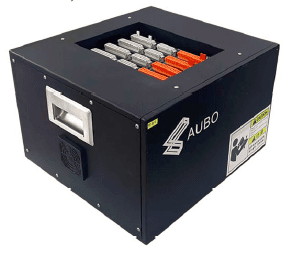
The controller is the control center of the AUBO robot. It contains a control main board, a safety interface board, a switching power supply, and safety protection components. The controller is powered by 100V-240V AC. Its internal switching power supply converts the 100V-240V AC into 12V, 24V, and 48V DC to power the loads inside the controller and the robot. Before use, check that the connections between the robot, the teach pendant, and the controller are secure.
The controller has both hardware protection and software protection to ensure safety during use to the greatest extent. The controller uses multiple circuit breakers internally, providing reliable short-circuit protection and overload protection in hardware. An external emergency stop switch can also be connected to the controller, allowing the user to cut off the robot power supply in the shortest time to protect personnel and equipment safety.
6.2 Important Safety Instructions
| Sign | Description |
|---|---|
| 1. Ensure that the controller, teach pendant, and cables do not come into contact with liquid. A damp controller may cause personal injury or death. 2. The controller and teach pendant must not be placed in a dusty environment, or in a place where the humidity exceeds the IP protection level requirements of the equipment. If conductive dust is present on site, pay special attention to protection. 3. There is dangerous voltage inside the box. Non-professionals must not open the cabinet while it is powered on. 4. Do not directly touch the screws and other metal parts fastened inside the controller with your hands, and never remove wiring while it is powered on. |
| 1. A safety assessment must be carried out after each installation of the robot, and the instructions in the Safety chapter must be strictly followed. 2. The controller shall be placed horizontally on the ground. A clearance of 50 mm shall be reserved on each side of the controller to ensure ventilation and heat dissipation. 3. The teach pendant can be hung on the controller. Ensure that the cable does not trip personnel. 4. If non-AUBO factory components (cables, etc.) are added to the robot, the user shall ensure that such components do not interfere with or damage the safety functions of the equipment. 5. The software in the robot system only supports the upgrade and use of the default software. Installing other software systems such as ROS is prohibited. Checks before use: 1. Check that the controller power cable is properly connected. 2. Check that the controller and the robot are properly connected. 3. Check that the controller support is stable, and the whole machine remains level without shaking or offset. |
6.3 Controller Panel Introduction
The front panel and top panel of the controller contain switches, buttons, indicators, and electrical interfaces.
6.3.1 Controller Front Panel
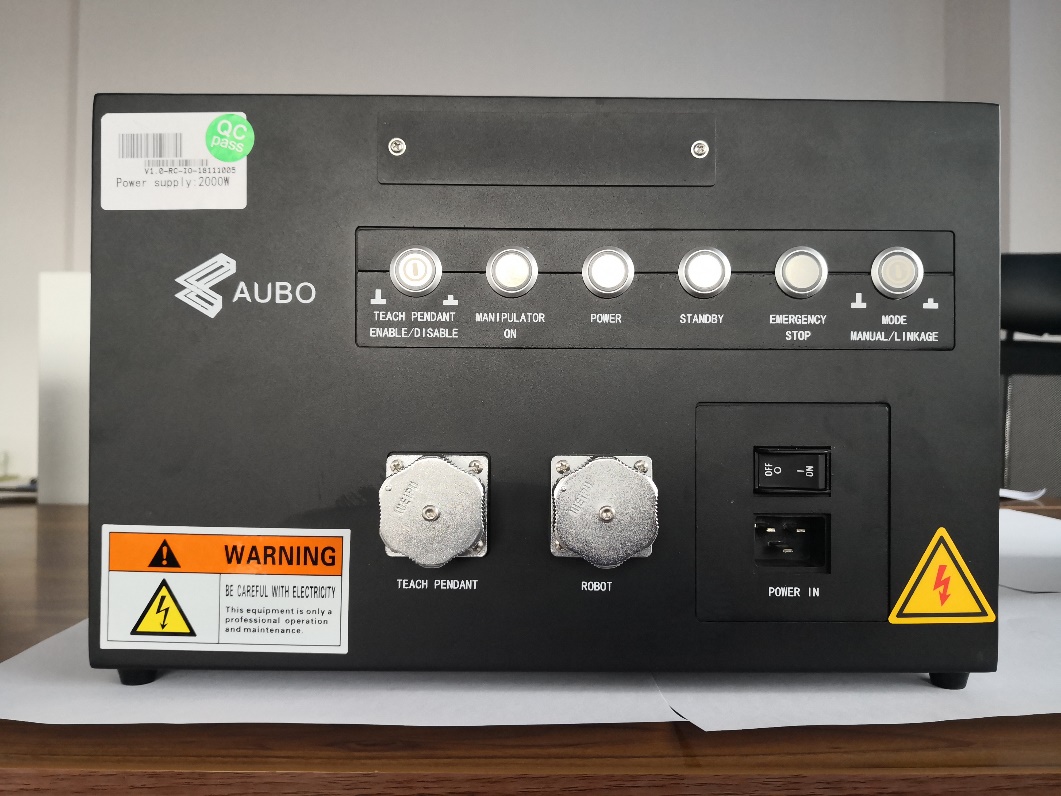
The structure of the controller front panel is shown in the following figure.
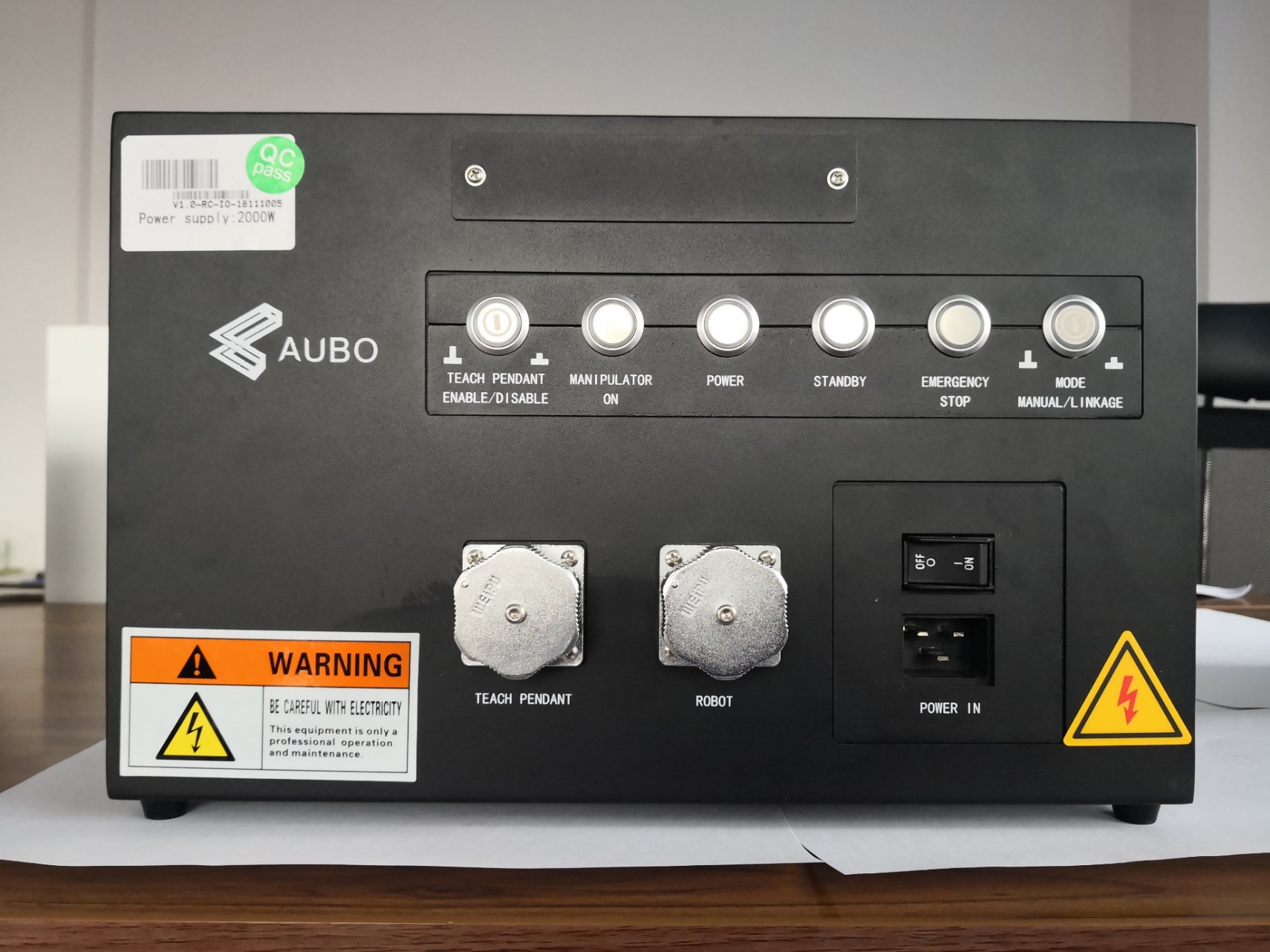
| Name | Function |
|---|---|
| TEACH PENDANT ENABLE/DISABLE | Teach pendant enable switch button |
| MANIPULATOR ON | The indicator lights up when the robot arm power is turned on. |
| POWER | The indicator lights up when the external power is turned on. |
| STANDBY | The indicator lights up when the controller interface board program initialization is complete, and the teach pendant power button can be pressed to power on the robot. A blinking indicator indicates that the controller is powered on and waiting for connection. |
| EMERGENCY STOP | The indicator lights up when the robot is in the emergency stop state. |
| MODE MANUAL/LINKAGE | Empty. |
| TEACH PENDANT | Teach pendant cable interface for connecting the teach pendant cable. |
| ROBOT | Robot arm cable interface for connecting the robot arm cable. |
| POWER IN | Power switch and power cable interface. |
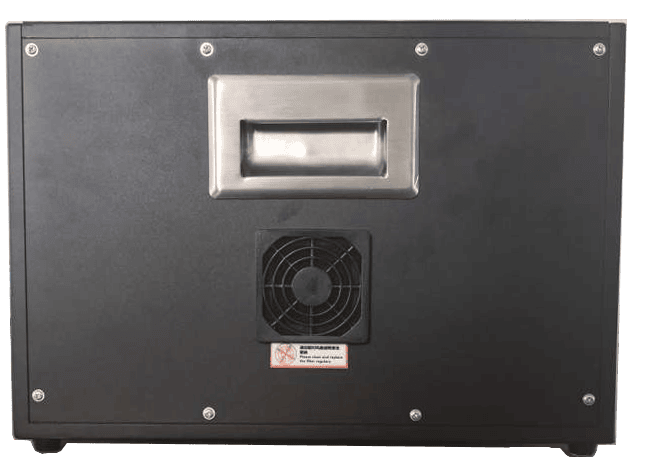
6.3.2 Controller Side Panel
Fans are provided on both sides of the controller.
6.3.3 Controller Top Panel
The top of the controller provides an Ethernet interface and a USB interface, as shown in the following figure.
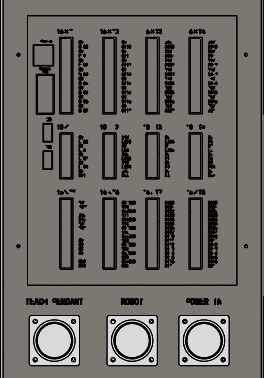
| No. | Interface | Function |
|---|---|---|
| 1 | Ethernet interface | Can be used for remote access and control. |
| 2 | Modbus RTU interface | Can be connected to Modbus devices. |
| 3 | USB interface | Can be used for software update and import/export of project files. |
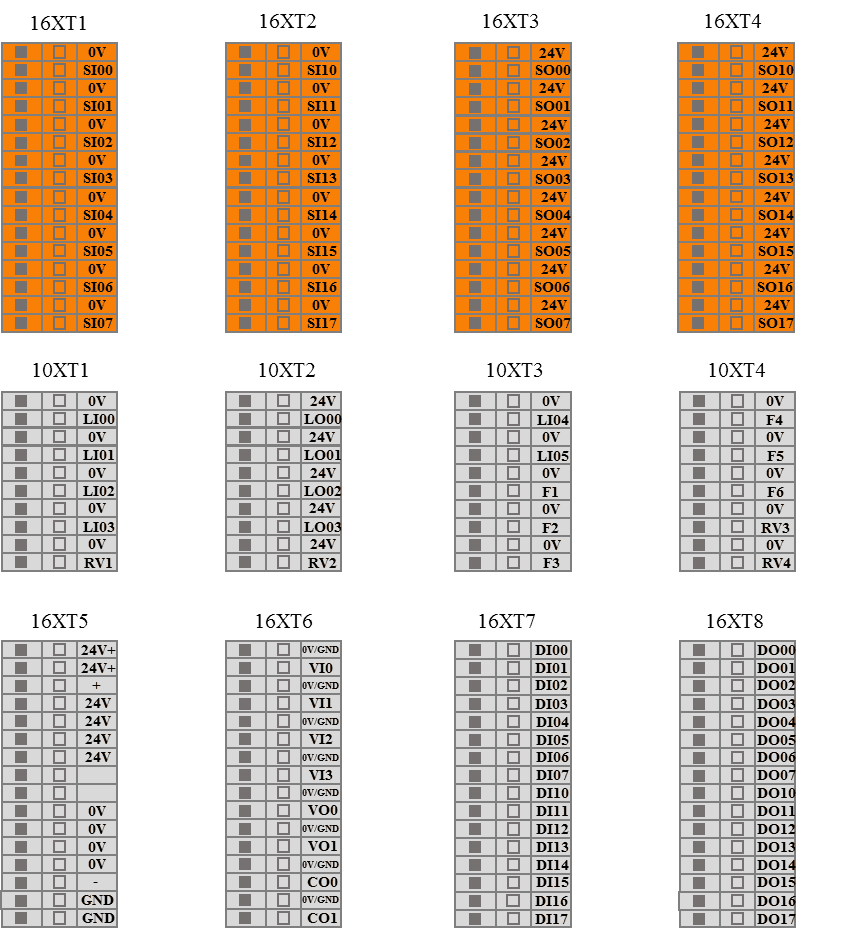
| 4 | Controller external electrical interface | Provides external I/O interfaces. |
| Sign | Description |
|---|---|
| Do not plug or unplug USB devices while the robot arm is running. |
6.4 Teach Pendant Enable Switch
The teach pendant enable switch is used when the teach pendant is not needed. Generally, this button is popped up, in which case the teach pendant can be used normally (the teach pendant emergency stop is available). If the teach pendant needs to be unplugged, press this button. At this time, the teach pendant emergency stop is unavailable, and the teach pendant cable can be unplugged to control the robot arm status via interface signals.
The enable switch is located on the upper left side of the controller panel, as shown in the following figure:
| Sign | Description |
|---|---|
| The teach pendant enable switch can only be turned on or off when the controller is powered off. An external emergency stop button is required. |
6.5 Cable Connection
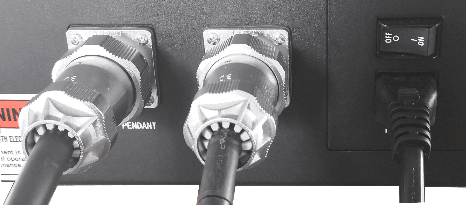
- Robot arm cable and controller connection: First unscrew the dust cap on the ROBOT interface on the controller front panel, and then plug the robot cable connector into the ROBOT interface, as shown in Figure 6-6.
- Teach pendant cable and controller connection: Plug the teach pendant cable connector into the TEACH PENDANT interface of the controller, as shown in Figure 6-6.
- Power cable and controller connection: Plug the power cable connector into POWER IN, as shown in Figure 6-6.
- Control handle and controller connection (optional): Plug the control handle cable connector into the handle adapter board, and connect to the controller through the handle adapter board. Refer to Chapter 6.7 for the specific wiring method.
6.6 Power On
- Place the controller in an appropriate position.
- Connect the controller cables as described in the above chapters.
- Check that all controller cables (teach pendant, power, robot arm cable, terminal blocks, etc.) are properly connected.
- Connect the power cable and turn on the power switch. The POWER indicator on the controller front panel lights up. Wait for the STANDBY indicator to light up.
- Long press the power button on the wired teach pendant, and wait for the system to start. Then the robot arm can be powered on and operated normally.
6.7 Power Off
The following are the normal power-off methods:
Method 1: Click the [Shutdown] button on the teach pendant software interface, wait for the STANDBY indicator to light up, turn off the power switch, and disconnect the power cable.
Method 2: Long press the power button on the wired teach pendant, wait for the STANDBY indicator to light up, turn off the power switch, and disconnect the power cable.
Method 3: Long press the power button on the control handle, wait for the STANDBY indicator to light up, turn off the power switch, and disconnect the power cable.
Forced power-off:
Method 1: Long press the power button on the wired teach pendant for 10 s.
Method 2: Long press the power button on the control handle for 10 s.
Method 3: Directly unplug the power cable or directly turn off the power switch.
| Sign | Description |
|---|---|
| Directly unplugging the power supply from the socket or turning off the power switch may damage the file system of the robot, which may cause robot function failure. |
7 Electrical Interface
7.1 Electrical Warnings and Cautions
When designing and installing the robot and the AUBO-CB-M controller application, be sure to follow the following warnings and cautions. These warnings and cautions shall also be followed when carrying out maintenance work.
| Sign | Description |
|---|---|
| 1. Never connect safety signals to a non-safety PLC with an unsuitable safety level. Failure to observe this warning may result in serious injury or even death due to the failure of a safety stop function. 2. When wiring the electrical interface of the controller, the controller must be powered off. 3. All safety-type signals have dual-channel safety channels (redundant design). Keeping the two channels independent ensures that the safety function is not lost in the event of a single fault. |
| 1. Ensure that all equipment that must not get wet remains dry. If water enters the product, cut off the power supply and contact your supplier. 2. Use only the original cables of this robot. Do not use the robot in applications where the cables need to be bent. If longer cables or flexible cables are needed, contact your supplier. 3. All GND connectors mentioned in this document are only for power supply and signal transmission. For protective grounding (PE), use the screw connector marked with the grounding symbol in the controller. The grounding connector shall be rated for at least the highest current in the system. 4. Be careful when installing interface cables to the I/O of the robot. |
| 1. Interference signals above the levels specified in IEC standards will cause abnormal behavior of the robot. Extremely high signal levels or excessive exposure will cause permanent damage to the robot. EMC problems usually occur during welding and are usually indicated by error messages in the log. AUBO (Beijing) Intelligent Technology Co., Ltd. is not liable for any loss caused by EMC problems. 2. The length of I/O cables used to connect the controller to other machines and factory equipment shall not exceed 30 meters, unless extension testing shows that it is feasible. |
7.2 Controller Communication Interface
The AUBO-CB-M controller provides a variety of electrical interfaces for connecting external devices, which users can use conveniently.
Remove the protective cover on the top panel of the controller. The panel provides an Ethernet interface, a Modbus RTU interface, a USB interface, and some electrical interfaces. (See 6.3.3 Controller Top Panel)
Ethernet Interface
The Ethernet interface can be used for remote access and control.
Modbus Device Interface
The Modbus device interface is located on the top panel of the controller (see 6.3.3 Controller Top Panel). Modbus devices can be connected through the USB interface and the Modbus RTU interface.
The pin description of the Modbus RTU interface is shown in the following figure:

USB Interface
The USB interface is located on the top panel of the controller (see 6.3.3 Controller Top Panel). It can be used for device connection, software upgrade, and export of project files.
7.3 Controller I/O Power Supply
7.3.1 Internal Power Supply
The I/O on the controller panel selects the internal power supply mode by default, as shown in the following figure:

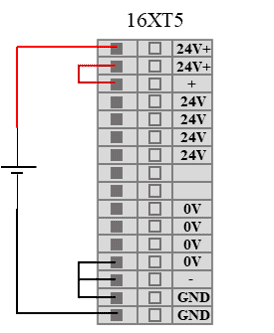
7.3.2 External Power Supply
If the user needs to use an external power supply, use the following wiring method.
| Sign | Description |
|---|---|
| When wiring the electrical interface of the controller, the controller must be powered off. |
7.4 Fixed I/O of the Controller
The AUBO-CB-M controller provides 6 fixed-function digital input interfaces and 4 fixed-function digital output interfaces. For the specific fixed functions, refer to the software user manual.
| Input | Interface Type | Function Definition |
|---|---|---|
| LI00 | NPN | Start program |
| LI01 | NPN | Stop program |
| LI02 | NPN | Pause program |
| LI03 | NPN | Return to initial position |
| LI04 | NPN | Remote power-on |
| LI05 | NPN | Remote power-off |
| Output | Interface Type | Function Definition |
| LO00 | NPN | Logic low after program stop. In linkage mode, logic low is set when program execution is completed or terminated. |
| LO01 | NPN | Logic high after program stop. In linkage mode, logic high is set when program execution is completed or terminated. |
| LO02 | NPN | Program paused. In linkage mode, logic high is set when the program is paused. |
| LO03 | NPN | Function 1: Home. In linkage mode, logic high is set when the robot arm joint reaches the home position in joint space; Function 2: Handle function - green indicator light. Note: Function 1 is set by default. After the handle control function is activated, it switches to Function 2. |
7.5 Configurable I/O of the Controller
The AUBO-CB-M controller provides 16 configurable digital input interfaces and 16 configurable digital output interfaces. The configurable I/O has dual-channel safety channels, which ensures that the safety function is not lost in the event of a single fault. When in use, safety devices and equipment must be installed in accordance with the safety instructions and can only be used after a comprehensive risk assessment.
Configurable I/O can be used as safety I/O only after being configured in the teach pendant software; if not configured, it is used as general digital I/O of the controller. Safety I/O has a higher priority than general I/O. That is, when the same I/O is configured as both safety I/O and general I/O, only the safety I/O function is retained. For the specific functions and description of safety I/O, refer to the software user manual.
| Input/Output | Interface Type | Function Definition |
|---|---|---|
| SI00-SI07 | NPN | Specific functions are set through the software interface |
| SI10-SI17 | NPN | |
| SO00-SO07 | NPN | |
| SO10-SO17 | NPN |
7.6 General I/O of the Controller
The AUBO-CB-M controller provides 4 general analog input interfaces, 2 general analog voltage output interfaces, 2 general analog current output interfaces, 16 general digital input interfaces, and 16 general digital output interfaces. The functions of the general I/O need to be configured in the teach pendant software. For specific functions and descriptions, refer to the software user manual.
| Input/Output | Interface Type | Function Definition |
|---|---|---|
| VI0-VI3 | NPN | Specific functions are set through the software interface |
| VO0-VO1 | NPN | |
| CO0-CO1 | NPN | |
| DI00-DI07 | NPN | |
| DI10-DI17 | NPN | |
| DO00-DO07 | NPN | |
| DO10-DO17 | NPN |
7.7 Control Handle I/O
The AUBO-CB-M controller reserves 6 digital interfaces for connecting the control handle. To connect the control handle, first connect the controller to the handle adapter board, and then connect the control handle through the handle adapter board.
7.7.1 Reserved I/O Function Definition of the Controller
| Input/Output | Interface Type | Function Definition |
|---|---|---|
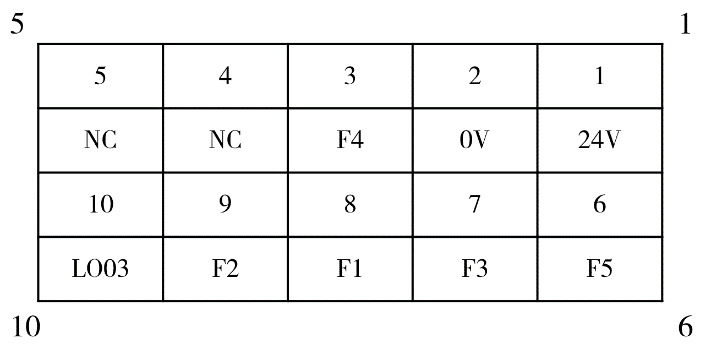
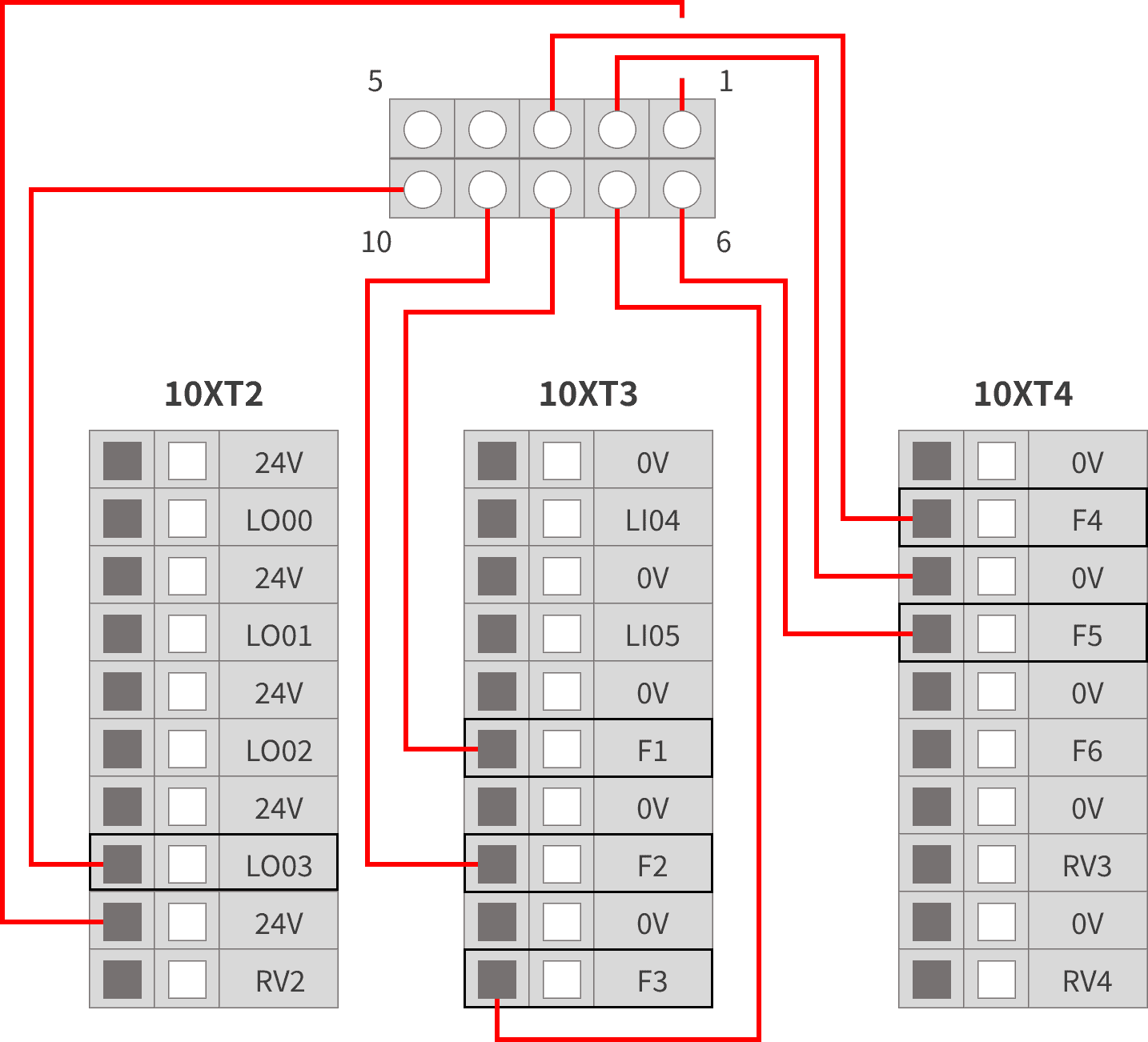
| F1 | NPN | Handle function - power button |
| F2 | NPN | Handle function - enable button |
| F3 | NPN | Handle function - start/stop button |
| F4 | NPN | Handle function - custom button |
| F5 | NPN | Handle function - emergency stop button |
| LO03 | NPN | Handle function - green indicator light (valid only when the control handle function is enabled) |
7.7.2 Connection of the Handle Adapter Board
The AUBO-CB-M controller must connect to the control handle through the control handle adapter board. The pin description and wiring diagram of the control handle adapter board are as follows.
8 Appendix
8.1 Glossary
Category 0 stop: Uncontrolled stop, the power is cut off immediately and the joint brakes are applied without controlled deceleration, so the robot may deviate from the programmed path. It applies only to extreme cases such as exceeding the safety-rated limit or a failure in the safety-rated part of the control system. For the definitions of stop categories and the requirement to remove power immediately, refer to IEC 60204-1:2016 (9.2.2 Stop categories); for the design requirements of the emergency stop function, refer to EN ISO 13850:2015.
Category 1 stop: Controlled stop with power removed afterwards, the robot stops along the programmed path and the power is removed once the stop is achieved, balancing safety and path stability. For the definitions of stop categories and the requirement to remove power after the stop, refer to IEC 60204-1:2016 (9.2.2 Stop categories); for the design requirements of the emergency stop function, refer to EN ISO 13850:2015.
Category 2 stop: Controlled stop with power maintained, the robot remains powered after it stops, and the safety-rated control system holds it in the stopped position so that work can be resumed quickly. For the definitions of stop categories and the requirement to maintain power, refer to IEC 60204-1:2016 (9.2.2 Stop categories). A category 2 stop must not be used as an emergency stop, and is therefore not covered by EN ISO 13850:2015.
8.2 Technical Specifications
| Controller Type | AUBO-CB-M | |
|---|---|---|
| IP Protection Rating | IP20 | |
| Controller Dimensions (L*H*W) | 380mm*350mm*265mm | |
| Controller Weight | 15kg | |
| I/O Ports | Digital input | 32 |
| Digital output | 32 | |
| Analog input | 4 | |
| Analog output | 4 | |
| I/O Power Supply | DC24V 3A | |
| Communication Protocol | Ethernet, ModBus-RTU/TCP, Profinet (optional) | |
| Interface and Openness | SDK (supports C/C++/C#/Lua/Python development), supports ROS system, API | |
| Operating Temperature | The robot can work within a temperature range of 0-50°C | |
| Transportation and Storage Temperature | -25℃~55℃ | |
| Humidity | 90% relative humidity (non-condensing) | |
| Power Supply | 100-240VAC, 50-60 Hz | |
| Connection Cables | Cable connecting the robot arm and the controller (5m) Cable connecting the teach pendant and the controller (4m) Cable connecting the power supply and the controller (5m) | |
8.3 Revision Records
| Version No. / Date | Description |
|---|---|
| v1.0.1/20240805 | Release of trial version v0.0.1. |
| v1.0.1*/20260827 | 1. Released v1.0.1* trial version. 2. Unified manual structure, safety instructions, chapter names, and warning signs. |
| v1.0.2*/20260922 | 1. Released v1.0.2* trial version. 2. Added descriptions of stop categories in the appendix. |