
AUBO-S Series Robot Arm User Manual
1 About this Manual
1.1 Version Information
| Item | Content |
|---|---|
| Manual name | AUBO-S Series Robot Arm User Manual |
| Manual version | v1.0.2* |
| Release date | 2026-09-22 |
| Applicable products | AUBO-S2 robot arm, AUBO-S5 robot arm |
| Applicable controller | The AUBO-S series robot arm is only compatible with the AUBO-CB-S controller. |
The User Manual will be subject to regular check and revision, and updated content will appear in new versions. The content or information in this manual is subject to change without prior notice.
Before installing and using the product, read this manual completely and keep it properly for future reference.
All figures in this manual are for illustrative purposes only. The actual product shall prevail.
1.2 Copyright and Disclaimer
This manual is the exclusive property of AUBO (Beijing) Intelligent Technology Co., Ltd. It may not be photocopied, reproduced in whole or in part, or converted into any other form without the written permission of AUBO (Beijing) Intelligent Technology Co., Ltd.
AUBO (Beijing) Intelligent Technology Co., Ltd. is not responsible for any errors or omissions that may appear in this manual, or for any accidental or indirect damages resulting from the use of this manual and the products described herein.
Copyright © 2015-2026 AUBO All rights reserved.
1.3 Purpose of this Manual
This manual provides guidance for installation, commissioning, pre-operation inspection, maintenance, repair, handling, storage, and disposal of AUBO-S series robot arms.
This manual does not replace the system integrator's risk assessment, on-site safety design, work instructions, or the laws, regulations, and safety standards applicable in the country/region where the robot is used.
1.4 Target Audience
This manual is intended for the following professionals:
- Robot arm installation personnel
- Commissioning and operating personnel
- Maintenance and repair personnel
- Safety management personnel
1.5 Operation Prerequisites
Personnel who read and use this manual shall meet the following requirements:
- Have received relevant training provided by AUBO or an authorized AUBO distributor;
- Have the basic knowledge required for installation and maintenance of mechanical, electrical, and automation equipment;
- Be familiar with on-site safety management requirements and have basic risk identification and safe operation awareness;
- Have read and understood the safety instructions in this manual and related documents.
1.6 Related Documents
When using this manual, it is recommended to also read the following documents:
1.7 More Information
For more information about products, services, training, or technical support, please visit https://www.aubo-robotics.cn.
2 Safety
2.1 Safety Instructions
This chapter describes the basic safety principles that must be followed when operating the robot arm or robotic system. Integrators, users, and operators must carefully read this chapter and strictly follow the instructions marked with safety warning signs.
Due to the complexity and potential hazards of robotic systems, this manual cannot list all possible hazardous scenarios. Users and integrators shall conduct risk assessment based on the actual application, end tools, peripheral equipment, work environment, and personnel activity range, and take appropriate risk reduction measures.
2.2 Safety Warning Signs
This manual uses the following safety warning signs to indicate important safety information. When you see these signs, read and follow the corresponding instructions.
| Sign | Level | Description |
|---|---|---|
 | DANGER | Indicates a potentially hazardous situation which, if not avoided, could result in death or serious injury. |
 | WARNING | Indicates a potentially hazardous situation which, if not avoided, could result in personal injury or serious equipment damage. |
 | CAUTION | Indicates a potentially hazardous situation which, if not avoided, could result in minor personal injury or equipment damage. Matters marked with this symbol may, depending on the specific circumstances, sometimes have the potential for serious consequences. |
 | NOTICE | Indicates a situation which, if not avoided, could result in personal injury or equipment damage. Matters marked with this symbol may, depending on the specific circumstances, sometimes have the potential for serious consequences. |
2.3 General Safety Specifications
When operating the robot arm and its related equipment, the following basic safety rules must always be followed. This section lists general safety requirements; safety instructions for specific scenarios are described in the relevant chapters of this manual.
Install the robot and all electrical equipment in accordance with the requirements and specifications in this user manual.
Initial tests and inspections on the robot and its protective system are required before the first use and commissioning.
Before starting the robot and system for the first time, check whether the robot and system are complete, safe to operate, and free of any damage. During this inspection, observe national or regional production safety regulations, and test all safety features.
The user must check and ensure that all safety parameters and user programs are correct, and that all safety features are functioning properly. Personnel qualified to operate the robot are required to check each safety feature. The robot can only be started after it has passed comprehensive and careful safety tests and reached the required safety level.
The robot must be installed and commissioned by qualified personnel in accordance with installation standards.
When the robot installation and construction are complete, a comprehensive risk assessment must be conducted again and documented.
Safety parameters must be set and changed by authorized personnel, and passwords or isolation measures must be used to prevent unauthorized personnel from changing or setting them. After the safety parameters are modified, the relevant safety features must be analyzed.
In case of an accident or abnormal operation, the emergency stop switch can be used to stop the robot's movement.
The AUBO-S series robot arm has a collision detection function. When an external force on the powered-on robot exceeds the normal force range set by the user for safety, the robot will stop automatically to prevent robot damage or personal injury to the operator from collision. This feature is specially designed for the safety of human-robot collaboration in the AUBO-S series robot arm. However, it requires the robotic system to be within its normal operating range and to be used with AUBO series controllers. If the users develop their own controllers, the robot will not have the above functions. The user is solely responsible for any hazardous consequences arising therefrom.
Connecting different machines may increase existing hazards or create new ones. Always perform a comprehensive risk assessment of the entire installation. When different safety and emergency stop performance levels are required, always select the highest level.
AUBO (Beijing) Intelligent Technology Co., Ltd. is not liable for any damage to the robot or personal injury caused by improper operation of the robot.
Strictly Prohibited:
| Sign | Description |
|---|---|
| 1. It is strictly prohibited to start the robot arm before safety checks and risk assessment are completed. The following checks must be completed before first startup: - System integrity check (mechanical installation, electrical connection, protective grounding) - Testing of all safety functions - Verification of safety parameter correctness - Review of risk assessment documents 2. It is strictly prohibited to power on the robot arm without connecting the protective grounding wire (PE wire). Improper grounding may result in electric shock, equipment damage, or electromagnetic interference. 3. It is strictly prohibited to use the controller in humid environments or environments with conductive dust, as this may result in injury or death. 4. It is strictly prohibited to frequently turn the power supply system on and off manually. The robot arm joint modules are equipped with brakes to maintain the robot pose during power-off. Do not frequently turn the power supply system on and off manually. It is recommended that the interval between power cycles be greater than 10s. 5. When the robot arm is running, it is strictly prohibited to touch the joints or motor surfaces. Do not operate or touch the robot while it is working or immediately after it has stopped. Turn off the power supply and wait for one hour for the robot to cool down. 6. It is strictly prohibited to modify safety parameters or bypass safety functions without authorization. |
Operation Specifications:
| Sign | Description |
|---|---|
| 1. Ensure that the robot arm and end tool are securely installed. Improper installation may cause equipment to fall or reduce operating accuracy. 2. Ensure that the robot arm has sufficient workspace, without obstacles, sharp corners, or pinch points. Operators' head and face shall be outside the reachable range of the robot arm. 3. Do not connect safety devices to general I/O interfaces; only dedicated safety interfaces may be used. 4. Correctly configure installation parameters, including installation angle, TCP weight and offset, safety parameters, etc. 5. Do not continue using the robot arm if it is damaged. Stop it immediately and contact AUBO or an authorized service provider. 6. Robot arms with large payloads (≥20 kg) must not be moved manually and must be handled using compliant dedicated lifting equipment. 7. A safety assessment must be carried out after each installation to confirm that all safety functions operate properly. |
| 1. Before transporting the robot arm, check the insulation and protective measures. Handle it carefully during transportation to avoid collisions. 2. Do not expose the robot arm to strong magnetic fields for a long time, as strong magnetic fields may damage the equipment. 3. Do not modify the robot arm without authorization. Any unauthorized modification will void the warranty, and AUBO shall not assume any liability arising therefrom. |
2.4 Personnel Safety
During operation of the robotic system, personnel safety shall be ensured first. Users and integrators shall at least take the following measures:
- Ensure that all related personnel have received official training from AUBO or an authorized AUBO distributor, and fully understand safe and standard operating procedures. For training details, please contact support@aubo-robotics.cn.
- During operation, hair must be tied back, loose clothing must not be worn, and jewelry must not be worn. When the robot is stationary, it may be waiting to start and shall be regarded as continuously operating; casual approach is strictly prohibited.
- In emergency situations such as when a person is trapped or surrounded, the joints may be forced to move by pushing or pulling the robot arm firmly. Manually moving the robot arm without power is limited to emergency situations and may damage the robot arm joints.
- Personnel must not place the head, face, neck, fingers, or other body parts in areas where collision, pinching, or entanglement may occur.
2.5 Responsibilities and Specifications
The robot arm is a component of a complete robotic system and does not constitute a complete machine by itself. Therefore, this manual does not cover the full design, installation, and operation scheme of a complete robot, nor does it list all risk conditions that may affect the safety of peripheral equipment in the integrated system. The installation safety performance of a complete robotic device depends on the design and construction of the complete integration solution. The integrator must conduct risk assessment throughout the design and installation process of the entire integrated system in accordance with applicable local laws, regulations, safety specifications, and industry standards.
All safety information contained in this manual shall not be considered a guarantee by AUBO (Beijing) Intelligent Technology Co., Ltd. Personal injury or equipment damage may still occur even if the operator strictly follows all safety instructions in this manual.
AUBO (Beijing) Intelligent Technology Co., Ltd. continuously improves product performance and reliability and reserves the right to upgrade products without prior notice. We have made every effort to ensure that the content of this manual is accurate and reliable, but assume no responsibility for omissions or errors in the documentation.
2.5.1 Integrator Responsibilities
The integrator assumes the following key responsibilities:
- Conducting a comprehensive risk assessment of the complete robotic system
- Ensuring that the design, installation, and commissioning of the entire system comply with safety requirements
- Providing necessary training to users and related operators
- Developing complete system operating specifications and emergency plans
- Establishing and maintaining appropriate safety protection measures
- Using appropriate methods at the time of final installation to eliminate hazards or minimize all hazards to an acceptable level
- Communicating residual risks to end users
- Marking integrator information on the robot
- Archiving all relevant technical documents and risk assessment reports
2.5.2 Reference Standards
The integrator may refer to the following international standards when performing risk assessment:
| Standard No. | Name | Description |
|---|---|---|
| ISO 12100:2010 | Safety of Machinery - General Principles for Design - Risk Assessment and Risk Reduction | Basic risk assessment framework |
| ISO 10218-2:2025 | Robots and Robotic Devices - Safety Requirements - Part 2: Industrial Robot Systems and Robot Applications | Safety requirements for industrial robot integration |
| RIA TR R15.306-2014 | Technical Report for Industrial Robots and Robot Systems - Safety Requirements - Task-based Risk Assessment Methodology | Task-based risk assessment guide |
| ANSI B11.0-2010 | Safety of Machinery - General Requirements and Risk Assessment | U.S. machinery safety standard |
For applicable standards and regulatory guidelines, please visit the AUBO official website at www.aubo-robotics.cn or consult local regulatory authorities.
2.6 Hazard Identification
Risk assessment shall consider potential hazards during normal use, commissioning, maintenance, cleaning, abnormal recovery, and foreseeable misuse. Using a collaborative robot arm without peripheral safety protective devices may involve the following potential hazards:
- Risk of puncture or cut injuries caused by sharp end-effectors or tool connectors.
- Risk of exposure when handling toxic, corrosive, or other harmful substances.
- Risk of operators' fingers or limbs being pinched by robot arm joints or the base.
- Risk of collision with personnel during robot arm movement.
- Risk of objects falling due to improper fixation of end tools.
- Danger caused by impact between the robot payload and a solid surface. The integrator must assess such hazards and their associated risk levels through risk assessment, and determine and implement corresponding measures to reduce risks to an acceptable level. Please note that other significant hazards may exist for specific robotic equipment.
By combining the inherent safety design of AUBO robots with the safety specifications and risk assessment developed by the integrator and end user, the risks associated with collaborative operation of the robot arm can be reduced to a reasonably practicable range. This document serves to communicate residual risks present before robot installation to the integrator and end user. If the integrator's risk assessment determines that hazards in the corresponding application scenario may pose an unacceptable risk to operators, the integrator must take appropriate risk reduction measures to eliminate or minimize these hazards until the risk level reaches an acceptable standard. Use of the robot is prohibited before necessary risk reduction measures are completed.
If the robot is deployed for non-collaborative use (for example, with hazardous work tools), the risk assessment may require the integrator to add safety devices (such as a safety start device) during program development to ensure the safety of personnel and equipment operation.
2.7 Emergency Handling
2.7.1 Emergency Stop Device
Pressing the emergency stop button will immediately stop all movements of the robot arm. The robot arm itself is not equipped with a button-type emergency stop device, but such button-type emergency stop devices are provided on the controller, wired teach pendant, control handle, and other devices. For details, refer to the user manual of the compatible controller or accessories.
| Sign | Description |
|---|---|
| 1. Emergency stop shall not be used as a regular risk reduction measure and shall be regarded as a secondary protective means. 2. If multiple emergency stop buttons need to be connected, this must be included in the risk assessment of the robot application. 3. If an end tool poses a potential threat, it must be integrated into the system's emergency stop circuit. Failure to comply with this warning may result in death, serious personal injury, or significant property damage. 4. Before releasing the emergency stop, confirm that the hazard has been completely eliminated. |
| Pressing the emergency stop button triggers a Category 1 stop. For descriptions of stop categories, see Appendix. |
2.7.2 Emergency Joint Movement
In an emergency, the robot arm joints can be moved by the following method:
- Forced dragging: Push or pull the robot arm joint firmly to force the joint to move.
| Sign | Description |
|---|---|
| Forcibly moving the robot arm manually is limited to emergency situations and may damage the robot arm joints. |
2.7.3 Over-force Safety Protection of Robot Arm
The robot arm is equipped with an over-force safety protection feature. When the robot arm is powered on and stationary, if an operator or other object accidentally collides with the robot arm and the collision force exceeds the safety threshold, the robot arm will move passively in the direction of the collision force. This feature can reduce injuries to operators and other objects as well as damage to the robot arm in the event of collision.
| Sign | Description |
|---|---|
| This feature can reduce collision damage. A risk assessment is required when this feature is used for other purposes. |
2.7.4 Collision Protection
The robot arm is equipped with a collision protection feature. During operation, if an operator or another object accidentally collides with the robot arm and the collision force exceeds the safety threshold, the robot arm will enter a Category 2 stop state and simultaneously enter drag teaching mode. At this point, the robot arm can be dragged to a relatively safe position, after which the operator can use the teach pendant to resume operation. This feature can reduce injuries to operators and other objects as well as damage to the robot arm in the event of collision, while saving time for restarting the program and improving work efficiency. The safety threshold for collision force can be changed by setting the collision level.
3 Description of Robot Arm
3.1 About the S Series
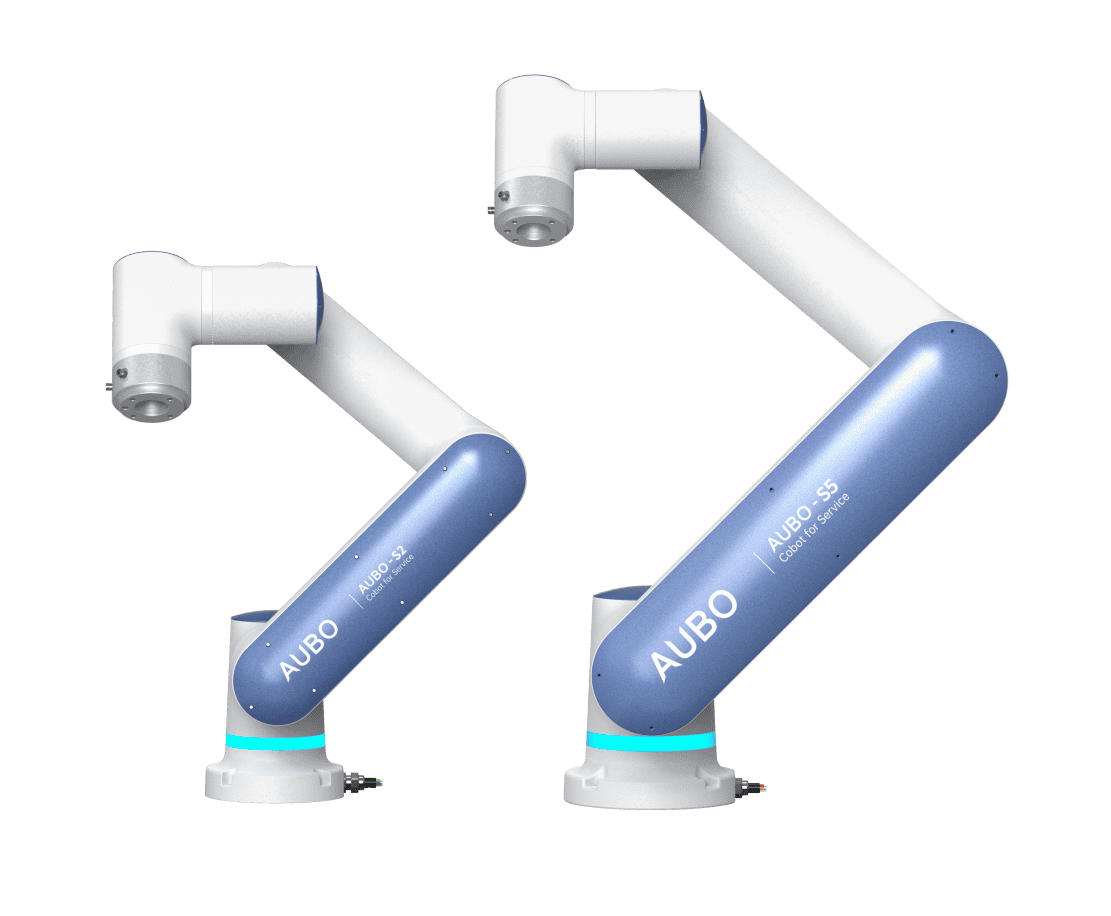
The AUBO-S series robot arm is a lightweight collaborative robot developed by AUBO (Beijing) Intelligent Technology Co., Ltd. for commercial and service applications. It features a deeply lightweight and compact design, provides two payload specifications of 2 kg and 5 kg, is equipped with abundant expansion interfaces, supports multiple simple interaction methods, and can implement ARCS wireless teaching to meet diverse commercial service application needs.
| Sign | Description |
|---|---|
| The AUBO-S series robot arm is only compatible with the AUBO-CB-S controller. |
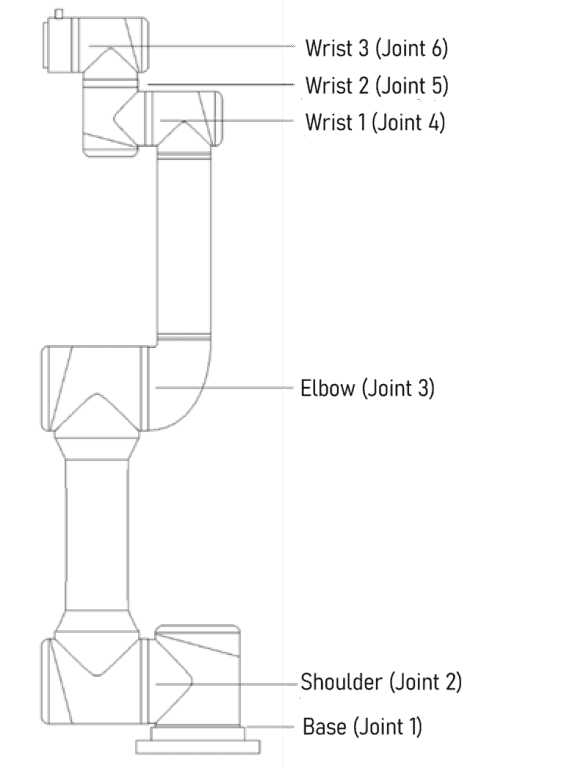
The AUBO-S series robot arm mimics the human arm and has six rotating joints, each representing one degree of freedom. As shown in Figure 3-2, the robot arm joints include the base (Joint 1), shoulder (Joint 2), elbow (Joint 3), wrist 1 (Joint 4), wrist 2 (Joint 5), and wrist 3 (Joint 6). The base is used to connect the robot arm body to the pedestal, and the tool end is used to connect the robot arm to the tool, where the tool end is the end of wrist 3. The shoulder and elbow, as well as the elbow and wrist, are connected by arm tubes. Through the AuboStudio interface or drag teaching, users can control each joint to rotate, allowing the robot's end tool to move to different poses.
3.2 Technical Specifications
3.2.1 AUBO-S2
| Robot arm type | AUBO-S2 |
|---|---|
| Degrees of freedom | 6 rotary joints |
| Body weight (including robot arm cable) | 13.5kg |
| Payload | 2kg |
| Maximum working radius | 650mm |
| Joint range | joint1/joint2/joint4/joint5/joint6: -360° ~ +360° joint3: -156° ~ +156° |
| Maximum joint speed | joint1/joint2/joint3: 180°/s joint4/joint5/joint6: 230°/s |
| Tool speed | ≤ 2.0m/s |
| Repeatability | ± 0.1mm |
| Operating ambient temperature range | 0 ~ 50°C |
| Operating ambient humidity | 90% RH (non-condensing) |
| IP rating | IP54 |
| Average power | Approx. 150W when running typical programs |
| Peak power | 500W |
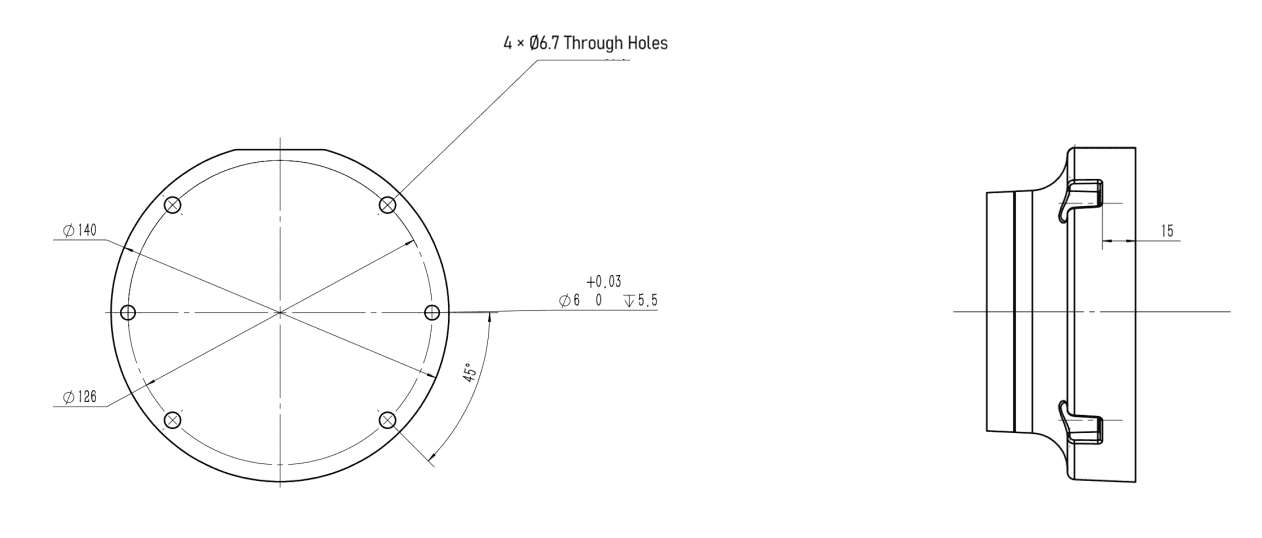
| Mounting surface diameter | ⌀140mm |
3.2.2 AUBO-S5
| Robot arm type | AUBO-S5 |
|---|---|
| Degrees of freedom | 6 rotary joints |
| Weight (including robot arm cable) | 15.5kg |
| Payload | 5kg |
| Maximum working radius | 900mm |
| Joint range | joint1/joint2/joint4/joint5/joint6: -360° ~ +360° joint3: -160° ~ +160° |
| Maximum joint speed | joint1/joint2/joint3: 180°/s joint4/joint5/joint6: 230°/s |
| Tool speed | ≤ 3m/s |
| Repeatability | ± 0.1mm |
| Operating ambient temperature range | 0 ~ 50°C |
| Operating ambient humidity | 90% RH (non-condensing) |
| IP rating | IP54 |
| Average power | Approx. 250W when running typical programs |
| Peak power | 800W |
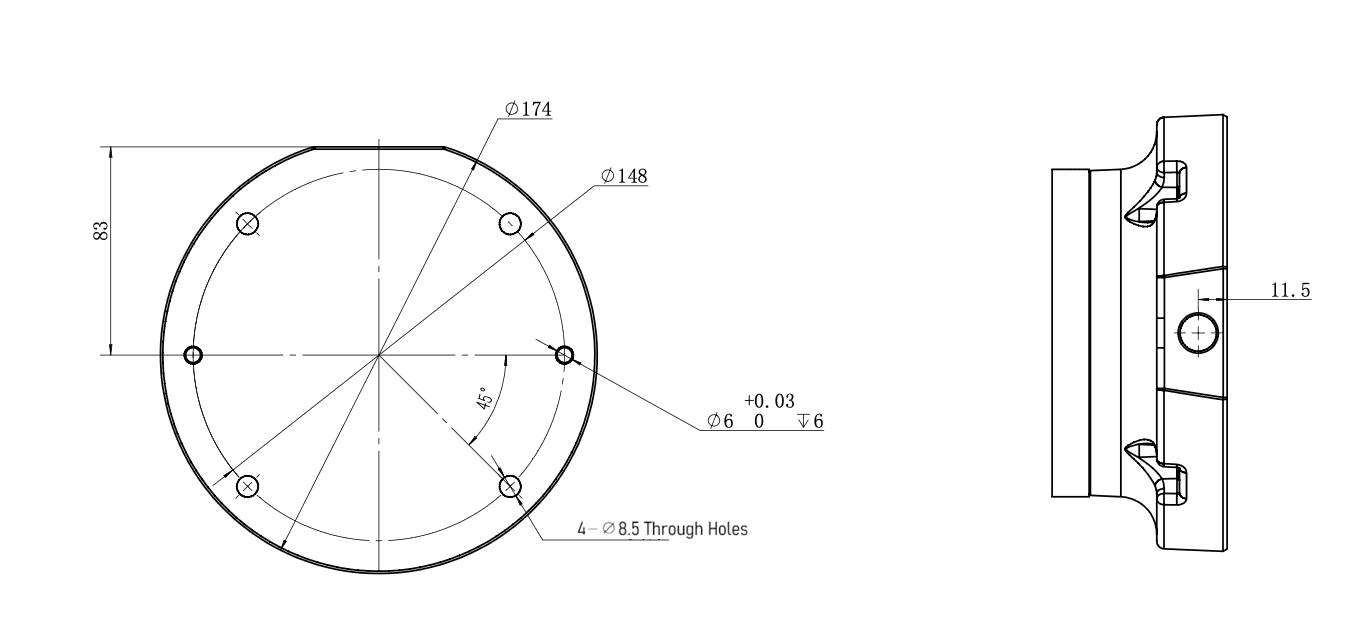
| Mounting surface diameter | ⌀174mm |
3.3 Performance Parameters
3.3.1 Load Offset
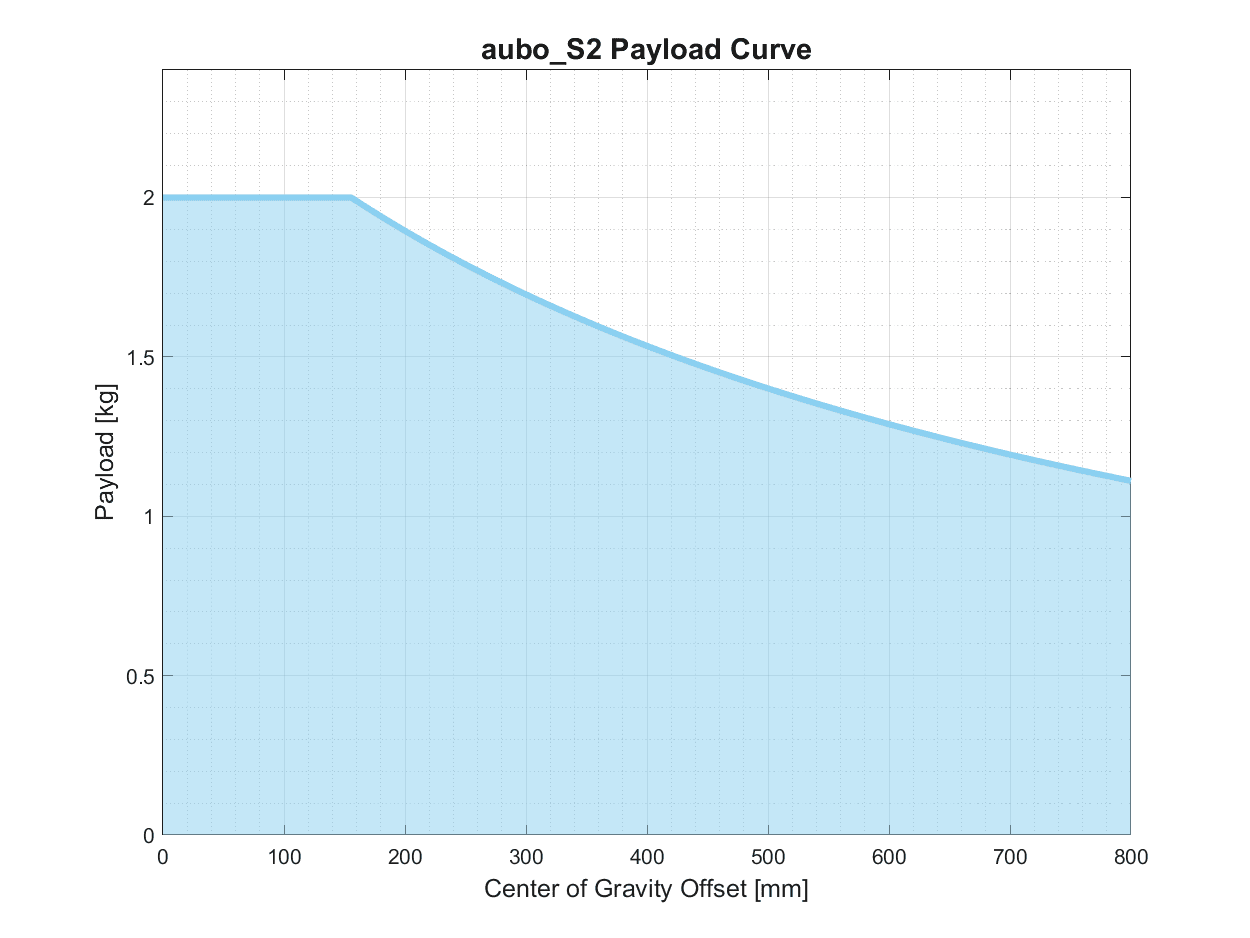
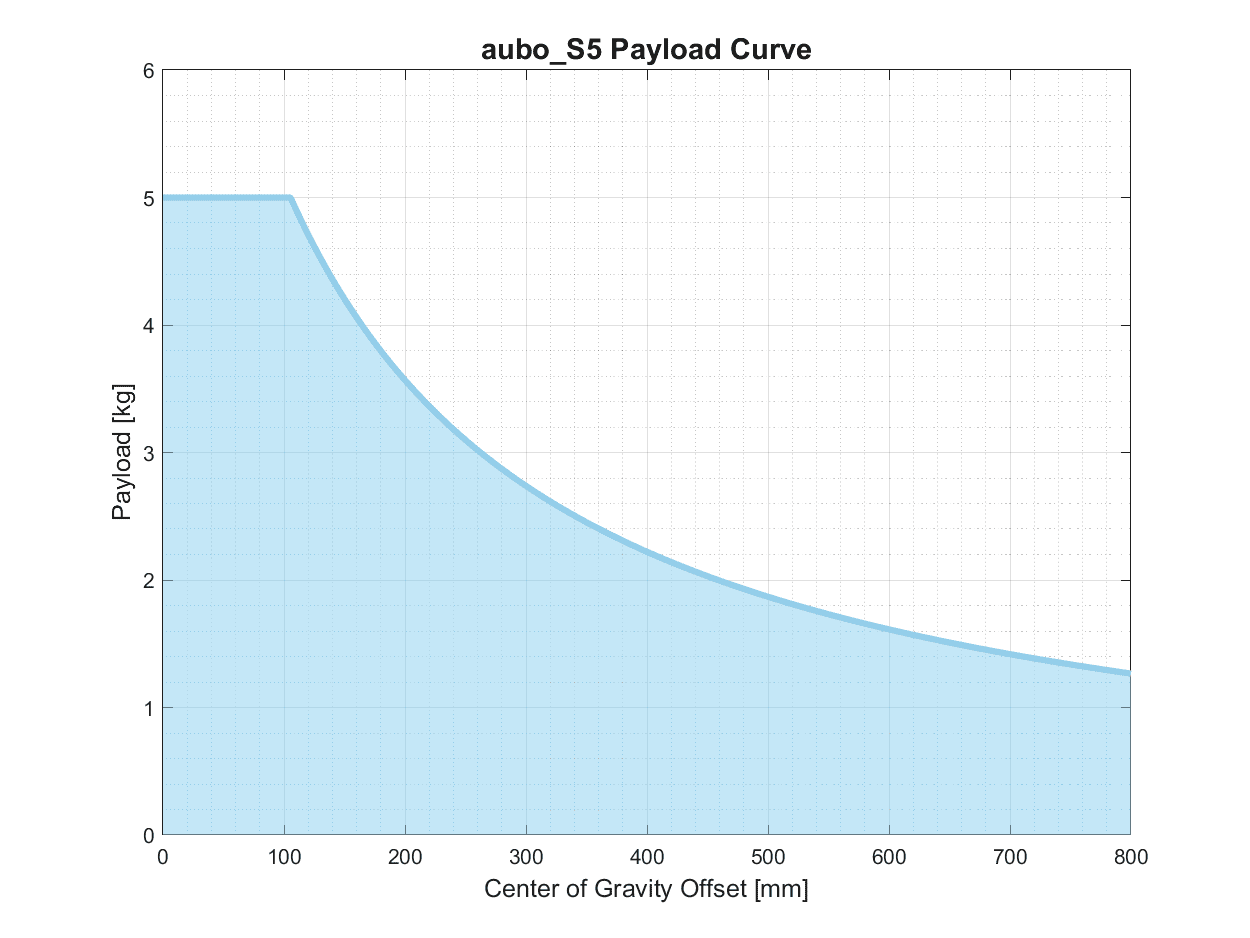
The following is the load offset curve of the robot arm wrist. The vertical axis represents the payload, and the horizontal axis represents the distance from the center of the tool end flange to the tool center.
| Sign | Description |
|---|---|
| 1. The load conditions should be within the range shown in the chart. 2. The load shown in the chart is the maximum load capacity of this robot arm. Under no circumstances should the maximum weight shown in the chart be exceeded. 3. Exceeding the allowable value may damage internal components of the machine. |
3.4 Robot Arm Workspace
3.4.1 Mechanical Dimensions
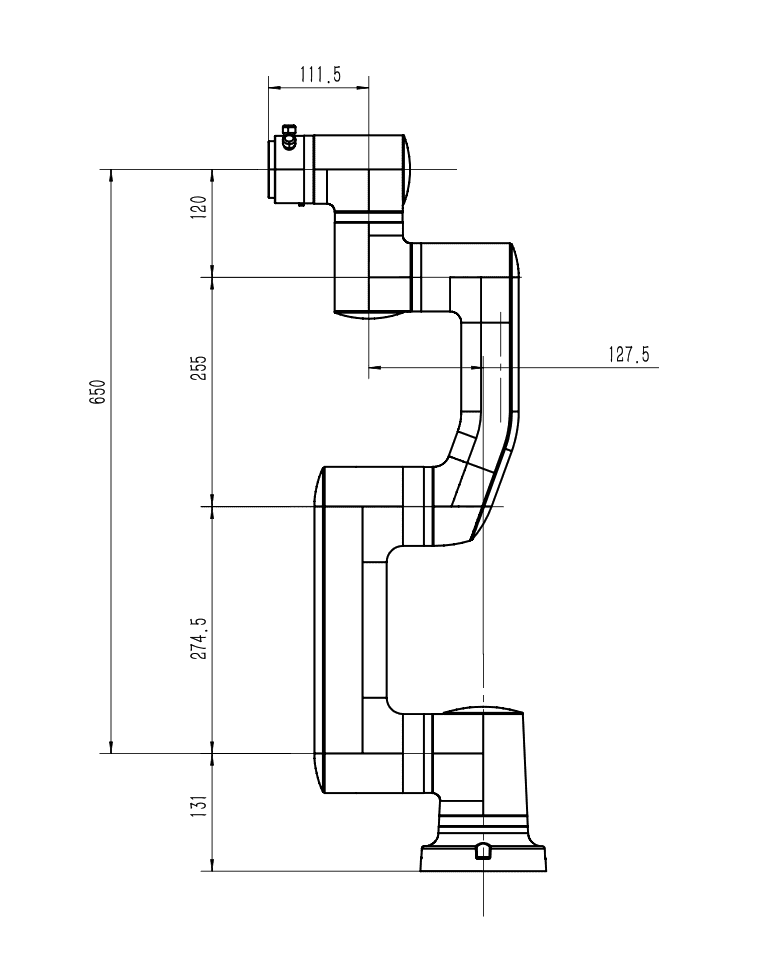
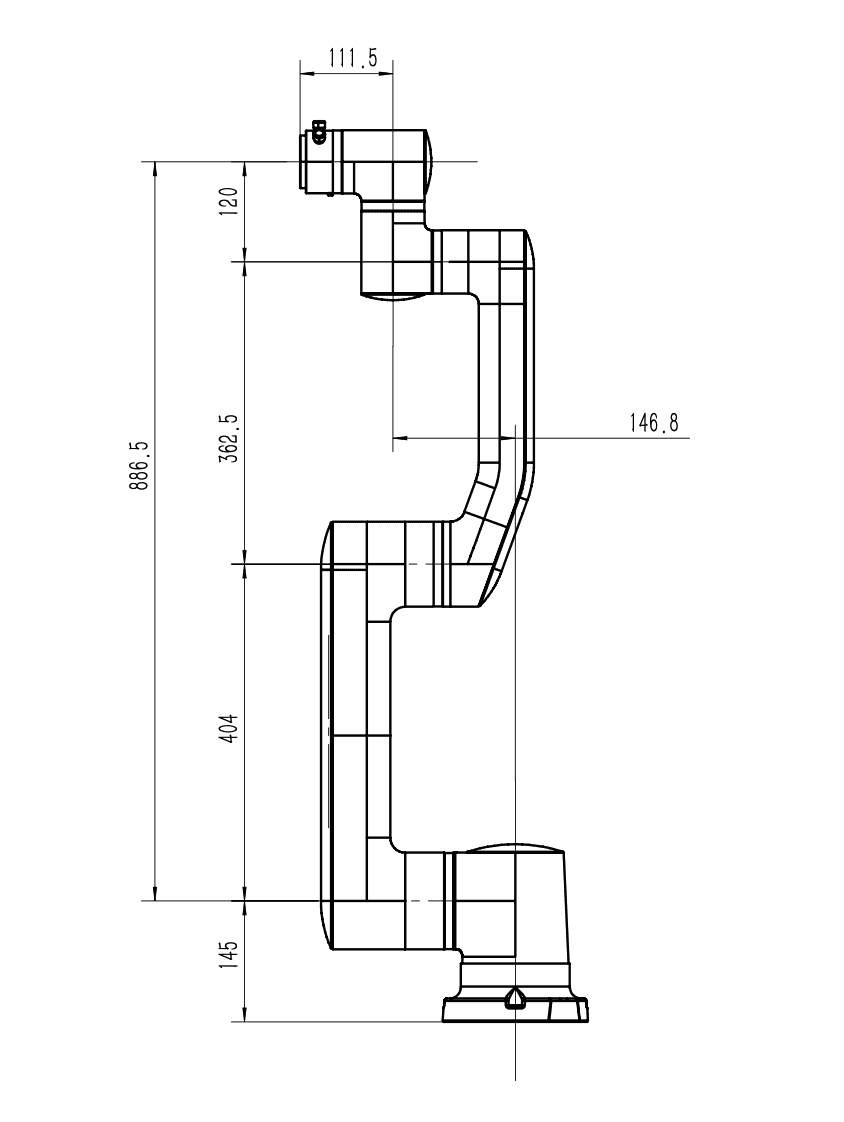
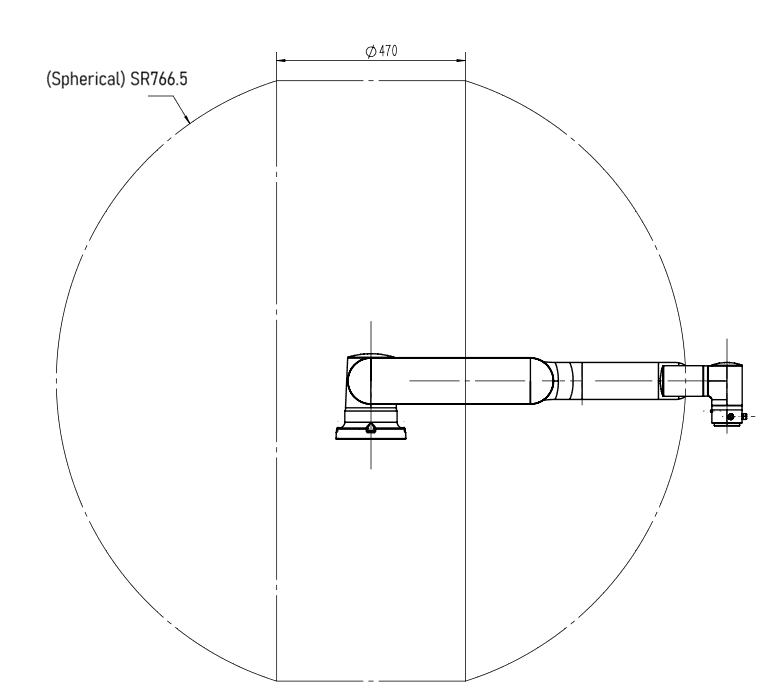
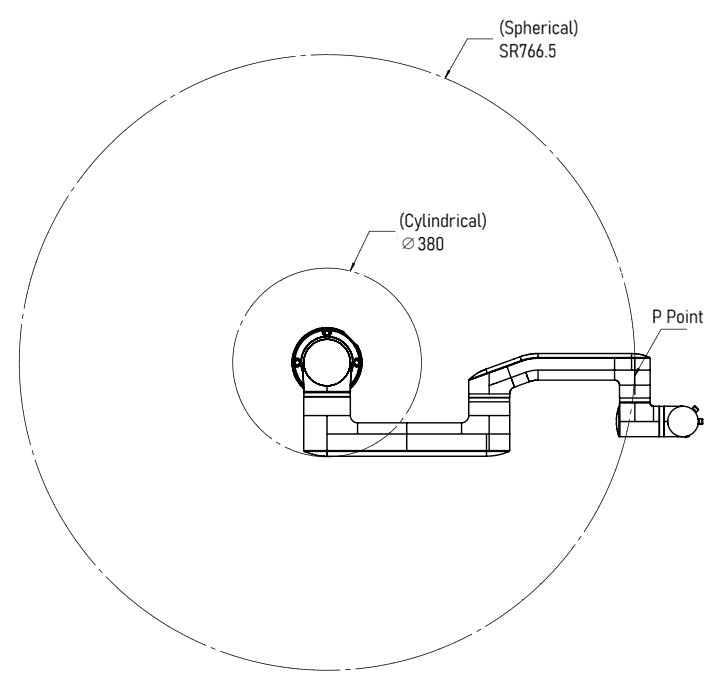
3.4.2 P Point Movement Range of Robot Arm Body
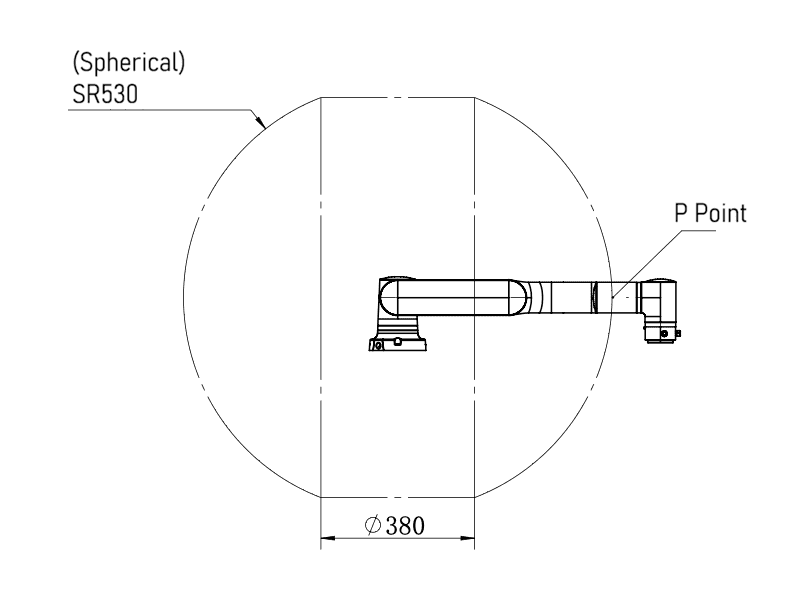
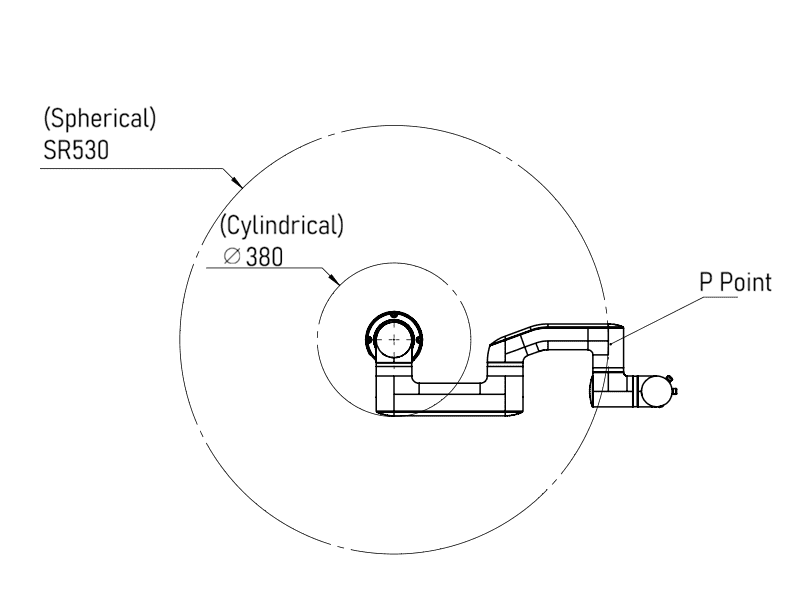
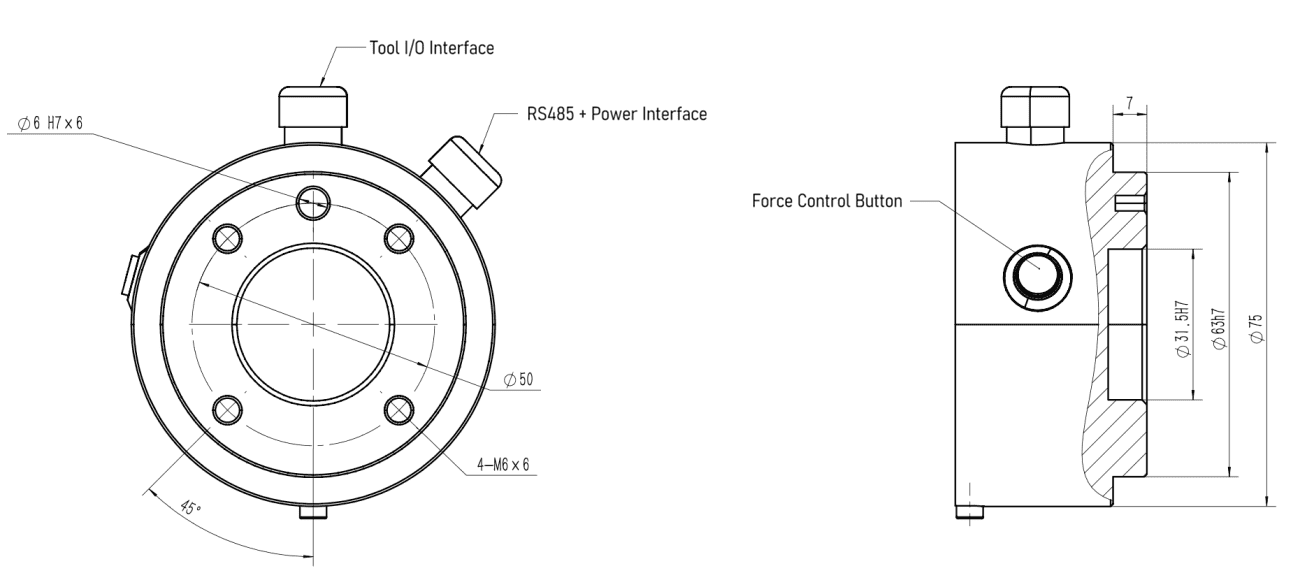
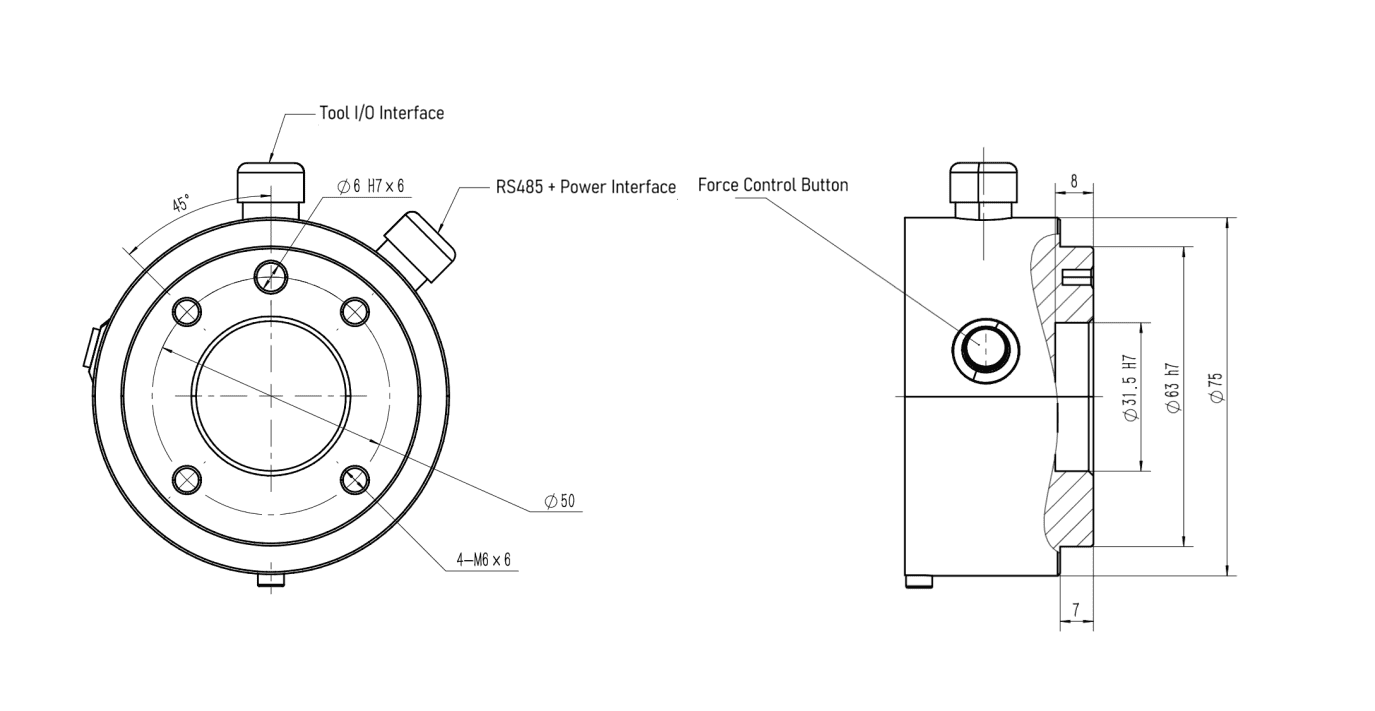
3.4.3 Mechanical Dimensions of End Flange
3.4.4 Top View of Base
4 Installation and Commissioning
4.1 Important Safety Instructions
4.1.1 Environmental Conditions
The robot arm shall be installed in an environment that meets the following conditions:
- No corrosive gases or liquids
- No oil mist
- No smoke
- No dust or metal powder
- No mechanical impact or vibration
- No electromagnetic noise
- No radioactive materials
- Low humidity
- No flammable materials
- Ambient temperature: 0℃ ~ 50℃
- Avoid direct sunlight (avoid outdoor use)
4.1.2 Safety Requirements
The installation foundation shall meet the following mechanical load-bearing requirements:
- Load-bearing capacity: Install the robot on a solid surface that is capable of withstanding at least 10 times the full torsional force of the base joint and at least 5 times the weight of the robot arm.
- Stability: The installation surface shall be free of vibration and shall not become loose after installation.
Instructions for installing additional devices:
If non-AUBO original supporting components (such as cables) are added to the robot, the user must ensure that such components do not interfere with or compromise the safety functions of the equipment.
Controller safety instructions:
- The controller should be placed horizontally on the floor.
- A clearance of ≥ 50 mm shall be reserved on each side of the controller to ensure ventilation and heat dissipation.
- The teach pendant may be hung on the controller; ensure that cables will not trip personnel.
| Sign | Description |
|---|---|
| 1. A damp controller can cause injury or death. 2. Pay close attention to environments with conductive dust. |
4.2 Installing the Robot Arm
The installation of the robot arm is divided into the following main steps:
- Determine the workspace: Plan a safe working area according to the movement range of the robot arm.
- Install the robot arm body: Secure the robot arm to the base or workbench surface.
- Install the end tool: Install the end effector on the robot arm flange.
- Connect the controller: Complete electrical connections according to the controller manual.
- Power-on commissioning: After power-on, complete initial configuration through the AuboStudio.
A safety assessment must be carried out after each installation of the robot, and the requirements in the safety chapter of this manual must be strictly followed.
4.2.1 Base (Optional)
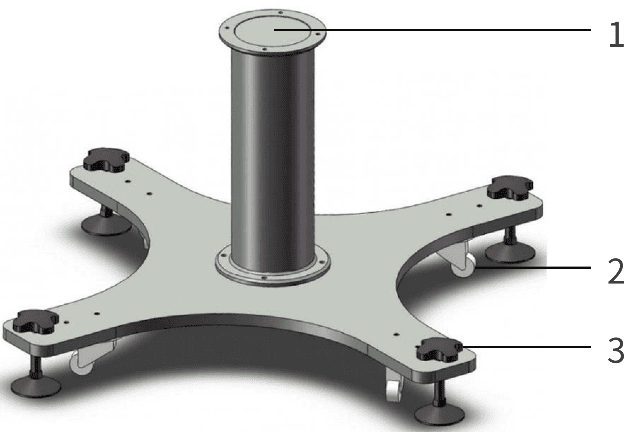
The AUBO robot base is an optional component used to support and fix the robot arm. Figure 4-1 shows a schematic diagram of the base structure. The actual equipment shall prevail.
| Base Type | Color | Applicable Payload | Structure Description |
|---|---|---|---|
| Low-payload base | Silver | Max. 5 kg payload | Equipped with 4 leveling bolts and 4 swivel casters for easy fixing and movement. To fix the robot arm, rotate the upper part of the leveling bolt to lower the leveling bolt. To move the robot arm, use a wrench to rotate the lower nut of the leveling bolt and raise the leveling bolt so that the swivel caster is released from the floor. |
Observe the following requirements when selecting and using the base:
| Sign | Description |
|---|---|
| 1. The silver low-payload base supports a maximum payload of 5 kg. Do not overload it. 2. The bottom of the base is not fixed to the floor. It is suitable only for simple commissioning scenarios and must not be operated at full payload and full speed; otherwise, there is a risk of tip-over. |
4.2.2 Installing the Robot Arm
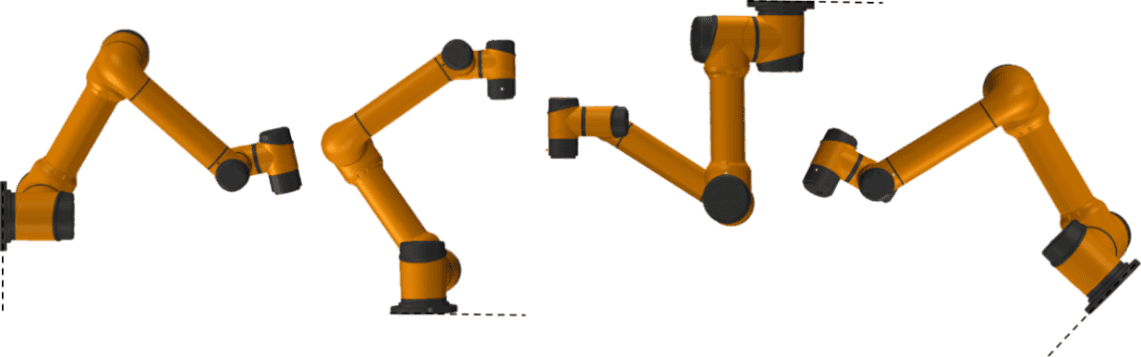
The AUBO-S series robot arm features 360° installation position and pose adaptation capability, and supports base mounting, ceiling mounting, wall mounting, and various other installation methods, as shown in Figure 4-2. After the robot arm is installed, the AuboStudio will automatically identify and adjust the working parameters of the robot arm after power-on.
For installation on the base, it is recommended to use four bolts for fastening and to pre-install two positioning pins in holes with slightly smaller diameters to improve installation accuracy. For mechanical dimensions, refer to 3.4.4 Top View of Base.
| Sign | Description |
|---|---|
| 1. Ensure that the robot arm is correctly and securely installed. 2. The robot arm should not be installed in water or in a humid environment unless it is stated to meet IP67 protection. Otherwise, if the robot arm is submerged in water for a period of time, it may suffer damage. 3. Risk of tip-over: If the robot arm is not securely placed on a sturdy surface, it may tip over and cause injury. |
| 1. When installed on the base, the contact surface between the robot and the base must be in close contact. 2. It is recommended that users use a base contact surface with strong heat dissipation performance, such as an all-aluminum material. When the operating environment exceeds 35℃, users are strongly recommended to use materials with strong heat dissipation performance. |
4.2.3 Installing the End Tool
The end tool flange has several threaded holes and one positioning hole, allowing tools such as grippers to be mounted to the end of the robot arm. For the mechanical dimensions of the tool flange, refer to 3.4.3 Mechanical Dimensions of End Flange.
| Sign | Description |
|---|---|
| 1. Ensure that the tool is correctly and securely installed. 2. Ensure the safety structure of the tool so that no parts accidentally fall and cause risks. |
4.2.4 Protective Grounding
The power input terminal of the robot arm controller must be connected to a qualified grounding wire (PE wire), ensuring a good electrical connection between the enclosure and earth. It is strictly prohibited to power on the robot arm without connecting the protective grounding wire (PE wire).
- Grounding technical requirements:
- Cable specification: The protective grounding conductor (PE) must use a copper-core cable with a cross-sectional area of ≥ 2.5mm². The insulation layer must be intact. Connection terminals must be securely crimped using professional crimping tools; wrapping connections are strictly prohibited.
- Grounding resistance: After grounding construction is completed, a grounding resistance tester must be used to measure between the robot arm PE terminal and earth. A grounding resistance of ≤ 4Ω is qualified.
- Record retention: Grounding test records must be retained and filed as important proof of safety compliance.
- Safety inspection and maintenance:
- Routine inspection: Operators shall regularly inspect the PE wire connection status to ensure there is no looseness, breakage, or corrosion.
- Maintenance requirements: After equipment maintenance, relocation, or reinstallation, the grounding resistance must be retested to ensure that the grounding system remains effective.
- Training requirements: All operators must receive grounding safety training and understand the risks of ungrounded equipment and the correct grounding method.
| Sign | Description |
|---|---|
| 1. It is strictly prohibited to power on the robot arm without connecting the protective grounding wire (PE wire). Failure to provide grounding or improper grounding may result in electric shock, abnormal electromagnetic interference, or permanent equipment damage. 2. When the robot arm is not connected to the PE wire, the enclosure may carry an induced voltage of 15V ~ 105V. Contact by operators may cause discomfort such as numbness or tingling, which may lead to panic-induced incorrect operation and secondary hazards such as collision with the robot arm or accidental emergency stop activation. |
4.2.5 Cable Connection
After the robot arm is installed, it must be correctly connected to the controller before it can be powered on and used. For cable connection methods, refer to the controller user manual.
4.3 Arm-side Interfaces and Buttons
4.3.1 Introduction
To meet the diverse needs of end tools, the AUBO-S series robot arm is designed with an 8-pin connector (hereinafter referred to as the "tool I/O interface"), a 4-pin connector (hereinafter referred to as the "tool RS485 interface"), and a drag teach button at the wrist. Among these, the tool RS485 interface is optional.
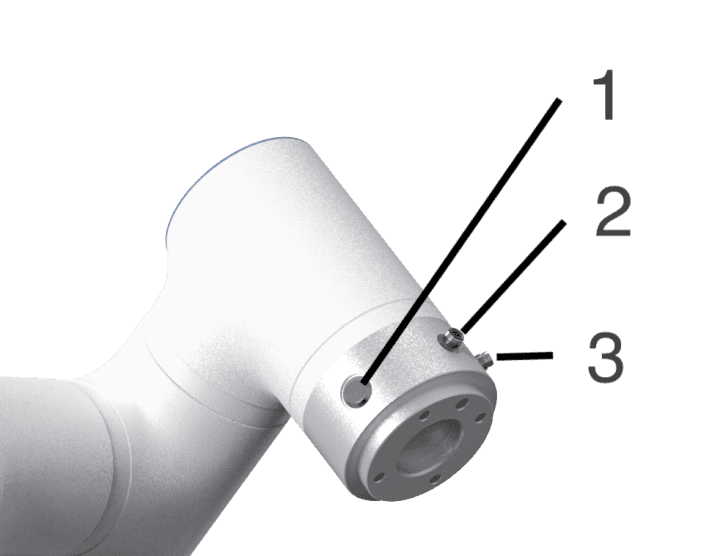
4.3.2 Tool I/O Interface
The tool I/O interface integrates power supply and signal transmission functions, supports the connection and control of end-effectors such as grippers and sensors, adopts industrial-grade cable connection, and internally includes eight functional wires (as shown in Figure 4-4 and Table 4-1). The power supply voltage, digital I/O interface mode, and I/O interface functions can be configured in AuboStudio. For configuration methods and functions, refer to AuboStudio User Manual.
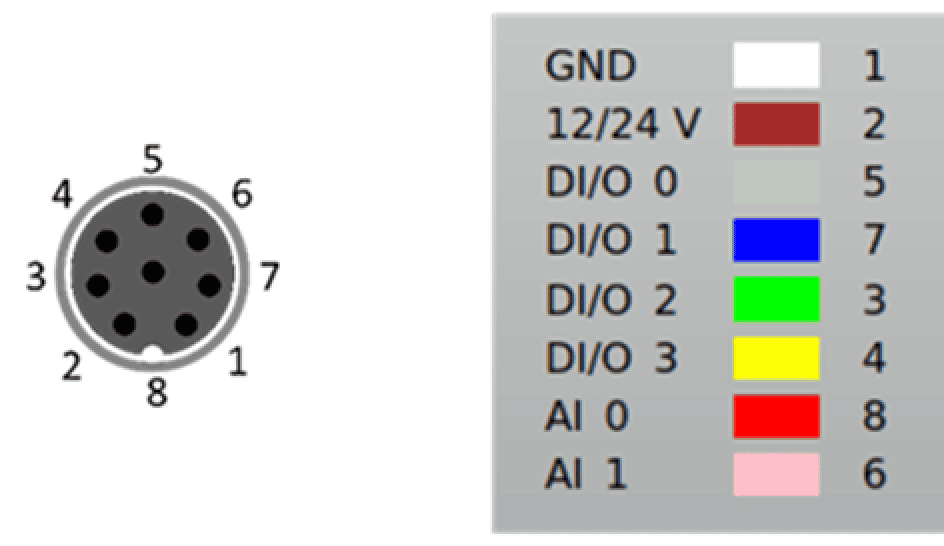
| Color | Signal | Pin | Color | Signal | Pin |
|---|---|---|---|---|---|
| White | GND | 1 | Green | DI/O 2 | 3 |
| Brown | 12/24V | 2 | Yellow | DI/O 3 | 4 |
| Gray | DI/O 0 | 5 | Red | AI 0 | 8 |
| Blue | DI/O 1 | 7 | Pink | AI 1 | 6 |
The digital I/O interface of the tool I/O interface adopts the NPN switching scheme:
- Digital input mode: When activated, the connector is driven to connect to GND; when disabled, it is open;
- Digital output mode: A weak pull-down resistor is provided to ensure signal stability and reliability.
For detailed electrical parameters of the tool I/O interface, refer to Table 4-2 to Table 4-4, with electrical tolerance within ±10%.
| Parameter | Minimum | Typical | Maximum | Unit |
|---|---|---|---|---|
| Power supply voltage in 24V mode | 23 | 24 | 25 | V |
| Power supply voltage in 12V mode | 11.5 | 12 | 12.5 | V |
| Power supply current in both modes | - | 0.35 | 1.0 | A |
| Parameter | Minimum | Typical | Maximum | Unit |
|---|---|---|---|---|
| Input voltage range | 0 | - | 10 | V |
| Voltage resolution | - | 2.5 | - | mV |
| I/O type | Parameter | Minimum | Typical | Maximum | Unit |
|---|---|---|---|---|---|
| Digital input interface | Input voltage | -0.5 | - | Vout+2 | V |
| Logic low voltage | 0 | 1.5 | 2 | V | |
| Logic high voltage | Vout-4 | Vout | Vout+2 | V | |
| Input resistance | - | 4.3 | - | kΩ | |
| Digital output interface | Open-circuit voltage | Same as current power supply | |||
| Voltage at 1A input current | 0.35 | 0.4 | 0.85 | A | |
| Input current | 0.35 | 0.4 | 0.5 | A | |
| Current through GND | 0.35 | 0.4 | 0.5 | A | |
| Analog input interface | AI 0 | 0 | - | +10 | V |
| AI 1 | 0 | - | +10 | V | |
| Sign | Description |
|---|---|
| When connecting tools and grippers, ensure that interrupting the power supply will not cause any danger, such as the workpiece falling from the tool. |
4.3.3 Tool RS485 Interface (Optional)
The tool RS485 interface provides fieldbus communication capability, supports direct communication and data exchange with various devices, uses the standard RS485 communication protocol, adopts industrial cable connection, and internally includes four functional wires (as shown in Figure 4-5 and Table 4-5). Its power supply voltage is configured in the same way as that of the tool I/O interface. For configuration methods and functions, refer to AuboStudio User Manual. For related electrical parameters, refer to Table 4-2.
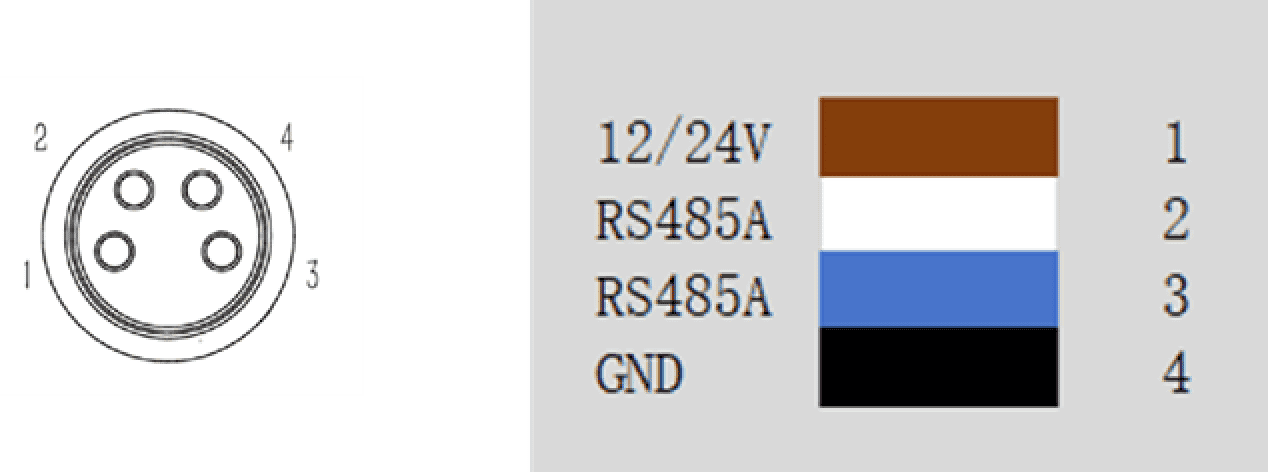
| Color | Signal | Pin |
|---|---|---|
| Brown | 12/24V | 1 |
| White | RS485A | 2 |
| Blue | RS485B | 3 |
| Black | GND | 4 |
4.3.4 Drag Teach Button
The drag teach button is a human-machine interaction component provided by the AUBO-S series robot arm. Press and hold the button to enter drag teaching mode, allowing the user to easily move the robot arm. After the button is released, the robot arm maintains its current pose and exits drag teaching mode. This function can be used together with the "trajectory recording" function. For details, refer to AuboStudio User Manual.
5 Handling and Transportation Precautions
For hoisting the robot, appropriate measures shall be taken to position the moving components to prevent hazards caused by unexpected movement during hoisting and transportation. During packaging for transportation, the robot shall be packed according to packaging standards, and the required marks shall be placed on the outside of the packing box.
During transportation, ensure that the robot is stable and fixed in a proper position.
The controller should be lifted using the handle.
When moving the robot from its packaging materials to the installation position, hold the robot until all bolts on the robot base are fully tightened.
After securing, power on the robot and use the drag teaching function to adjust the robot pose to an appropriate position.
Keep the original packaging after transportation is complete. Store the packaging materials in a dry place in case the robot needs to be repacked and moved in the future.
| Sign | Description |
|---|---|
| 1. Ensure that your back or other body parts are not overstrained when lifting the equipment. 2. All regional and national guidelines shall be followed. AUBO (Beijing) Intelligent Technology Co., Ltd. is not responsible for any damage caused during equipment transportation. 3. Ensure that the installation of the robot strictly follows the installation instructions in the manual. |
6 Maintenance, Repair, and Disposal
6.1 Maintenance and Repair
All maintenance and repair work must strictly comply with all safety specifications in this manual.
Equipment maintenance, calibration, and repair operations must be carried out according to the latest service manual, which is available from the official technical support website www.aubo-robotics.cn. All authorized distributors of AUBO (Beijing) Intelligent Technology Co., Ltd. can access this website.
Equipment repair work may only be performed by authorized system integrators or AUBO factory personnel. If parts need to be returned to AUBO (Beijing) Intelligent Technology Co., Ltd., the relevant procedures in the service manual must be strictly followed.
During the work, the safety level requirements corresponding to maintenance and repair must be met, and current local work safety regulations must be followed. After the work is completed, all safety functions must be tested one by one to confirm that they operate normally.
Maintenance and repair work is used to ensure stable operation of the equipment or restore normal operating conditions after equipment failure, and includes both fault diagnosis and physical repair.
When operating the robot arm body or controller, strictly follow the following safety procedures and warning requirements:
| Sign | Description |
|---|---|
| 1. Remove the main input cable from the back of the controller to ensure that it is completely powered off. Necessary precautions must be taken to prevent others from reconnecting system energy during maintenance. After power-off, recheck the system to ensure that it is powered off. 2. Check the grounding connection before restarting the system. 3. Comply with ESD (electrostatic discharge) regulations when disassembling the robot arm or controller. 4. Avoid disassembling the controller power supply system. After the controller is turned off, its power supply system may retain high voltage for several hours. 5. Prevent water or dust from entering the robot arm or controller. |
| 1. Replace faulty components with new components with the same part number or corresponding components approved by AUBO (Beijing) Intelligent Technology Co., Ltd. 2. Immediately reactivate all disabled safety measures after completing this work. 3. Record all maintenance operations in writing and keep them in the technical documentation related to the entire robotic system. 4. The controller contains no parts that can be repaired by the end user. If maintenance or repair service is required, please contact your dealer or AUBO (Beijing) Intelligent Technology Co., Ltd. |
6.2 Disposal
AUBO robots must be disposed of in accordance with applicable national laws, regulations, and national standards.
7 Quality Assurance
7.1 Product Warranty
AUBO-S series robot arms have an 18-month limited warranty.
If the new equipment and its components show defects due to poor manufacturing or poor materials within 18 months after being put into use, AUBO (Beijing) Intelligent Technology Co., Ltd. shall provide the necessary spare components for replacement or repair the related components.
All equipment or components replaced or returned to AUBO (Beijing) Intelligent Technology Co., Ltd. are owned by AUBO (Beijing) Intelligent Technology Co., Ltd.
If the product is no longer within the warranty period, AUBO (Beijing) Intelligent Technology Co., Ltd. reserves the right to charge the customer for replacement or repair fees.
Outside the warranty period, if the equipment exhibits defects, AUBO (Beijing) Intelligent Technology Co., Ltd. shall not be liable for any resulting damage or loss, such as production loss or damage to other production equipment.
7.2 Disclaimer
The "Product Warranty" becomes void if the equipment defect is caused by improper handling or failure to follow the relevant information described in the User Manual.
Failures caused by the following situations are not covered by this warranty:
- Products purchased from channels not authorized by AUBO.
- Installation, wiring, or connection to other control equipment that does not comply with industrial standards or the requirements of the User Manual.
- Use beyond the specified conditions or standards of the product.
- Using this product for purposes other than those specified.
- Operating environmental conditions that exceed the product's specifications.
- Use in a grinding environment or other special environments without proper product protection.
- Product damage caused by improper transportation.
- Failures, damage, or indirect damage caused by accidents or human factors.
- Failures, damage, or indirect damage caused by modifications.
- Installation of non-original genuine parts or accessories.
- Damage caused by modification, commissioning, or repair of genuine parts by a third party other than AUBO (Beijing) Intelligent Technology Co., Ltd. or its designated integrators.
- Failures, damage, or indirect damage caused by natural disasters or other force majeure events.
- Failures caused by reasons other than the responsibility of AUBO (Beijing) Intelligent Technology Co., Ltd., in addition to the situations mentioned above.
The following situations are not covered by the warranty:
- The product traceability number cannot be identified.
- The production date or warranty start date cannot be identified.
- Changes to software or internal data.
- The failure cannot be reproduced or identified by AUBO (Beijing) Intelligent Technology Co., Ltd.
- Use of this product with radioactive equipment, in biological testing equipment, or for purposes deemed hazardous by AUBO (Beijing) Intelligent Technology Co., Ltd.
- Appearance parts and wearing parts. According to the product warranty agreement, AUBO (Beijing) Intelligent Technology Co., Ltd. only provides warranty commitments for flaws and defects in products and parts sold to distributors.
AUBO (Beijing) Intelligent Technology Co., Ltd. disclaims any other express or implied warranties or liabilities, including but not limited to any implied warranty of merchantability or fitness for a particular purpose. Furthermore, AUBO (Beijing) Intelligent Technology Co., Ltd. is not liable for any form of indirect or consequential damages arising from the related products.
8 Appendix
8.1 Glossary
Category 0 stop: Uncontrolled stop, power is cut off immediately and the joint brakes apply with no controlled deceleration, so the robot may deviate from the programmed path. It applies only to extreme cases such as exceeding the safety-rated limit or a failure in the safety-rated part of the control system. For the definitions of stop categories and the requirement to remove power immediately, refer to IEC 60204-1:2016 (9.2.2 Stop categories); for the design requirements of the emergency stop function, refer to EN ISO 13850:2015.
Category 1 stop: Controlled stop with power removal afterwards, the robot stops along the programmed path and the power is removed once the stop is achieved, balancing safety and path stability. For the definitions of stop categories and the requirement to remove power after the stop, refer to IEC 60204-1:2016 (9.2.2 Stop categories); for the design requirements of the emergency stop function, refer to EN ISO 13850:2015.
Category 2 stop: Controlled stop with power maintained, the robot stays powered after it stops, and the safety-rated control system holds it in the stopped position, so work can be resumed quickly. For the definitions of stop categories and the requirement to maintain power, refer to IEC 60204-1:2016 (9.2.2 Stop categories). A category 2 stop is not permitted as an emergency stop, and is therefore not covered by EN ISO 13850:2015.
Integrator: The integrator is the entity that designs the final installation of the robot. The integrator is responsible for conducting the final risk assessment and must ensure that the final installation complies with local laws and regulations.
Risk assessment: Risk assessment is the entire process of identifying all risks and reducing them to an appropriate level. Risk assessment shall be documented and archived. For details, refer to ISO12100.
Performance level: Performance Level (PL) is a discrete level used to describe the ability of safety-related parts of a control system to perform safety functions under predictable conditions. PLd is the second highest reliability classification, meaning that the safety function is quite reliable. For more information, refer to EN ISO13849-1:2008.
8.2 Revision Records
| Version No./Time | Description |
|---|---|
| v1.0.0*/20260428 | Trial version v1.0.0* released. |
| v1.0.1*/20260827 | 1. Released v1.0.1* trial version. 2. Unified manual structure, safety instructions, chapter names, and warning signs. |
| v1.0.2*/20260922 | 1. Released v1.0.2* trial version. 2. Added the stop category description for the emergency stop button and unified the glossary wording in the appendix. |
8.3 Technical Specifications Summary
| Parameter | AUBO-S2 | AUBO-S5 |
|---|---|---|
| Degrees of freedom | 6 rotary joints | 6 rotary joints |
| Weight | 13.5kg | 15.5kg |
| Payload | 2kg | 5kg |
| Maximum working radius | 650mm | 900mm |
| Joint range | joint1/joint2/joint4/joint5/joint6: -360° ~ +360° joint3: -156° ~ +156° | joint1/joint2/joint4/joint5/joint6: -360° ~ +360° joint3: -160° ~ +160° |
| Maximum joint speed | joint1/joint2/joint3: 180°/s joint4/joint5/joint6: 230°/s | joint1/joint2/joint3: 180°/s joint4/joint5/joint6: 230°/s |
| Tool speed | ≤ 2.0m/s | ≤ 3m/s |
| Repeatability | ± 0.1mm | ± 0.1mm |
| Operating ambient temperature range | 0 ~ 50°C | 0 ~ 50°C |
| Operating ambient humidity | 90% RH (non-condensing) | 90% RH (non-condensing) |
| IP rating | IP54 | IP54 |
| Average power | Approx. 150W when running typical programs | Approx. 250W when running typical programs |
| Peak power | 500W | 800W |
| Mounting surface diameter | ⌀140mm | ⌀174mm |