
AUBO-R Series Embodied Intelligence Universal Joint Module User Manual
1 About This Manual
1.1 Version Information
| Item | Content |
|---|---|
| Manual Name | AUBO-R Series Embodied Intelligence Universal Joint Module User Manual |
| Manual Version | v1.0.0* |
| Release Date | 2026-10-10 |
| Applicable Products | AUBO-RS14FN joint module, AUBO-RP14FN joint module, AUBO-RP17FN joint module, AUBO-RP20FN joint module, AUBO-RP25FN joint module |
This user manual is reviewed and revised periodically, and updates are released with new versions. The contents and information in this manual are subject to change without prior notice.
Please read this manual in full before installing or using the product, and keep it in a safe place for future reference.
All images in this manual are for illustrative purposes only. Please refer to the actual product received.
1.2 Copyright and Disclaimer
This manual is the exclusive property of AUBO (Beijing) Intelligent Technology Co., Ltd. It may not be copied, reproduced in whole or in part, or converted into any other form without the written permission of AUBO (Beijing) Intelligent Technology Co., Ltd.
AUBO (Beijing) Intelligent Technology Co., Ltd. assumes no responsibility for any errors or omissions that may appear in this manual, or for accidental or consequential injury arising from the use of this manual or the products described herein.
Copyright © 2015-2026 AUBO. All rights reserved.
1.3 Purpose of This Manual
This manual provides guidance for the installation, commissioning, pre-operation inspection, maintenance, repair, handling, storage, and disposal of AUBO-R series embodied joint modules.
This manual does not replace the system integrator's risk assessment, on-site safety design, work instructions, or the applicable laws, regulations, and safety standards of the country/region concerned.
1.4 Intended Readers
This manual is intended for the following professionals:
- Joint module installation personnel
- Commissioning and operating personnel
- Maintenance and repair personnel
- Safety management personnel
1.5 Prerequisites
Personnel reading and using this manual shall meet the following requirements:
- Have received relevant training provided by AUBO (or an authorized AUBO distributor);
- Possess the basic knowledge required for the installation and maintenance of mechanical, electrical, and automation equipment;
- Be familiar with on-site safety management requirements and possess basic risk identification and safe operation awareness;
- Have read and understood the safety instructions in this manual and related documents.
1.6 Related Documents
When using this manual, it is recommended to also read the following documents:
1.7 Obtaining More Information
For more information on products, services, training, or technical support, please visit https://www.aubo-robotics.cn.
2 Safety
2.1 Safety Instructions
This chapter describes the basic safety principles that must be followed when operating an embodied joint module system. Integrators, users, and operators must read this chapter carefully and strictly observe the instructions marked with safety warning signs.
Due to the complexity and potential hazards of robot systems, this manual cannot list all possible hazardous scenarios. Users and integrators shall conduct a risk assessment based on the actual application, end tools, peripheral equipment, working environment, and personnel activity range, and take appropriate risk reduction measures.
2.2 Safety Warning Signs
This manual uses the following safety warning signs to indicate important safety information. When you see the relevant signs, be sure to read and follow the corresponding instructions.
| Sign | Level | Description |
|---|---|---|
 | DANGER | Indicates a hazardous situation which, if not avoided, will result in death or serious injury. |
 | WARNING | Indicates a hazardous situation which, if not avoided, could result in personal injury or serious equipment damage. |
 | CAUTION | Indicates a hazardous situation which, if not avoided, could result in minor personal injury or equipment damage. For items marked with this symbol, serious consequences may sometimes occur depending on the specific situation. |
 | NOTICE | Indicates a situation which, if not avoided, could result in personal injury or equipment damage. For items marked with this symbol, serious consequences may sometimes occur depending on the specific situation. |
2.3 General Safety Rules
The following basic safety guidelines must always be observed when operating the joint module and its associated equipment. This section lists general safety requirements; safety instructions for specific scenarios are detailed in the relevant chapters of this manual.
Be sure to install the machine and all electrical equipment in accordance with the requirements and specifications in this manual.
Before using the machine for the first time and putting it into production, perform preliminary testing and inspection of the machine and its protective systems.
Before starting the machine and system for the first time, check whether the machine and system are complete, whether operation is safe, and whether any damage is detected. This inspection shall verify compliance with the nationally or regionally effective safety production rules and regulations, and all safety functions must be tested.
Users must check and ensure that all safety parameters and user programs are correct and that all safety functions work properly. Personnel qualified to operate the joint module are required to check each safety function. Startup is permitted only after comprehensive and careful safety testing has been passed and the safety level has been reached.
Professional personnel are required to install and commission the machine in accordance with installation standards.
After the joint module is integrated into a complete machine and assembly is completed, a comprehensive risk assessment of the entire equipment must be carried out, and assessment records must be retained.
When multiple joint modules are connected in series and assembled with an end effector, mechanical risks are compounded; the emergency stop and safety level of the entire system must be selected according to the highest level.
Connecting different machines together may increase hazards or create new hazards. Always perform a comprehensive risk assessment of the entire installation. When different safety and emergency stop performance levels are required, always select the highest performance level.
AUBO (Beijing) Intelligent Technology Co., Ltd. assumes no liability for damage to the machine or personal injury caused by improper operation of the machine.
Prohibited Actions:
| Sign | Description |
|---|---|
| 1. It is strictly prohibited to start the joint module before completing safety inspection and risk assessment. The following checks must be completed before the first startup: - System integrity check (mechanical installation, electrical connections, grounding protection) - Testing of all safety functions - Verification of the correctness of safety parameters - Review of risk assessment documentation 2. It is strictly prohibited to power on the joint module without connecting the protective earth (PE) wire. Poor grounding can cause electric shock, equipment damage, or electromagnetic interference. 3. It is strictly prohibited to operate the joint module in damp environments or environments with conductive dust, which may cause casualties. 4. It is strictly prohibited to manually switch the power supply system on and off frequently. Do not manually switch the power supply system on and off frequently; it is recommended that the interval between each power on/off be greater than 10 s. 5. When the joint module is running, it is strictly prohibited to touch the surface of the joint and motor. When the joint module is working or has just stopped, do not operate or touch the machine. Cut off the power and wait one hour for the joint module to cool down. 6. It is strictly prohibited to modify safety parameters or bypass safety functions without authorization. |
Operating Rules:
| Sign | Description |
|---|---|
| 1. When multiple joint modules are assembled in series, make sure that the connection end faces of each joint and the end effector tool are firmly locked and installed. Loose installation may cause the equipment to fall off or reduce operation accuracy. 2. After the joint module is built into a motion mechanism, ensure that the mechanism has an open motion space, free of obstacles, sharp corners, or pinch points. 3. Safety loop devices must not be connected to general-purpose I/O interfaces; only dedicated safety-type interfaces may be used. 4. Correctly configure the installation parameters, including installation angle, TCP weight and offset, safety parameters, etc. 5. If the joint module is subject to impact, housing damage, electrical faults, or other damage, it is prohibited to continue powering it on for operation. Stop the machine immediately and contact AUBO or an authorized service provider. 6. A safety assessment must be performed after each installation to confirm that all safety functions are normal. |
| 1. Before transporting the joint module, check the insulation condition and protective measures, and handle it carefully during transport to avoid impact. 2. Do not expose the joint module to strong magnetic fields for extended periods, as strong magnetic fields may damage the equipment. 3. Do not modify the joint module without authorization. Any unauthorized modification will void the warranty, and AUBO assumes no liability arising therefrom. |
2.4 Personnel Safety
When the joint module is running, personnel safety shall be given priority. Users and integrators shall take at least the following measures:
- Ensure that all relevant personnel have received training from AUBO official (or an authorized AUBO distributor) and fully understand safe and standardized operating procedures. Training inquiries: support@aubo-robotics.cn.
- During operation, tie back hair, do not wear loose clothing, and do not wear jewelry. When the joint module is stationary, it may be in a state ready to start and shall be regarded as continuously running; do not approach it casually.
- Personnel must not place their head, face, neck, fingers, or other body parts in areas where they may be struck, pinched, or drawn in.
2.5 Responsibility and Standards
The joint module is a component of a complete robot system and does not itself constitute a complete machine. Therefore, this manual does not cover a complete design, installation, and operation solution for the entire robot, nor does it list all risk conditions that may affect the safety of peripheral equipment of the integrated system. The installation safety performance of complete robot equipment depends on the design and construction method of the overall integration solution. The equipment integrator must conduct a risk assessment of the design and installation of the entire integrated system in accordance with locally applicable laws, regulations, safety rules, and industry standards.
None of the safety information contained in this manual shall be regarded as a guarantee by AUBO (Beijing) Intelligent Technology Co., Ltd. Even if operators strictly follow all safety guidelines in this manual, potential risks of personal injury or equipment damage still exist.
AUBO (Beijing) Intelligent Technology Co., Ltd. continuously improves product performance and reliability and reserves the right to iterate and upgrade products; product updates will not be notified separately. We have made every effort to ensure that the contents of this manual are accurate and reliable, but we assume no responsibility for omissions or errors in the document.
2.5.1 Integrator Responsibilities
The integrator bears the following key responsibilities:
- Conduct a comprehensive risk assessment of the complete robot system built from the joint modules
- Ensure that the design, installation, and commissioning of the entire system meet safety requirements
- Provide necessary training to users and relevant operators
- Develop complete system operating procedures and emergency plans
- Establish and maintain appropriate safety protection measures
- Use appropriate methods during final installation to eliminate hazards or minimize all hazards to an acceptable level
- Inform the end user of residual risks
- Mark the integrator information on the robot
- Archive all relevant technical documents and risk assessment reports
2.5.2 Reference Standards
Integrators may refer to the following international standards when carrying out the risk assessment process:
| Standard Number | Name | Description |
|---|---|---|
| ISO 12100:2010 | Safety of machinery — General principles for design — Risk assessment and risk reduction | Basic framework for risk assessment |
| ISO 10218-2:2025 | Robots and robotic devices — Safety requirements — Part 2: Industrial robot systems and robot applications | Safety requirements for industrial robot integration |
| RIA TR R15.306-2014 | Technical report for industrial robots and robot systems — Safety requirements, task-based risk assessment methodology | Guide for task-based risk assessment |
| ANSI B11.0-2010 | Safety of machinery — General requirements and risk assessment | U.S. machinery safety standard |
For applicable standards and regulatory guidelines, please visit the AUBO official website at www.aubo-robotics.cn or consult your local regulatory authority.
2.6 Hazard Identification
Risk assessment shall consider potential hazards during normal use, commissioning, maintenance, cleaning, abnormal recovery, and foreseeable misuse. When a robot system is built using this series of joint modules without peripheral safety guards, the following potential hazards may be involved:
- Risk of puncture or cuts from the use of sharp end effectors or tool connectors
- Risk of exposure when handling toxic, corrosive, or other hazardous substances
- Risk of operators' fingers or limbs being pinched by the joint or base
- Risk of collision with people when the module drives the mechanical structure to move
- Risk of objects falling due to improper fixing of the end tool
- Hazards caused by impact between the robot's payload and a solid surface. The integrator must measure such hazards and their associated risk levels through risk assessment, and determine and implement corresponding measures to reduce risks to an acceptable level. Please note that other significant hazards may also exist for specific robot equipment.
By combining the inherent safety design of AUBO robots with the safety rules and risk assessments developed by integrators and end users, the risks associated with collaborative work of the joint modules can be reduced to a reasonably practicable level. This document is intended to communicate the residual risks existing before installation of the joint module to integrators and end users. If, after carrying out a risk assessment, the integrator determines that the corresponding application scenario has hazards that pose unacceptable risks to operators, the integrator must take appropriate risk reduction measures to eliminate or minimize these hazards until the risk level reaches an acceptable standard. Before the necessary risk reduction measures are completed, it is prohibited to put the equipment into use.
If the joint module is deployed in a non-collaborative operation scheme (such as being equipped with hazardous operation tools), the risk assessment results may require the integrator to additionally install safety devices (such as safety startup devices) during program development to ensure the safety of personnel and equipment operation.
3 Joint Module Description
3.1 About the R Series
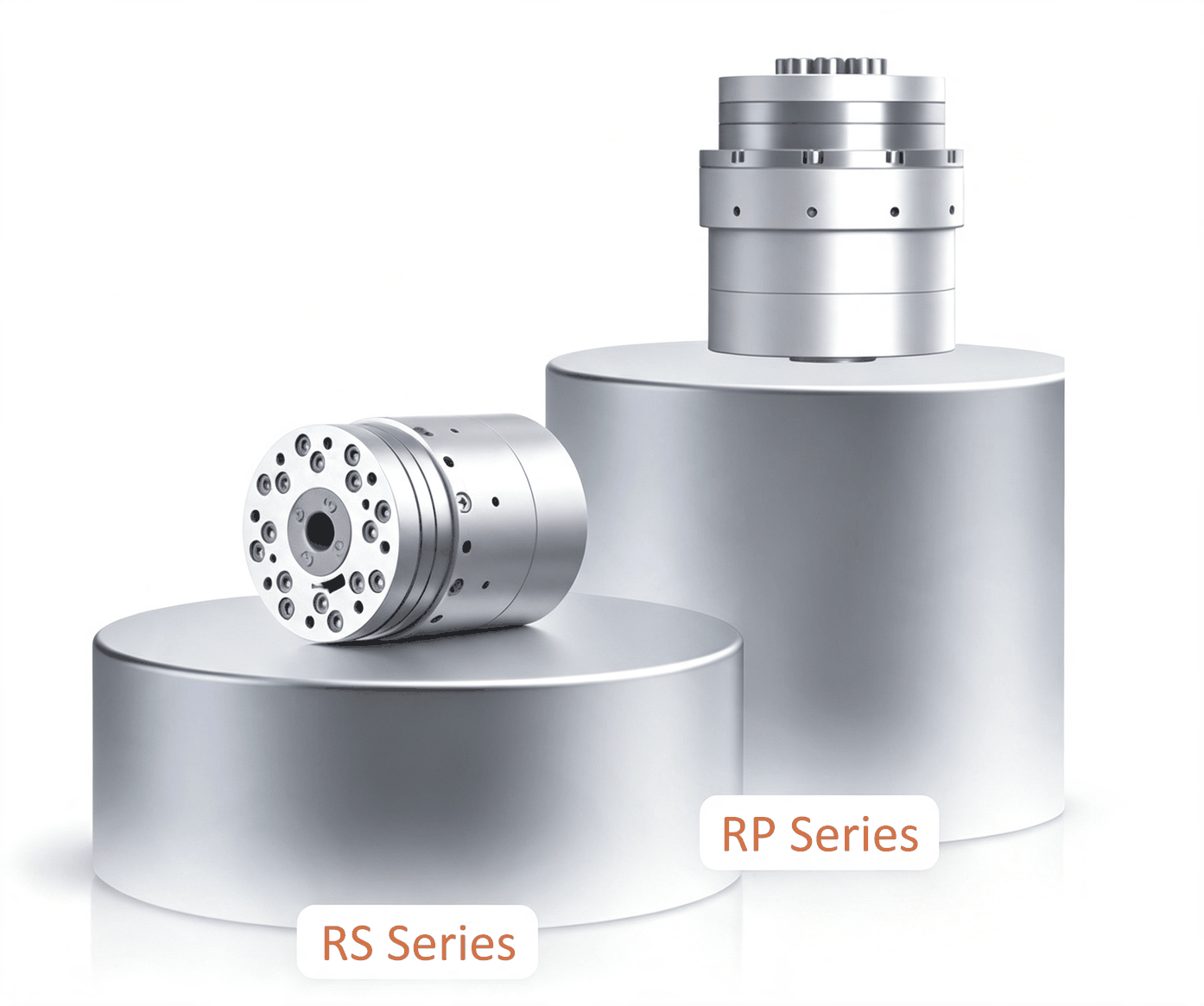
The AUBO R series embodied intelligence universal joint modules are integrated drive joint units developed for next-generation embodied intelligence, humanoid robots, and lightweight flexible equipment. The product line includes two configurations, the RS ultra-compact type and the RP high-torque type, fully supporting three major application scenarios: fine motion, heavy-load output, and built-in cable routing.
The R series deeply integrates five core components — a high-performance frameless torque motor, a high-precision harmonic reducer, a 19-bit high-resolution encoder, a highly sensitive torque sensor, and an integrated servo drive controller — achieving a high degree of integration of mechanical structure, perception system, and servo control. Relying on a high power density architecture and lightweight, reliable hardware, combined with real-time dynamic servo algorithms, it provides humanoid robots with the core capabilities of sub-angle precise motion, human-like compliant interaction, and all-round safety protection.
The module is natively adapted to high-speed dynamic motion conditions. The maximum motor speed reaches 7000 rpm, and the maximum joint output speed is 70 rpm, balancing rapid response and smooth low-speed operation. It is the standardized power foundation for the mass production and deployment of embodied intelligence equipment.
3.2 Product Features
- Ultra-high repeat positioning accuracy, sub-angle motion control The overall repeat positioning accuracy is 30 arcsec, paired with a 19-bit high-resolution encoder for maximum angular perception accuracy. It enables micro posture adjustment, precision assembly, and replication of bionic micro-movements, meeting the stringent accuracy requirements of humanoid robot bionic motion and high-end precision equipment.
- Extremely compact and lightweight, industry-benchmark dimensions The smallest joint in the series measures only Ø52×68.4 mm, with a single unit weighing as little as 420 g. Lightweight layout is achieved while integrating a torque sensor, dual encoders, and a driver, greatly reducing overall inertia and improving the robot's dynamic response speed and endurance.
- High-precision force perception, compliant human-machine interaction With a built-in highly sensitive torque sensor, the full-scale measurement accuracy reaches 0.5% FS. It can precisely perceive external contact forces and impact loads, and natively supports hybrid force-position control, drag teaching, collision detection, and compliant obstacle avoidance, replicating the force control characteristics of human muscles to achieve safe and natural human-robot interaction.
- Five-in-one high integration, universal modular design Frameless torque motor + harmonic reducer + 19-bit encoder + torque sensor + drive controller are integrated into one unit, requiring no external drive cabinet and no additional wiring or commissioning. Standardized mounting interfaces, output flange, and mounting datum support multi-joint series networking, ready to use out of the box, greatly reducing customers' structural development and electrical control integration costs.
- Dual-bus high-speed communication, all-round ecosystem compatibility Natively supports EtherCAT + CANFD dual-bus protocols with a 1 kHz communication frequency, suitable for advanced control of multi-joint linkage; the CAN bus is compatible with mainstream open-source/commercial motion control ecosystems and can quickly interface with humanoid main controllers, robotic arm controllers, and host computers, adapting to full-scenario development from research to mass production.
- High dynamic power response, wide speed range coverage With a built-in high-performance frameless torque motor, the maximum no-load speed is 7000 rpm and the maximum joint-end output speed is 70 rpm, balancing high-speed dynamic motion and low-speed smooth operation. It meets dynamic conditions such as humanoid robot walking and arm swinging, and is also suitable for low-speed steady processes such as precision assembly and grinding.
3.3 Technical Specifications
| Model | RS14FN | RP14FN | RP17FN | RP20FN | RP25FN |
|---|---|---|---|---|---|
| Product Image | 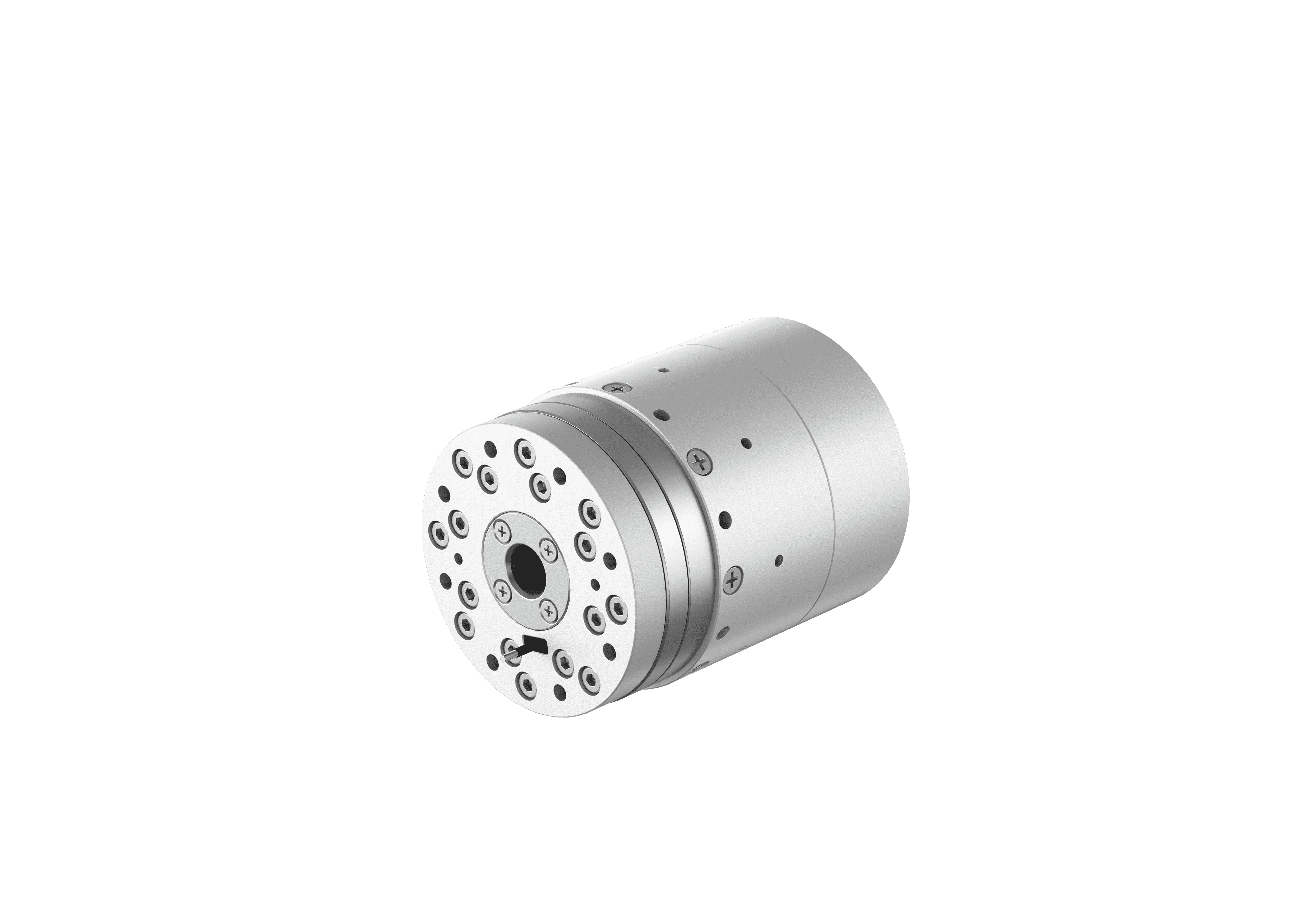 | 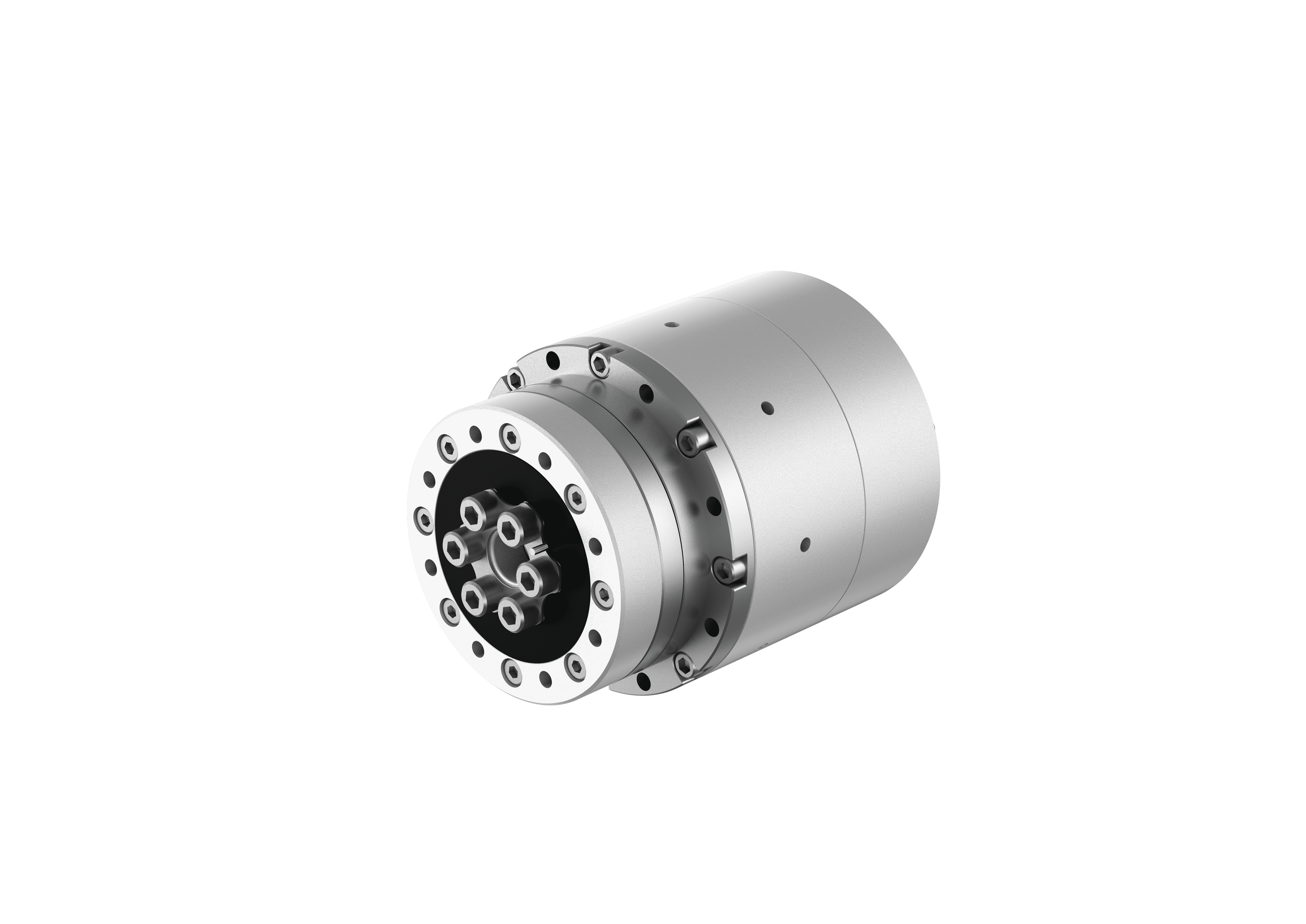 | 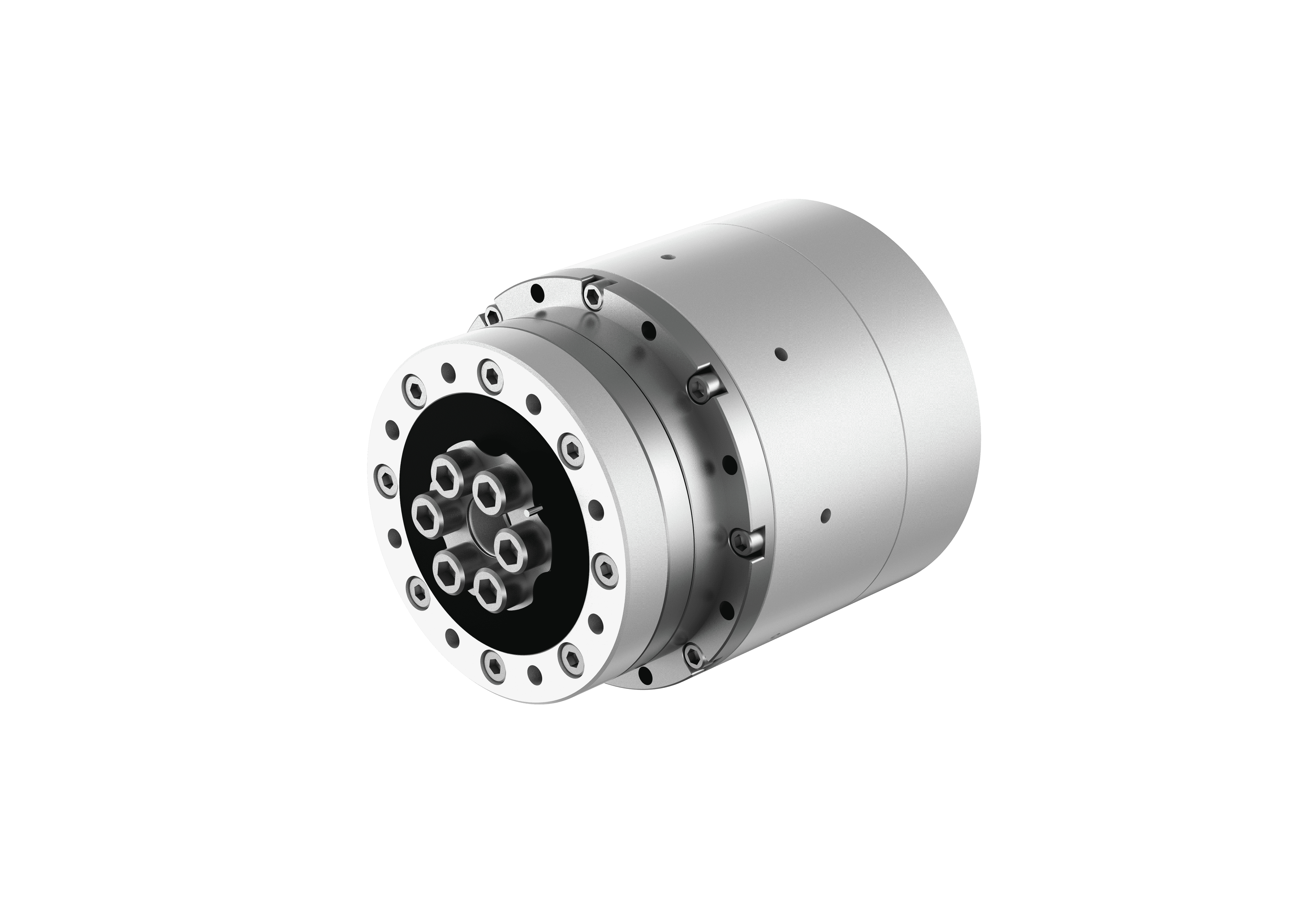 | 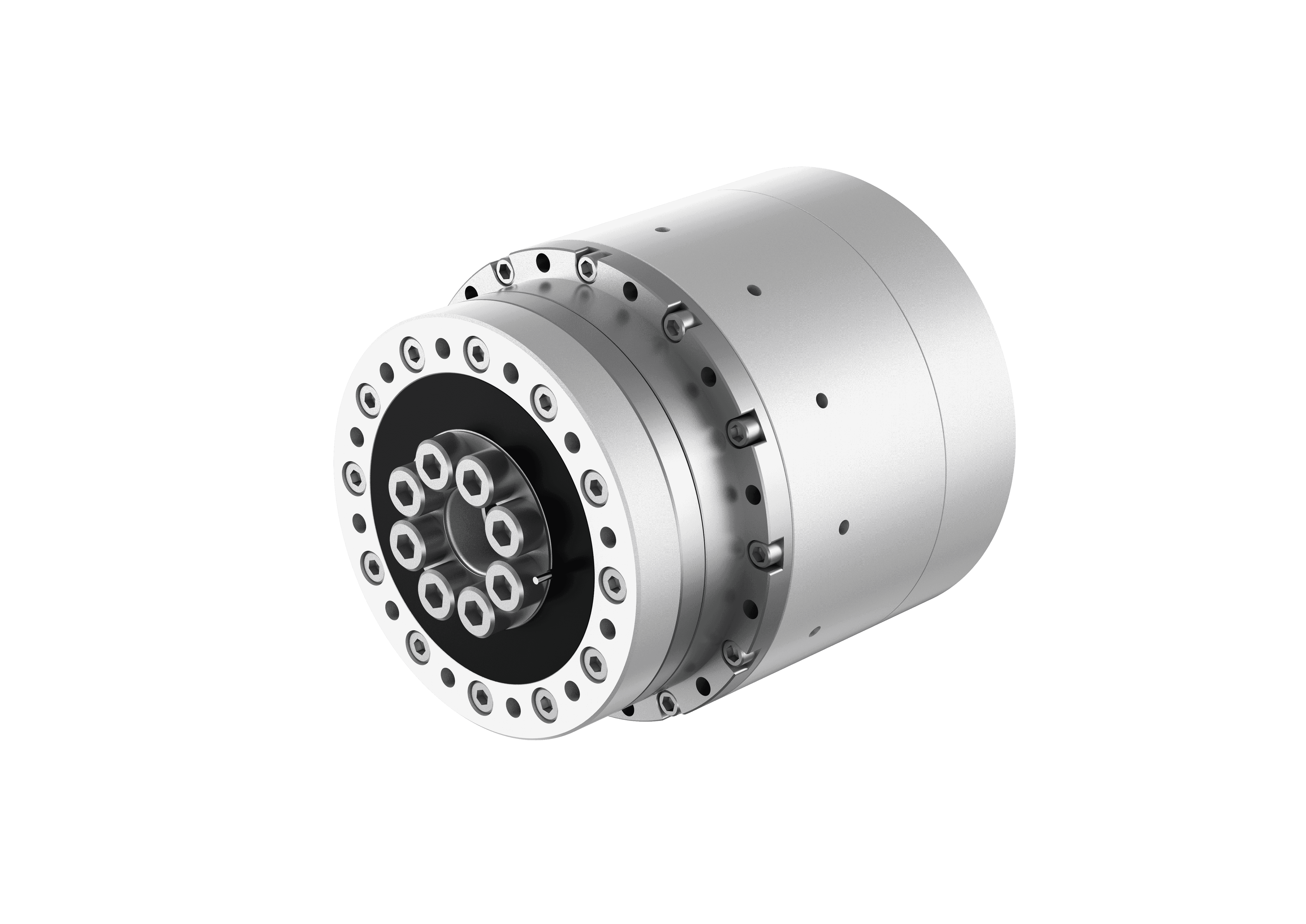 | 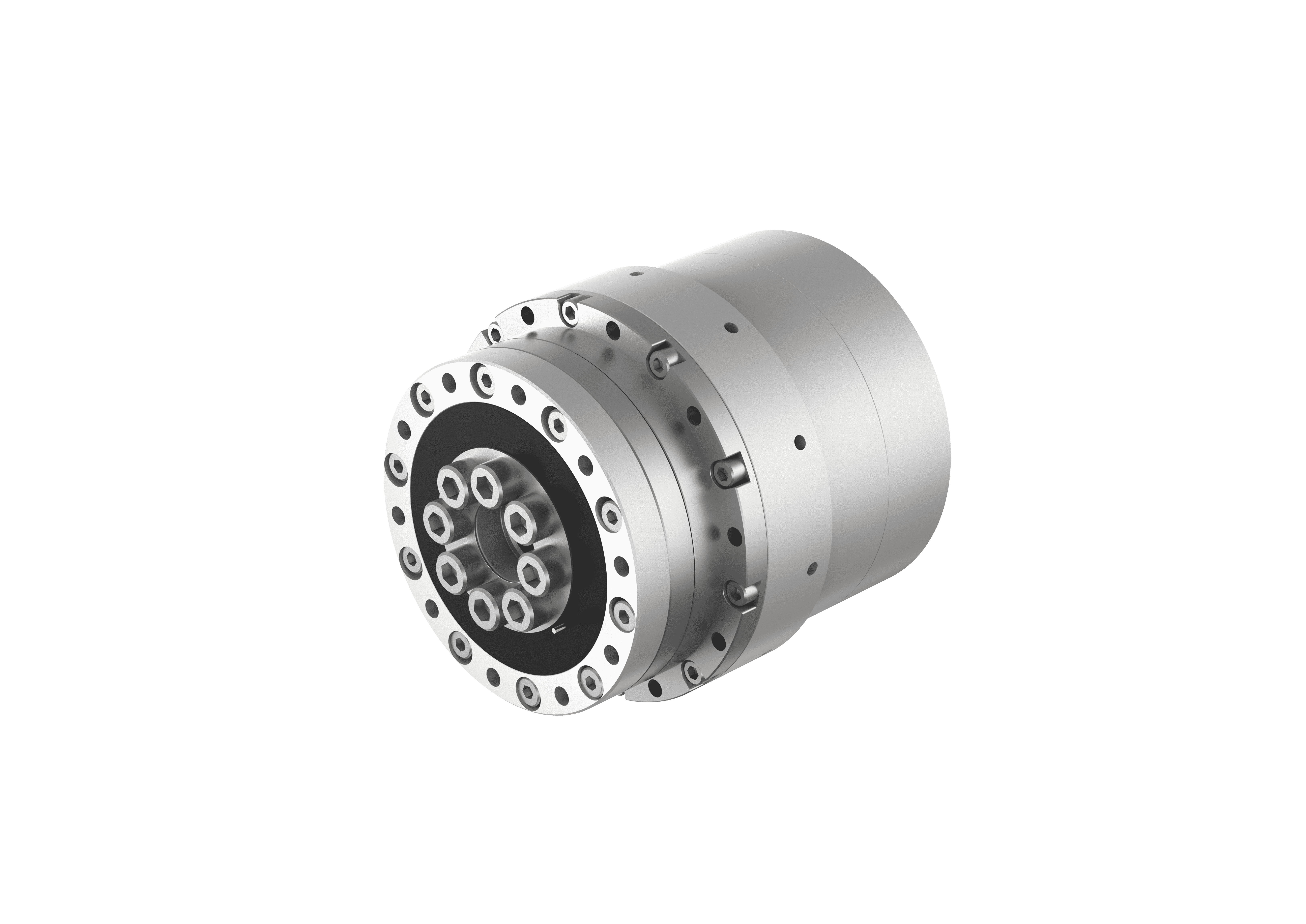 |
| Type | Short cup | Standard | Standard | Standard | Standard |
| Dimensions (Diameter × Height) | Ø52 × 68.4 mm | Ø60 × 74.6 mm | Ø70 × 82.8 mm | Ø80 × 88.6 mm | Ø94 × 97 mm |
| Center Bore | 8.5 mm | 8.5 mm | 10.5 mm | 13 mm | 15 mm |
| Weight | 420 g | 560 g | 890 g | 1240 g | 1800 g |
| Joint Reduction Ratio | 100 | 100 | 100 | 100 | 100 |
| Rated Speed | 35 RPM | 35 RPM | 35 RPM | 35 RPM | 35 RPM |
| Peak Speed | 70 RPM | 70 RPM | 60 RPM | 60 RPM | 55 RPM |
| Rated Torque | 5.1 N·m | 9.6 N·m | 30 N·m | 50 N·m | 84 N·m |
| Peak Torque | 18 N·m | 34 N·m | 66 N·m | 102 N·m | 194 N·m |
| Repeat Positioning Accuracy | ≤ 30 arcsec | ≤ 30 arcsec | ≤ 30 arcsec | ≤ 30 arcsec | ≤ 30 arcsec |
| Torque Sensor Accuracy | ≤ 0.5%FS | ≤ 0.5%FS | ≤ 0.5%FS | ≤ 0.5%FS | ≤ 0.5%FS |
| Communication Method | EtherCAT + CANFD | EtherCAT + CANFD | EtherCAT + CANFD | EtherCAT + CANFD | EtherCAT + CANFD |
| Communication Control Frequency | 1 kHz | 1 kHz | 1 kHz | 1 kHz | 1 kHz |
| Encoder | Dual encoder | Dual encoder | Dual encoder | Dual encoder | Dual encoder |
| Encoder Resolution | 19 bit | 19 bit | 19 bit | 19 bit | 19 bit |
| Brake | No | No | No | No | No |
| Rated Voltage | 48 V DC | 48 V DC | 48 V DC | 48 V DC | 48 V DC |
| Operating Temperature | -20 ℃ – 60 ℃ | -20 ℃ – 60 ℃ | -20 ℃ – 60 ℃ | -20 ℃ – 60 ℃ | -20 ℃ – 60 ℃ |
| IP Rating | IP54 | IP54 | IP54 | IP54 | IP54 |
| Noise | ≤ 60 dB | ≤ 60 dB | ≤ 60 dB | ≤ 60 dB | ≤ 60 dB |
3.4 Outline Dimension Drawings
3.4.1 RS14FN
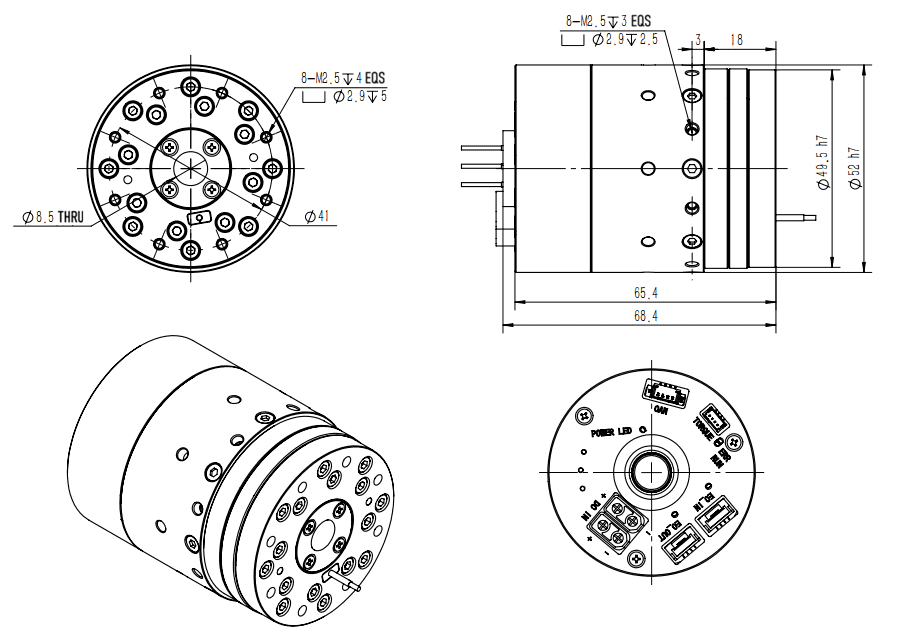
| Interface Mark | Interface Name | Terminal Type | Function Description |
|---|---|---|---|
| EC_OUT | EtherCAT Communication Interface (OUT) | BM04B-GHS-THT | ECAT_RX- EtherCAT signal receive - ECAT_RX+ EtherCAT signal receive + ECAT_TX- EtherCAT signal transmit - ECAT_TX+ EtherCAT signal transmit + |
| EC_IN | EtherCAT Communication Interface (IN) | BM04B-GHS-THT | ECAT_RX- EtherCAT signal receive - ECAT_RX+ EtherCAT signal receive + ECAT_TX- EtherCAT signal transmit - ECAT_TX+ EtherCAT signal transmit + |
| TORQUE | Torque Sensor Interface | BM04B-SRSS-TB | 5V power supply RS485- RS485+ Signal ground (GND) |
| DC IN | Power Interface | XT30UPB-M | Power positive Power negative |
| CAN | CAN Communication Interface | MX1.25-4PLB | CAN_H CAN_L |
| ERR | Alarm Indicator | - | Red, flashes when a fault or alarm exists |
| POWER LED | Power Indicator | - | Green, stays on when the power supply is normal |
| RUN | Run Indicator | - | Green, stays on when the module works normally |
3.4.2 RP14FN
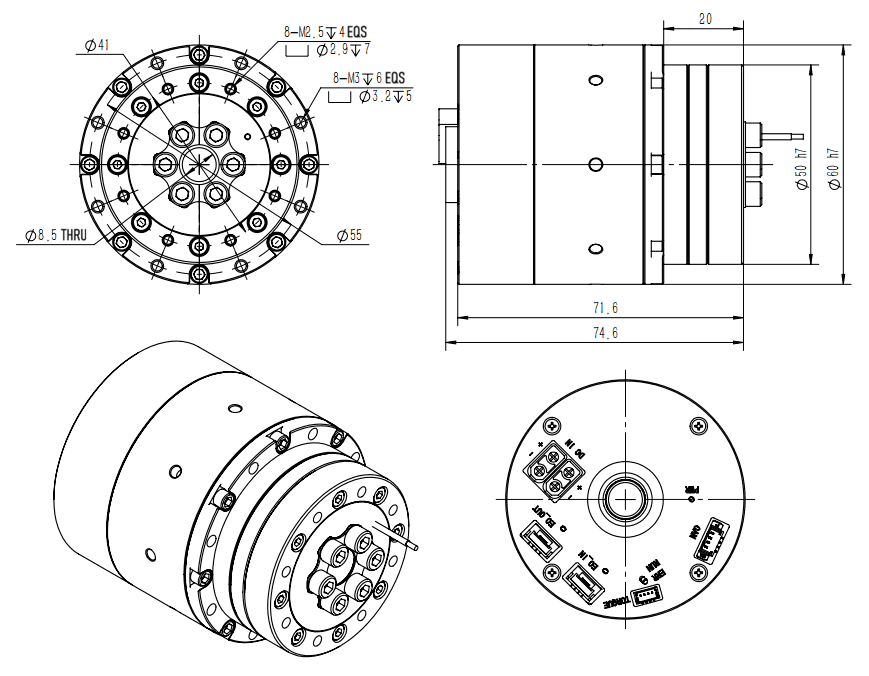
| Interface Mark | Interface Name | Terminal Type | Function Description |
|---|---|---|---|
| EC_OUT | EtherCAT Communication Interface (OUT) | BM04B-GHS-THT | ECAT_RX- EtherCAT signal receive - ECAT_RX+ EtherCAT signal receive + ECAT_TX- EtherCAT signal transmit - ECAT_TX+ EtherCAT signal transmit + |
| EC_IN | EtherCAT Communication Interface (IN) | BM04B-GHS-THT | ECAT_RX- EtherCAT signal receive - ECAT_RX+ EtherCAT signal receive + ECAT_TX- EtherCAT signal transmit - ECAT_TX+ EtherCAT signal transmit + |
| DC IN | Power Interface | XT30UPB-M | Power positive Power negative |
| PWR | Power Indicator | - | Green, stays on when the power supply is normal |
| CAN | CAN Communication Interface | MX1.25-4PLB | CAN_H CAN_L |
| TORQUE | Torque Sensor Interface | BM04B-SRSS-TB | 5V power supply RS485- RS485+ Signal ground (GND) |
3.4.3 RP17FN
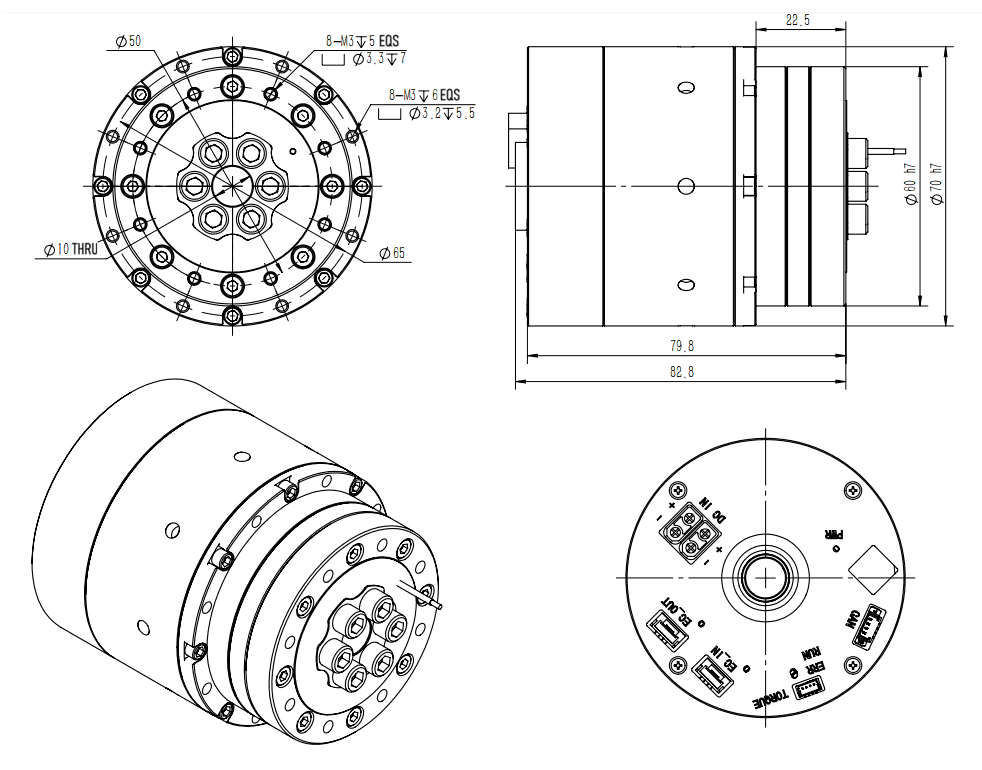
| Interface Mark | Interface Name | Terminal Type | Function Description |
|---|---|---|---|
| EC_OUT | EtherCAT Communication Interface (OUT) | BM04B-GHS-THT | ECAT_RX- EtherCAT signal receive - ECAT_RX+ EtherCAT signal receive + ECAT_TX- EtherCAT signal transmit - ECAT_TX+ EtherCAT signal transmit + |
| EC_IN | EtherCAT Communication Interface (IN) | BM04B-GHS-THT | ECAT_RX- EtherCAT signal receive - ECAT_RX+ EtherCAT signal receive + ECAT_TX- EtherCAT signal transmit - ECAT_TX+ EtherCAT signal transmit + |
| TORQUE | Torque Sensor Interface | BM04B-SRSS-TB | 5V power supply RS485- RS485+ Signal ground (GND) |
| DC IN | Power Interface | XT30UPB-M | Power positive Power negative |
| CAN | CAN Communication Interface | MX1.25-4PLB | CAN_H CAN_L |
| PWR | Power Indicator | - | Green, stays on when the power supply is normal |
| ERR | Alarm Indicator | - | Red, flashes when a fault or alarm exists |
| RUN | Run Indicator | - | Green, stays on when the module works normally |
3.4.4 RP20FN
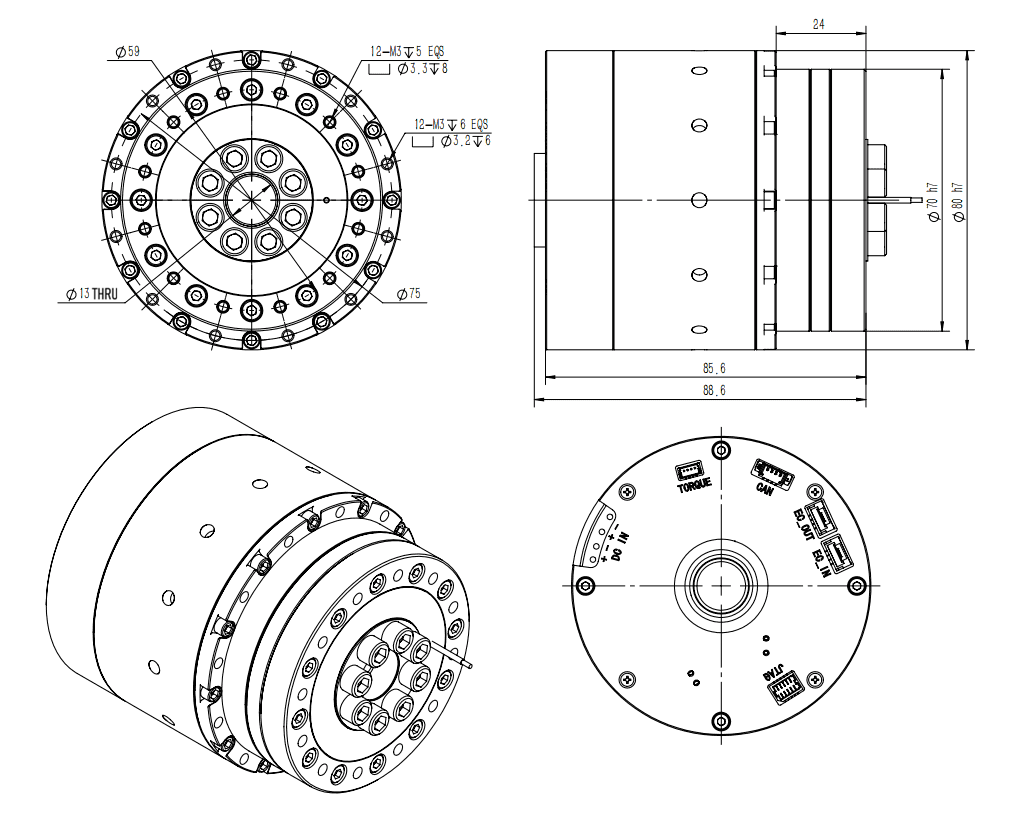
| Interface Mark | Interface Name | Terminal Type | Function Description |
|---|---|---|---|
| EC_OUT | EtherCAT Communication Interface (OUT) | BM04B-GHS-THT | ECAT_RX- EtherCAT signal receive - ECAT_RX+ EtherCAT signal receive + ECAT_TX- EtherCAT signal transmit - ECAT_TX+ EtherCAT signal transmit + |
| EC_IN | EtherCAT Communication Interface (IN) | BM04B-GHS-THT | ECAT_RX- EtherCAT signal receive - ECAT_RX+ EtherCAT signal receive + ECAT_TX- EtherCAT signal transmit - ECAT_TX+ EtherCAT signal transmit + |
| TORQUE | Torque Sensor Interface | BM04B-SRSS-TB | 5V power supply RS485- RS485+ Signal ground (GND) |
| DC IN | Power Interface | 3.81-2P | Power positive Power negative |
| JTAG | Debug Interface | HC-SHD-2*5PLT-G-04 | Includes the following signals: JTAG_TMS: JTAG mode select signal BOOT_RXD: BOOT serial receive pin BOOT_TXD: BOOT serial transmit pin JTAG_TCK: JTAG debug clock signal JTAG_TDO: JTAG debug data output JTAG_TDI: JTAG debug data input JTAG_TRST: JTAG hardware reset signal BOOT: Boot mode select pin GND: Signal ground 3V3: 3.3V power output |
| CAN | CAN Communication Interface | MX1.25-4PLB | CAN_H CAN_L |
3.4.5 RP25FN
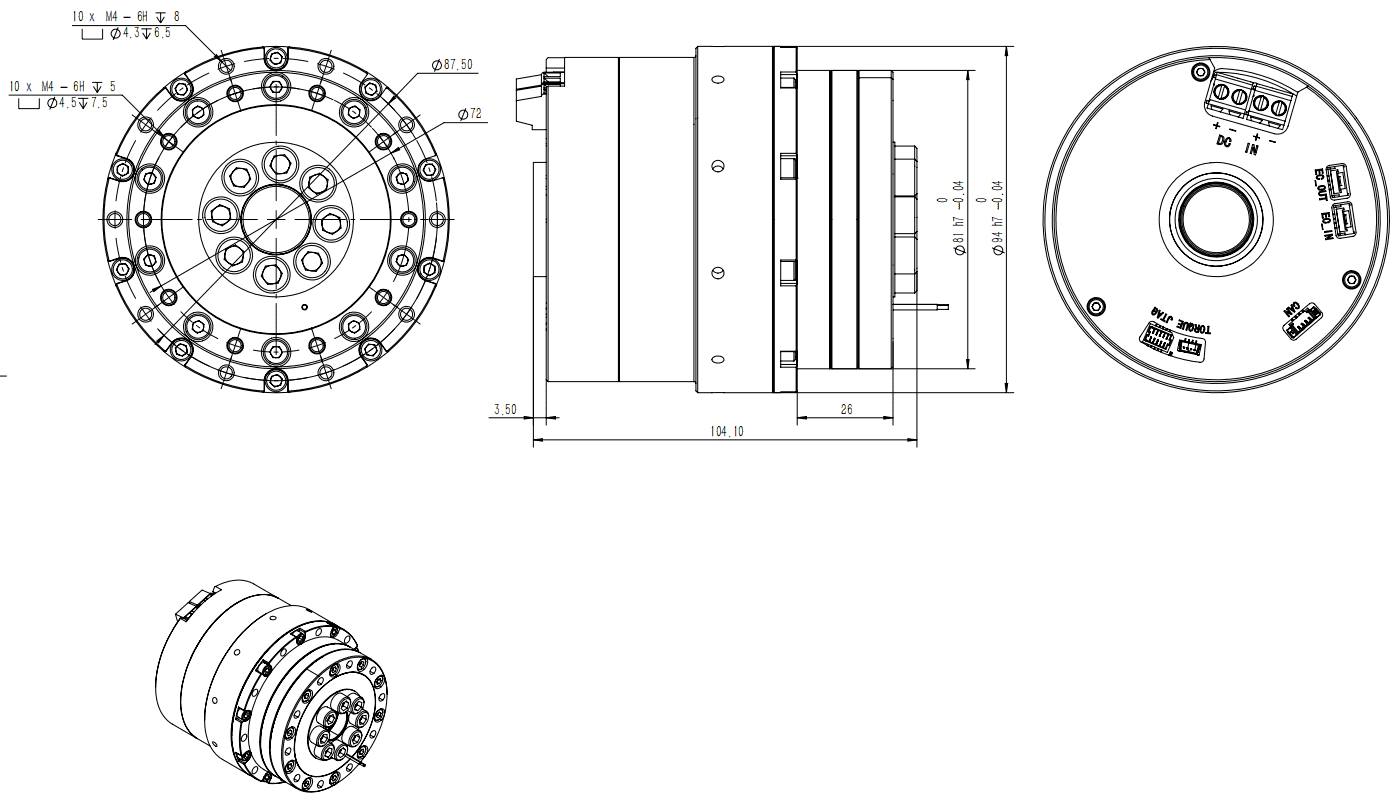
| Interface Mark | Interface Name | Terminal Type | Function Description |
|---|---|---|---|
| EC_OUT | EtherCAT Communication Interface (OUT) | BM04B-GHS-THT | ECAT_RX- EtherCAT signal receive - ECAT_RX+ EtherCAT signal receive + ECAT_TX- EtherCAT signal transmit - ECAT_TX+ EtherCAT signal transmit + |
| EC_IN | EtherCAT Communication Interface (IN) | BM04B-GHS-THT | ECAT_RX- EtherCAT signal receive - ECAT_RX+ EtherCAT signal receive + ECAT_TX- EtherCAT signal transmit - ECAT_TX+ EtherCAT signal transmit + |
| TORQUE | Torque Sensor Interface | BM04B-SRSS-TB | 5V power supply RS485- RS485+ Signal ground (GND) |
| DC IN | Power Interface | 5.08-2P | Power positive Power negative |
| JTAG | Debug Interface | HC-SHD-2*5PLT-G-04 | Includes the following signals: JTAG_TMS: JTAG mode select signal BOOT_RXD: BOOT serial receive pin BOOT_TXD: BOOT serial transmit pin JTAG_TCK: JTAG debug clock signal JTAG_TDO: JTAG debug data output JTAG_TDI: JTAG debug data input JTAG_TRST: JTAG hardware reset signal BOOT: Boot mode select pin GND: Signal ground 3V3: 3.3V power output |
| CAN | CAN Communication Interface | MX1.25-4PLB | CAN_H CAN_L |
4 Joint Module Operation
After the AUBO R series embodied intelligence universal joint modules are wired and powered on, various parameter configurations and commissioning can be completed through the JointGO Pro software.
- JointGO Pro is software developed by AUBO specifically for joint commissioning.
- Bidirectional data interaction between the computer and the R series joint module is carried out over the CAN communication bus.
4.1 CAN Communication Connect/Disconnect Operation
Open the JointGO Pro software. The communication status of the joint module is displayed in the lower-left corner of the software. When no joint is connected, the parameter values in the status monitoring pane on the right are NaN.
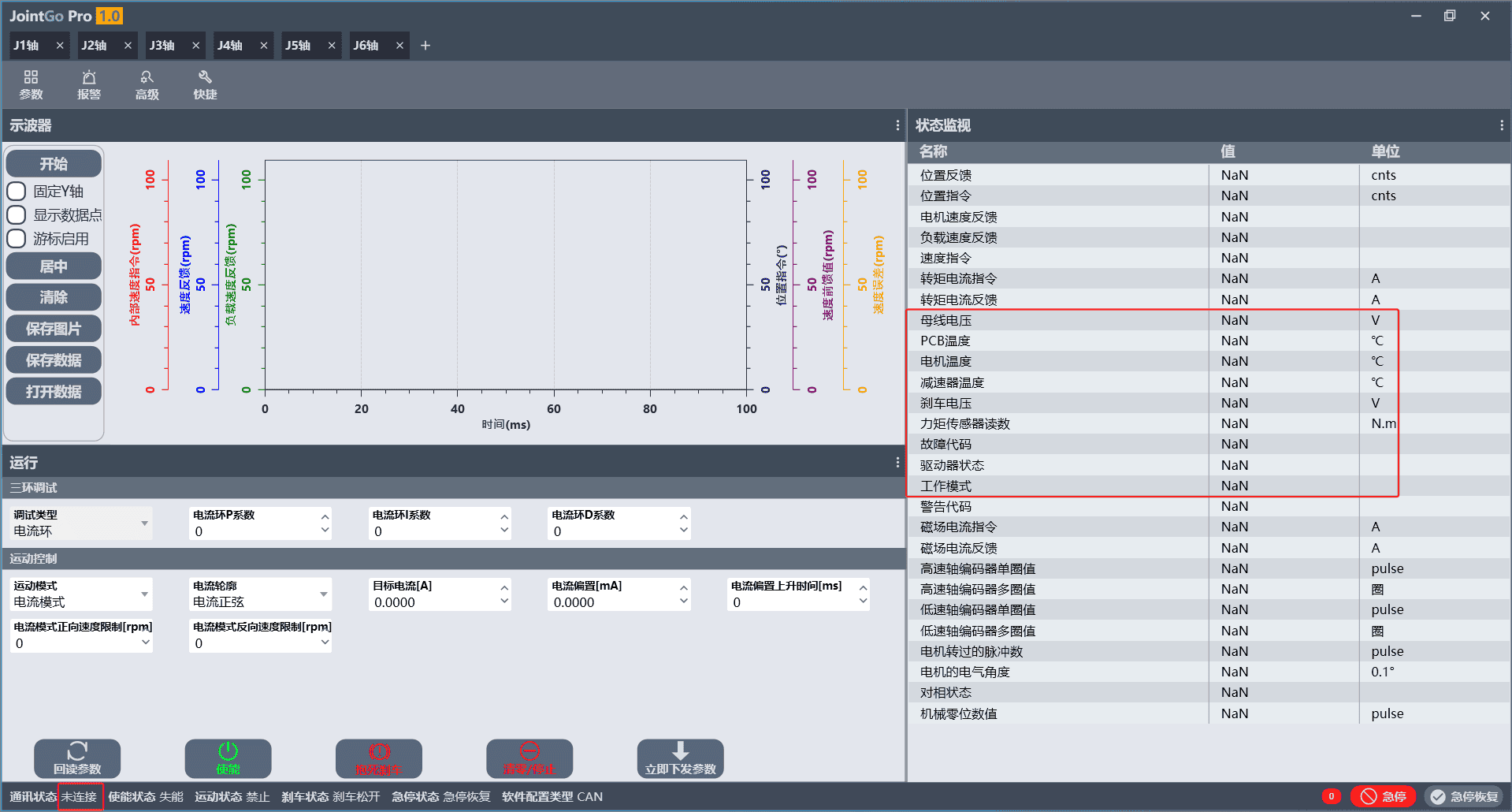 Figure 4-1 JointGO Pro Software Disconnected State Interface
Click the [+] option in the upper-left corner, select the [Target ID] in the joint connection dialog, and then click [Connect].
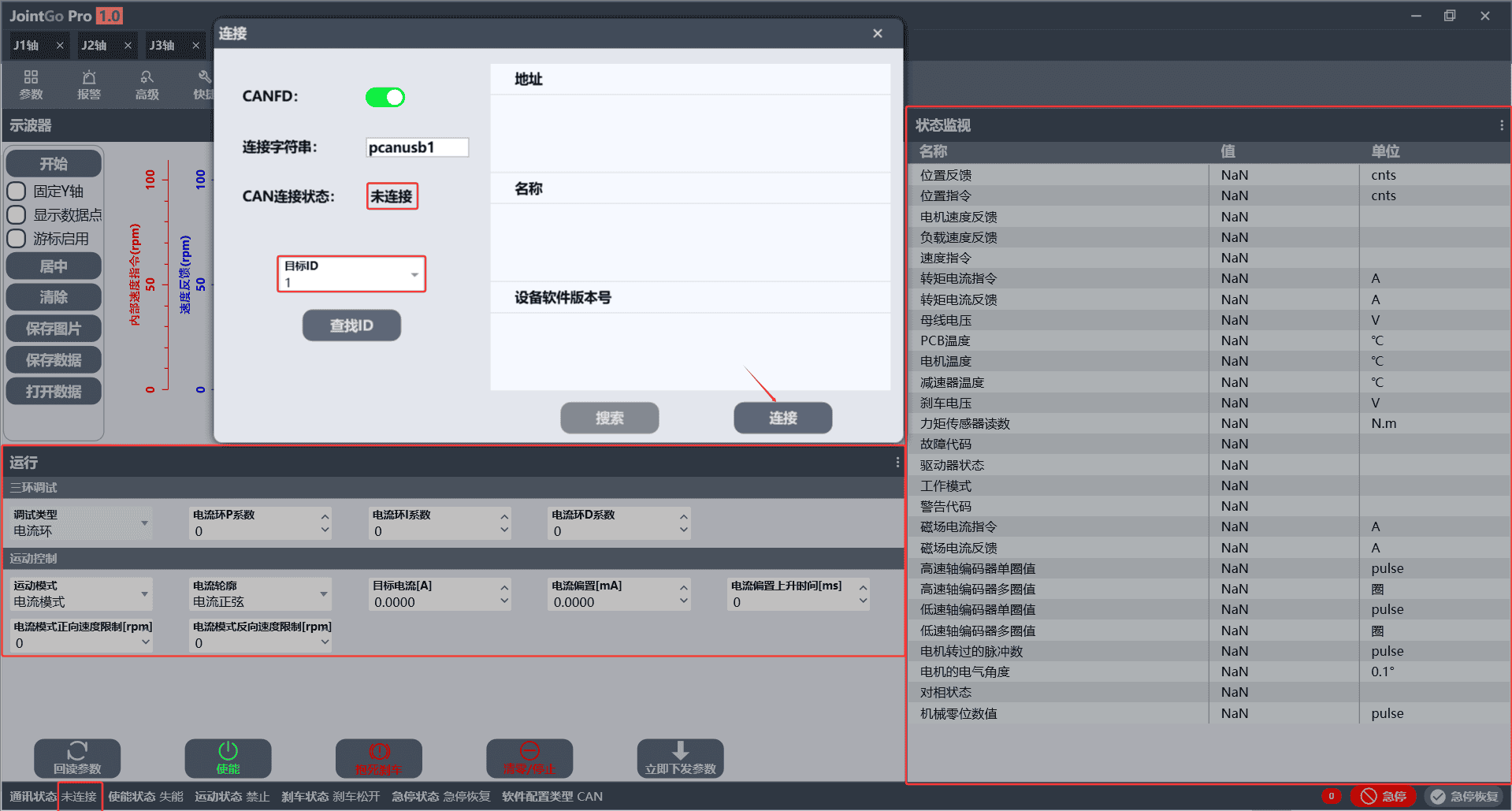 Figure 4-2 Joint Connection Configuration Interface
CANFD: an upgraded version of the CAN bus with higher speed and capacity expansion, which can be enabled or disabled according to hardware compatibility.
- On: select high-speed CAN connection.
- Off: use the standard normal CAN communication connection.
All R series joint modules support CANFD.
Connection string: used to distinguish the two hardware communication channels of a dual-channel PCAN adapter.
- pcanusb1: Channel 1
- pcanusb2: Channel 2
CAN connection status: the status of whether the bus is connected.
Target ID: optional 1 ~ 6, corresponding to Joint 1 ~ Joint 6 respectively.
After a successful connection, the communication status in the lower-left corner of the software displays [Connected], and the data in the [Status Monitoring] function and the taskbar are updated in real time according to the joint status.
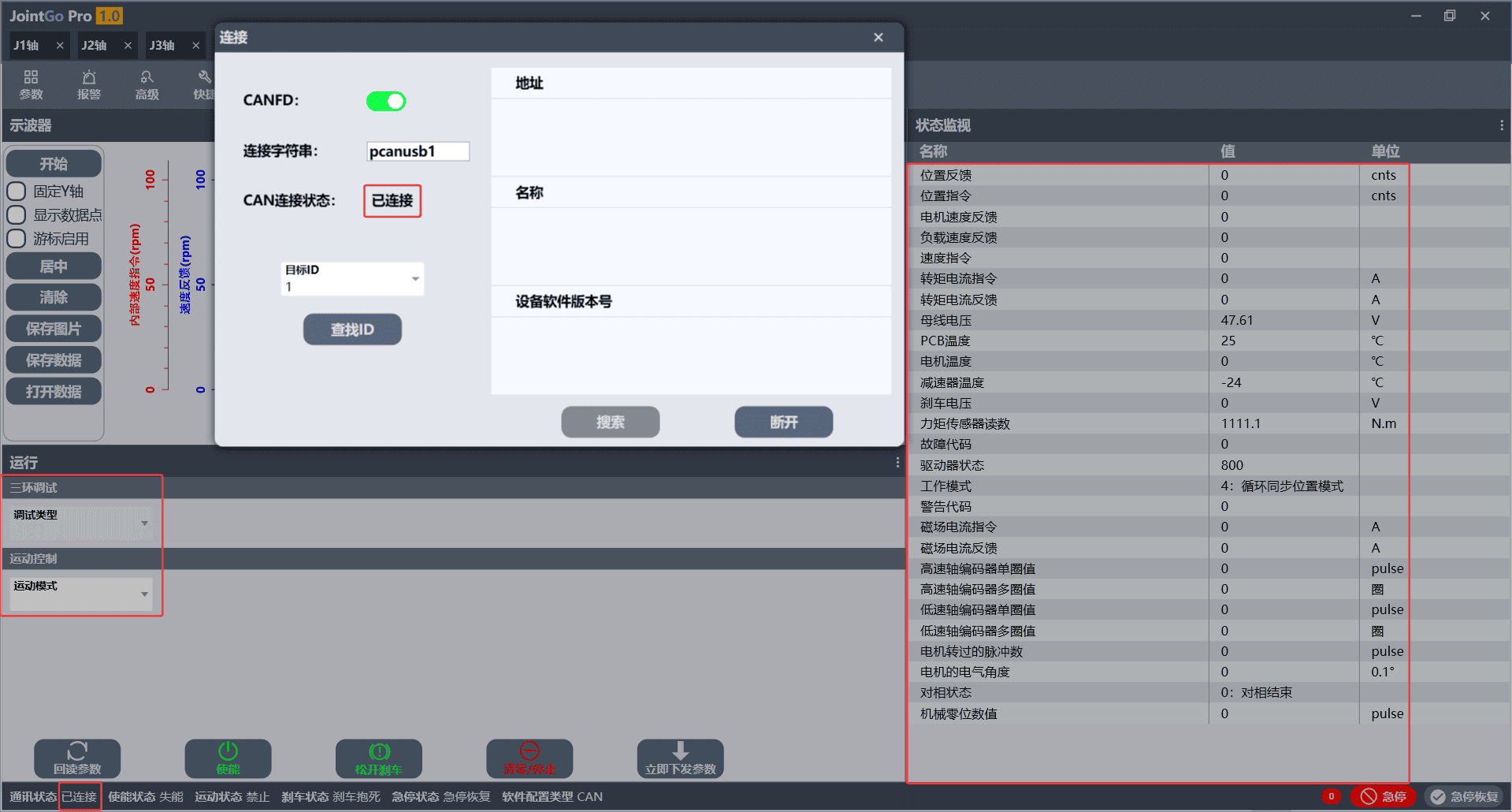 Figure 4-3 Interface of Successful CAN Communication Connection
To disconnect CAN communication, simply click [+] again, select the [Target ID], and then click [Disconnect].
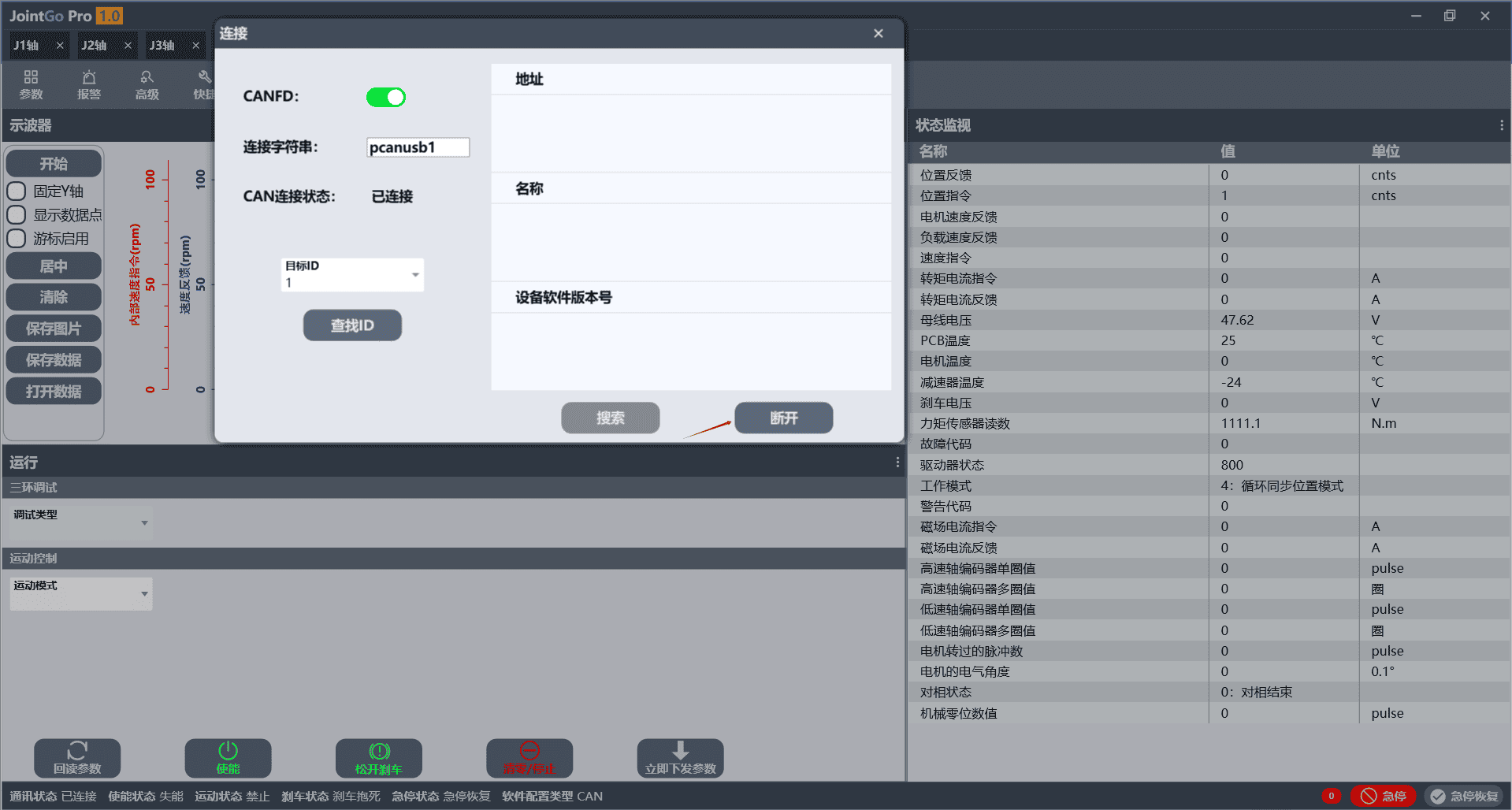 Figure 4-4 CAN Communication Disconnection Operation Interface
4.2 Joint Status Monitoring
The status monitoring function is used to view the operating parameters of each joint of the robot. The status monitoring panel can be opened or closed through the following steps.
Click
 in the upper-right corner of the software page to open the joint monitoring window and view the various parameters of the joint.
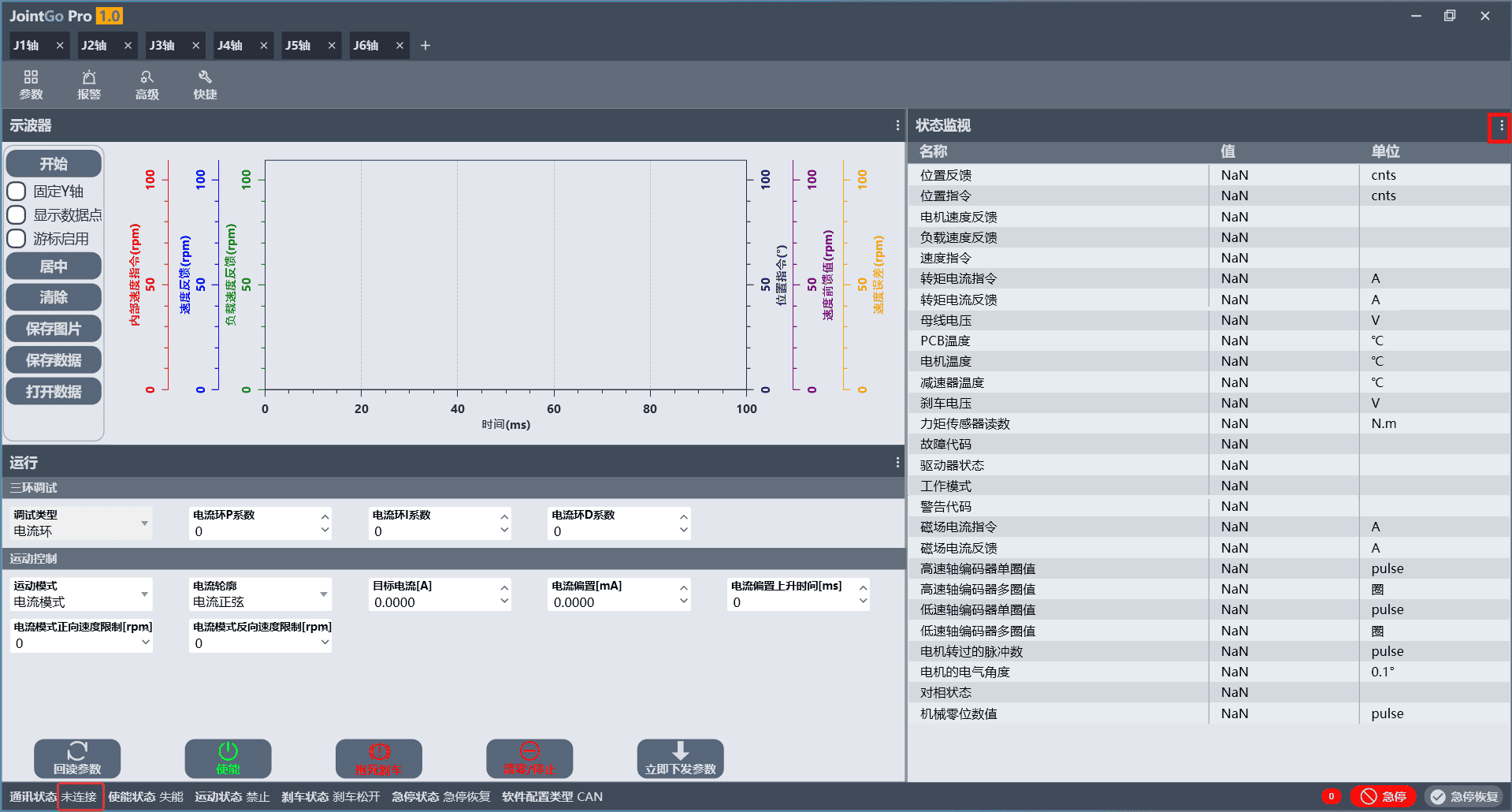 Figure 4-5 Joint Status Monitoring Interface
Click
 in the upper-right corner of the monitoring window to return to the software home page.
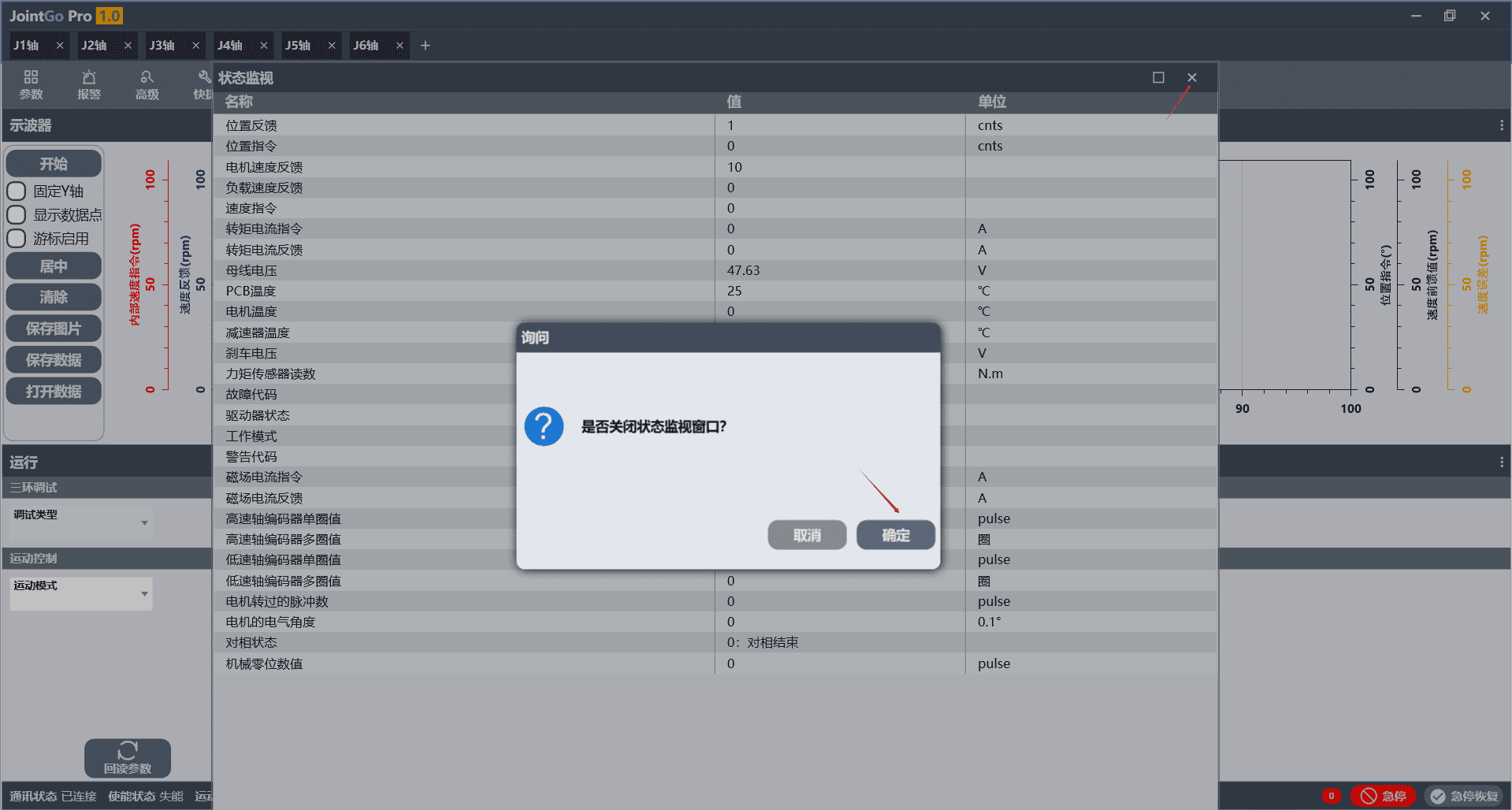 Figure 4-6 Closing the Joint Status Monitoring Interface
4.3 Alarm Handling
The alarm page is used to view various fault and abnormal alarm records generated during robot operation, and supports one-click clearing of alarm information. The specific steps are as follows:
Click the [Alarm] button in the upper-left corner of the page or
 to open the alarm handling page.
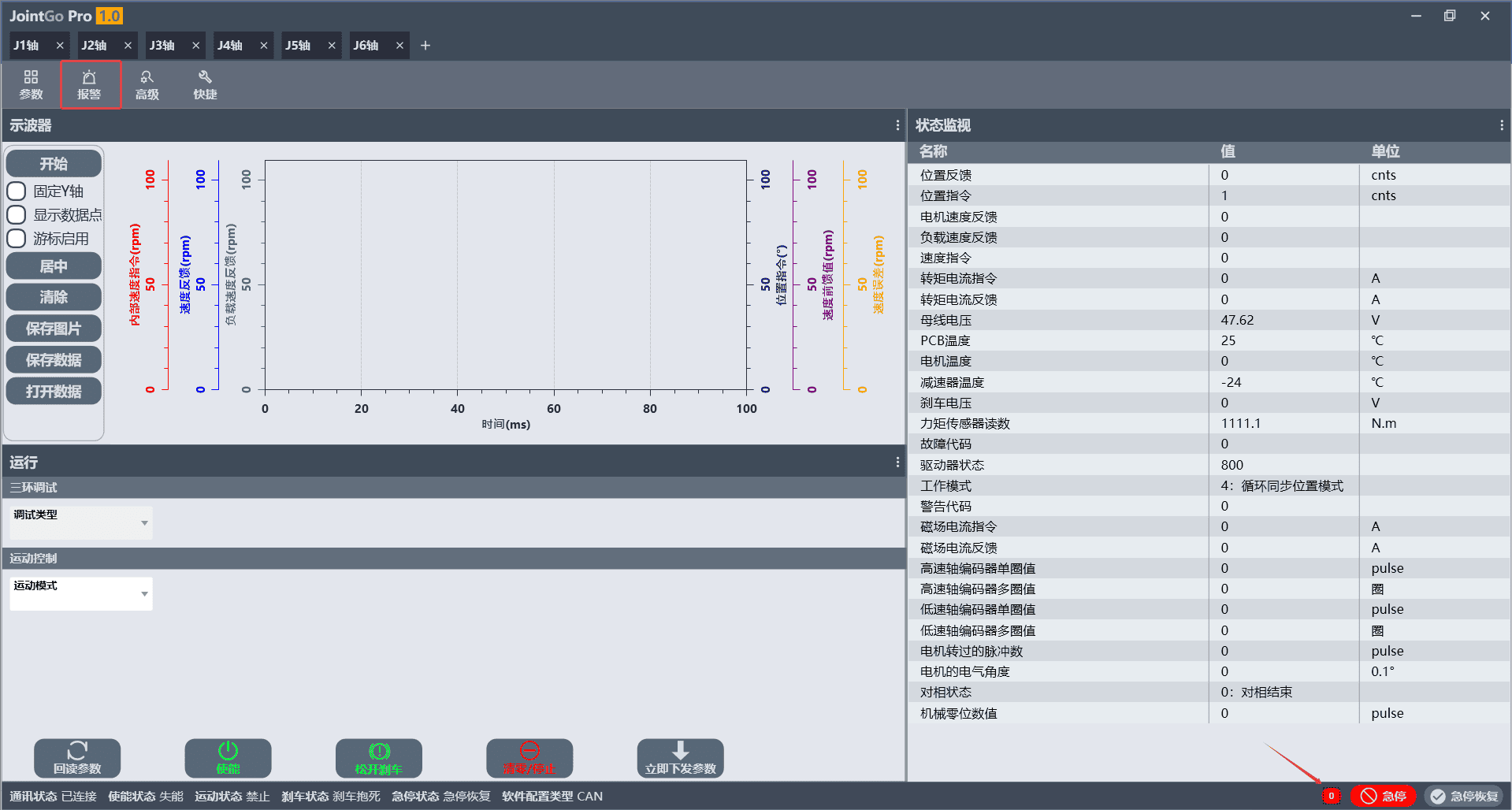 Figure 4-7 Alarm Handling Page Entry
On the alarm handling page, click [Clear Alarms] to delete all alarm information.
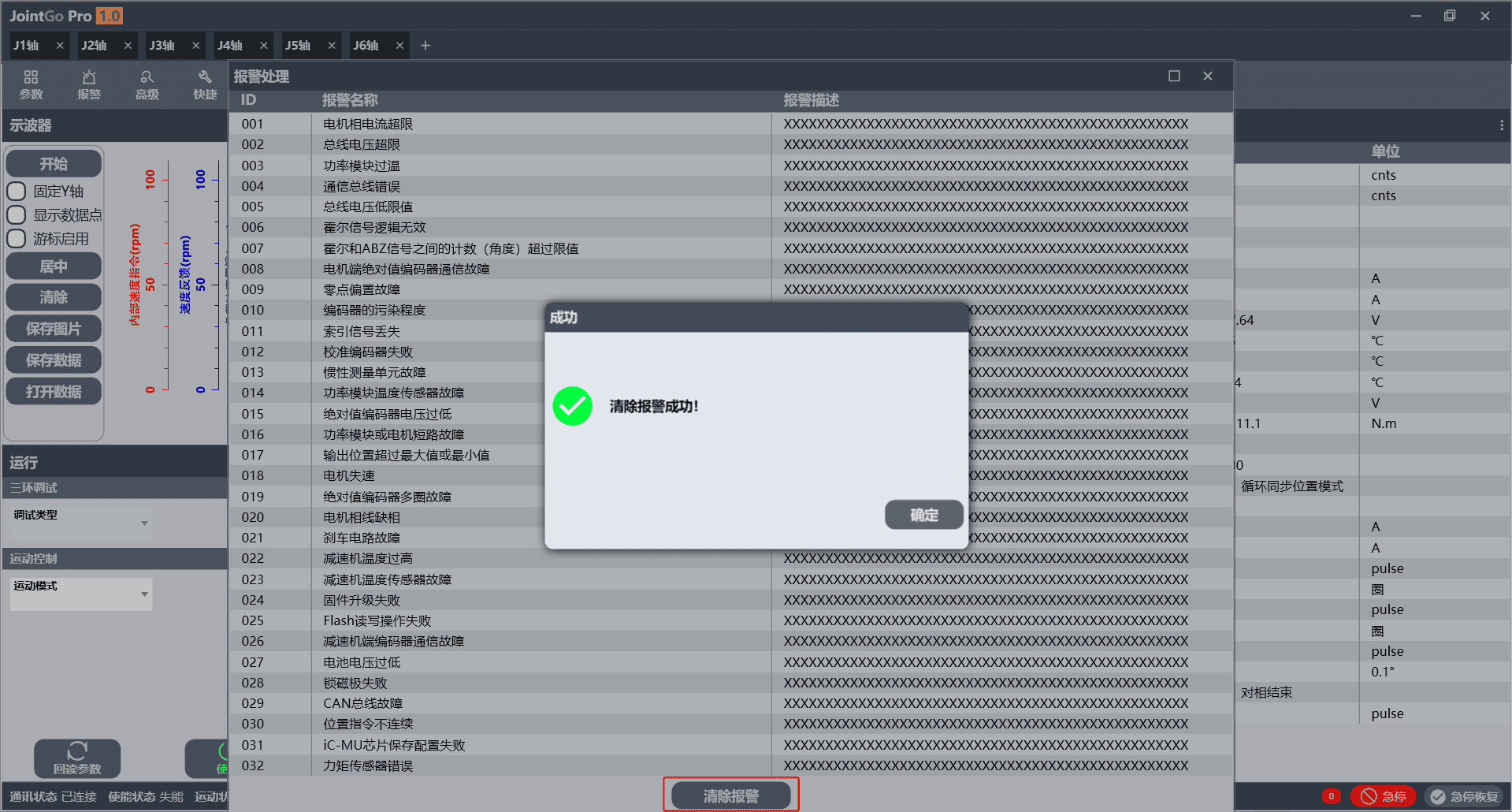 Figure 4-8 Clear Alarm Operation Interface
4.4 Parameter Configuration
Click [Parameters] in the upper-left corner of the software to configure the joint module parameters.
 Figure 4-9 Parameter Configuration Page Entry
Click [Find] in the upper-left corner of the parameter interface to search for parameters. Click a target parameter, and a description of the parameter is displayed at the bottom of the interface.
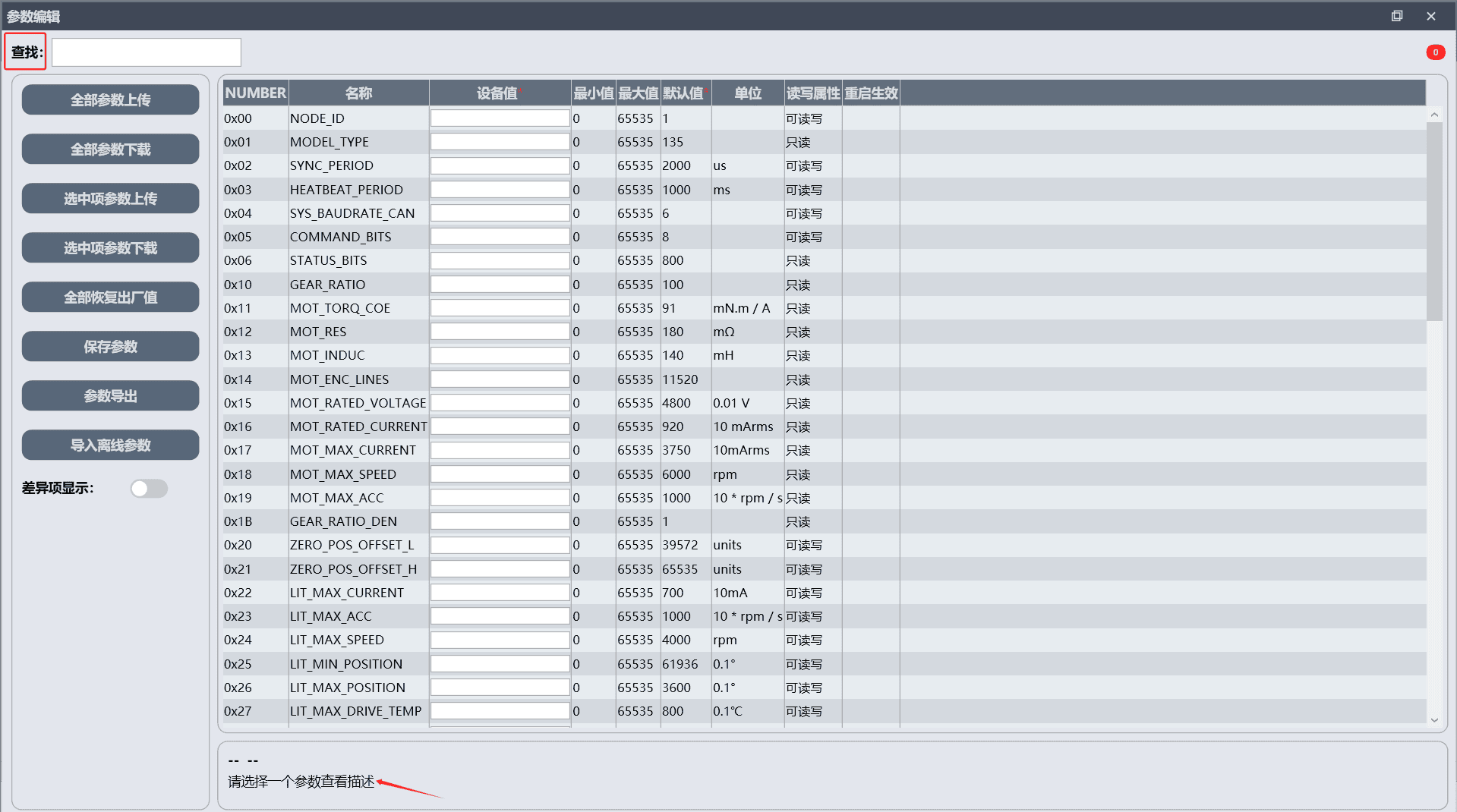 Figure 4-10 Parameter Search Interface
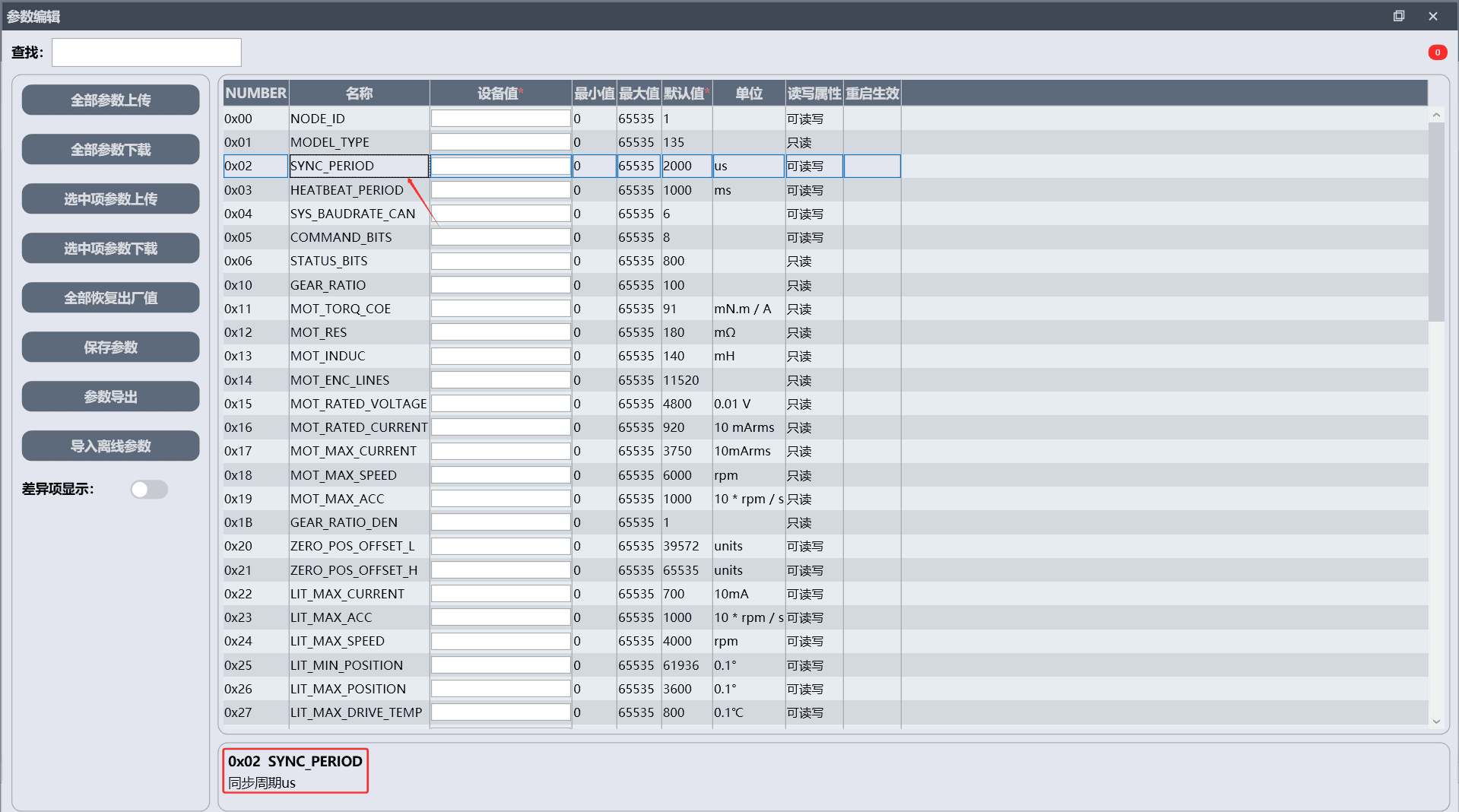 Figure 4-11 Parameter Description Information Interface
Parameter upload is used to read the actual [Device Values] currently in effect in the joint module's runtime memory (RAM). Two reading methods are provided:
- [Upload All Parameters]: click [Upload All Parameters] to read all module parameters with one click.
- [Upload Selected Parameters]: select the target parameters and click [Upload Selected Parameters] to read only the specified selected parameters.
After reading is complete, a pop-up prompts that the parameter upload is complete.
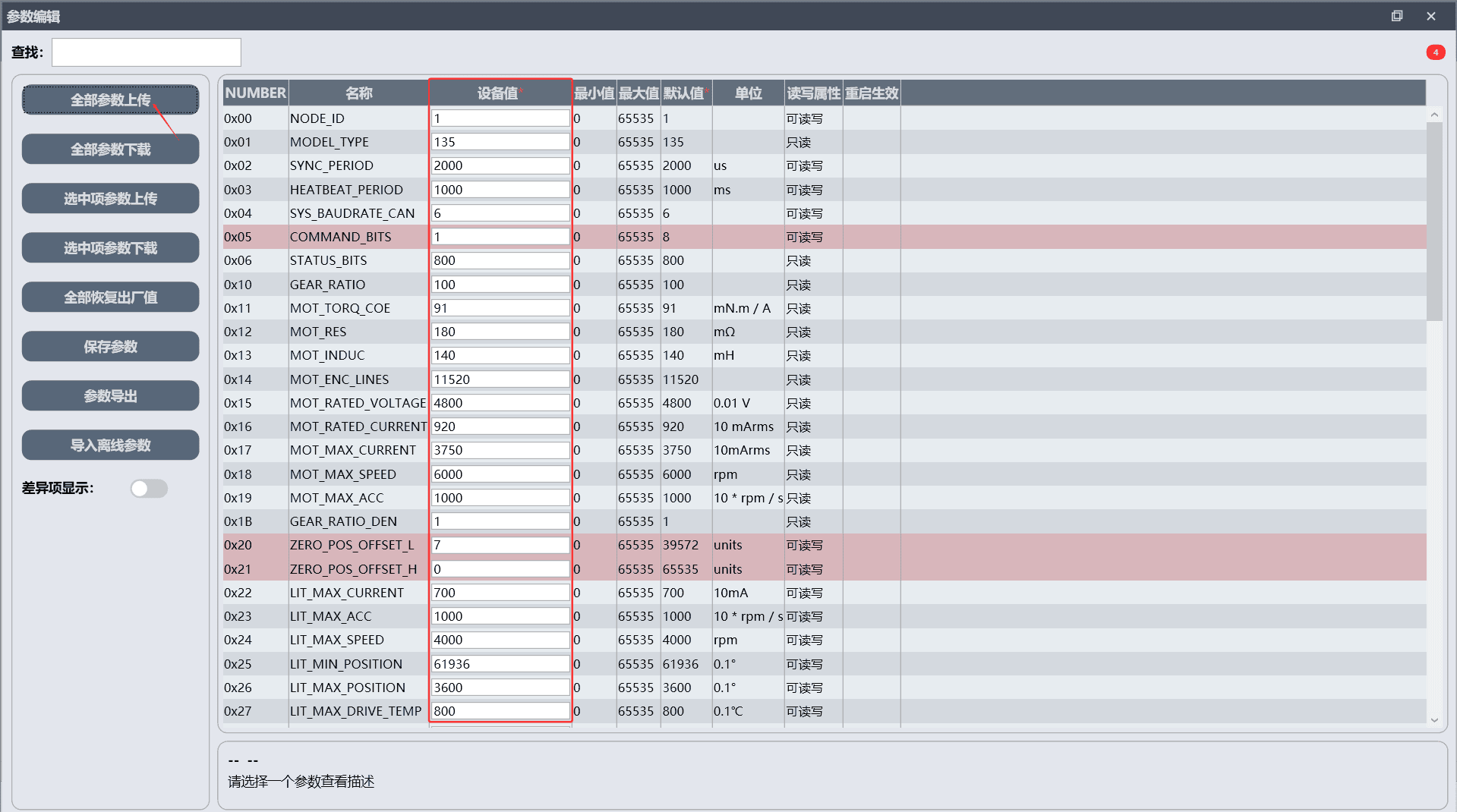 Figure 4-12 Parameter Upload Complete Prompt
Parameter download is used to write the parameters modified on the host computer into the joint module's runtime memory (RAM). There are two writing modes:
- [Download All Parameters]: click [Download All Parameters] to write all modified parameters to the module in batches.
- [Download Selected Parameters]: select the target modified parameters and click [Download Selected Parameters] to write only the selected modified parameters.
After a successful write, a pop-up prompts that the parameter download is complete.
Only parameters with read/write attributes can be modified; read-only parameters do not support write operations.
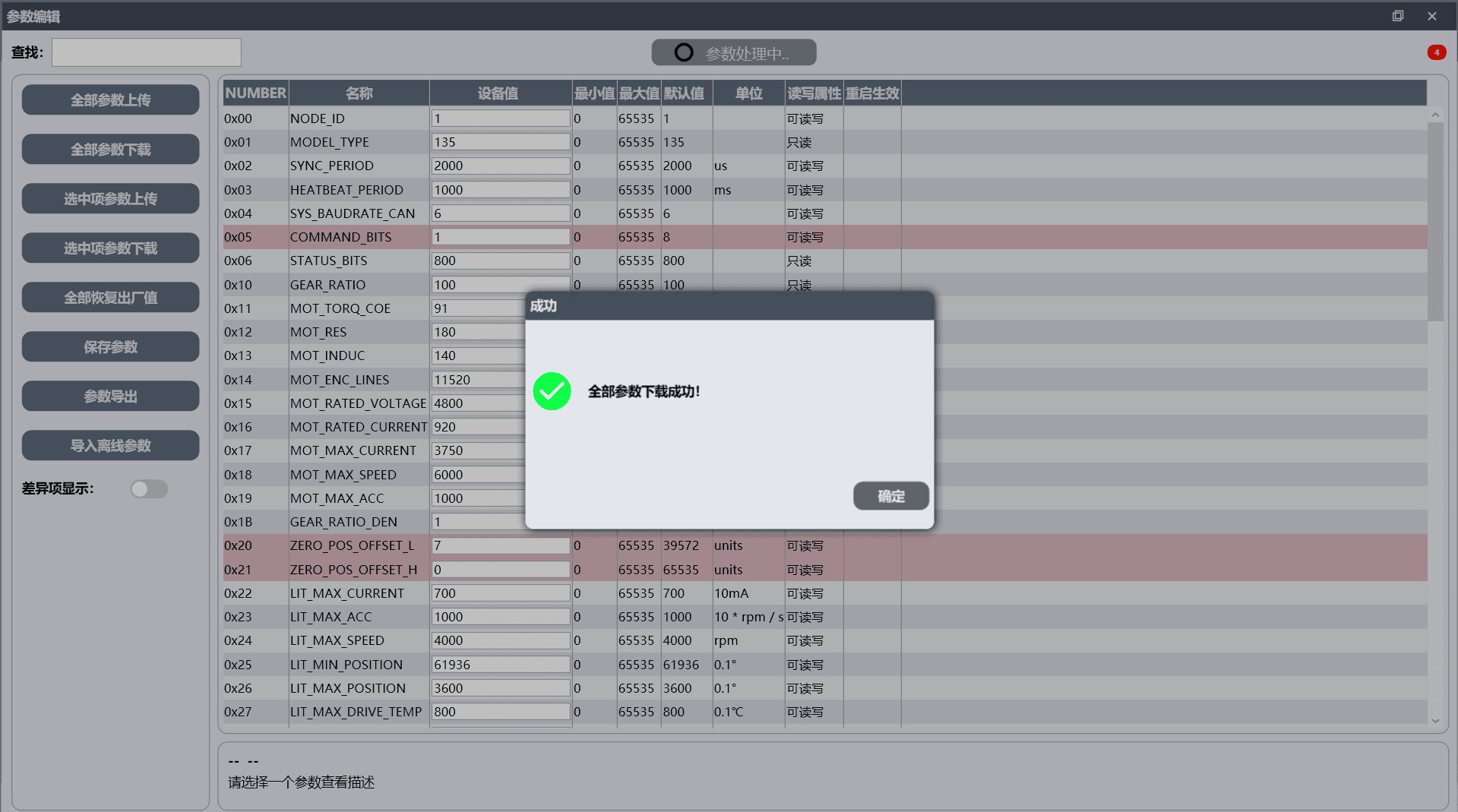 Figure 4-13 Parameter Download Complete Prompt
After the parameter download is complete, click [Save Parameters] to save the downloaded parameters.
After the parameter download is complete, if [Save Parameters] is not clicked, the rewritten parameters only take effect in the current operation and will not take effect after the joint module is powered off or restarted.
Click [Export Parameters] to export the actual [Device Values] currently in effect in the joint module's runtime memory (RAM).
Click [Restore All Factory Values > Save Parameters] to restore the modified parameters to factory settings.
Clicking [Show Differences] causes the system to filter and display all configuration items that have been manually modified and are inconsistent with the original factory preset parameters.
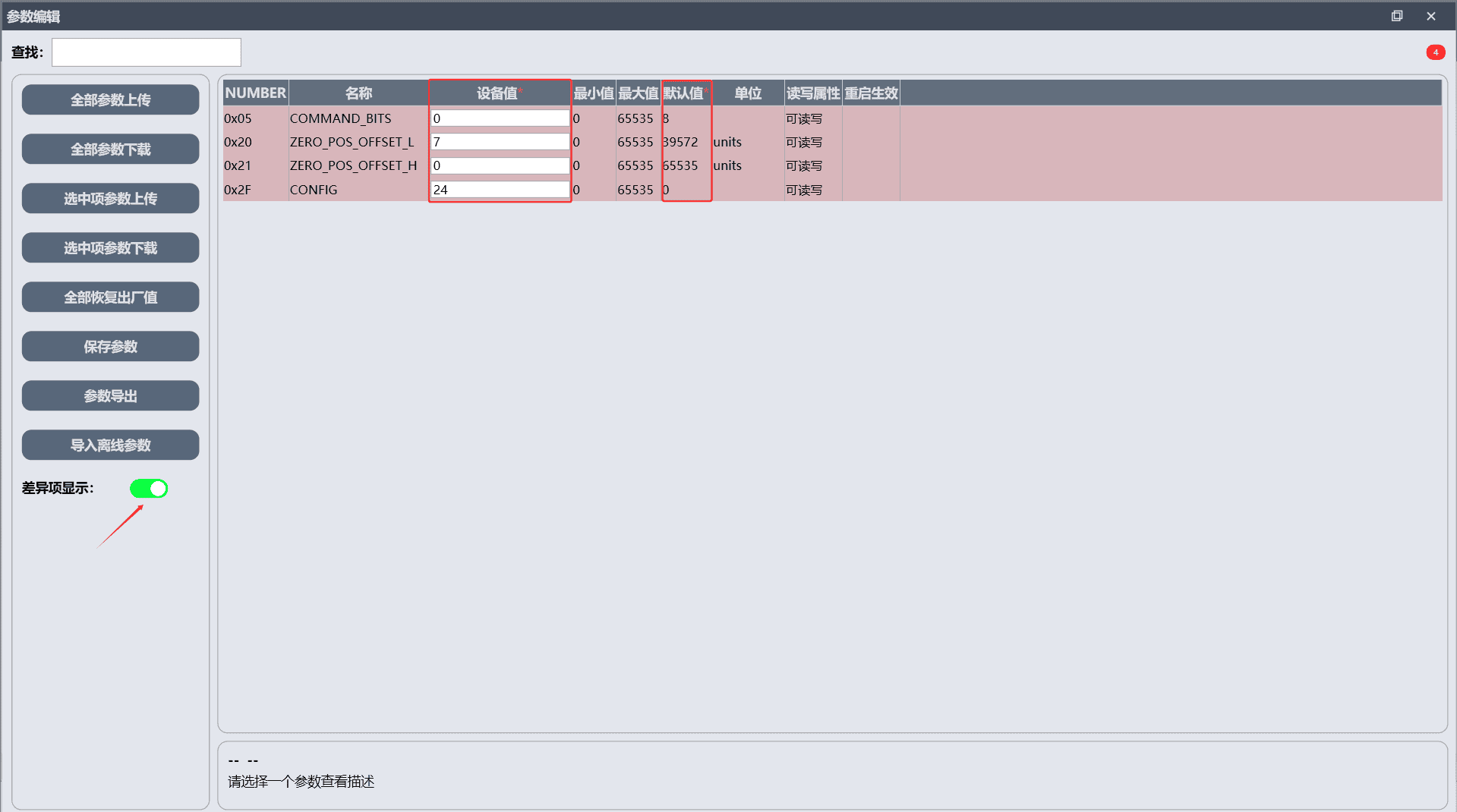 Figure 4-14 Show Differences Interface
4.5 Motion Control
The JointGO Pro software can switch the motion mode to [Current Mode], [Speed Mode], or [Position Mode], covering all-dimensional motion requirements of torque, speed, and position.
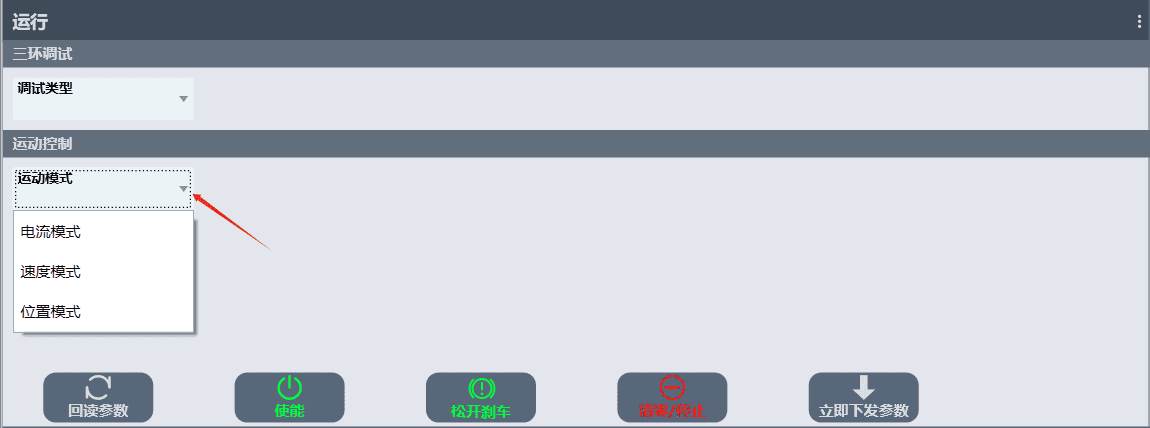
4.5.1 Speed Mode
This mode uses the running speed as the control target, and the load can still rotate at a constant speed when it changes; the motor only keeps rotating and will not stop at a fixed angle. It is mostly used in scenarios requiring constant-speed operation such as conveyor belts and rotary worktables, and is also the underlying basis of position control.
When the motion mode is switched to [Speed Mode], the status monitoring pane shows the default values: [Drive Status] is 800, and [Operation Mode] is [4: Cyclic Synchronous Position Mode].
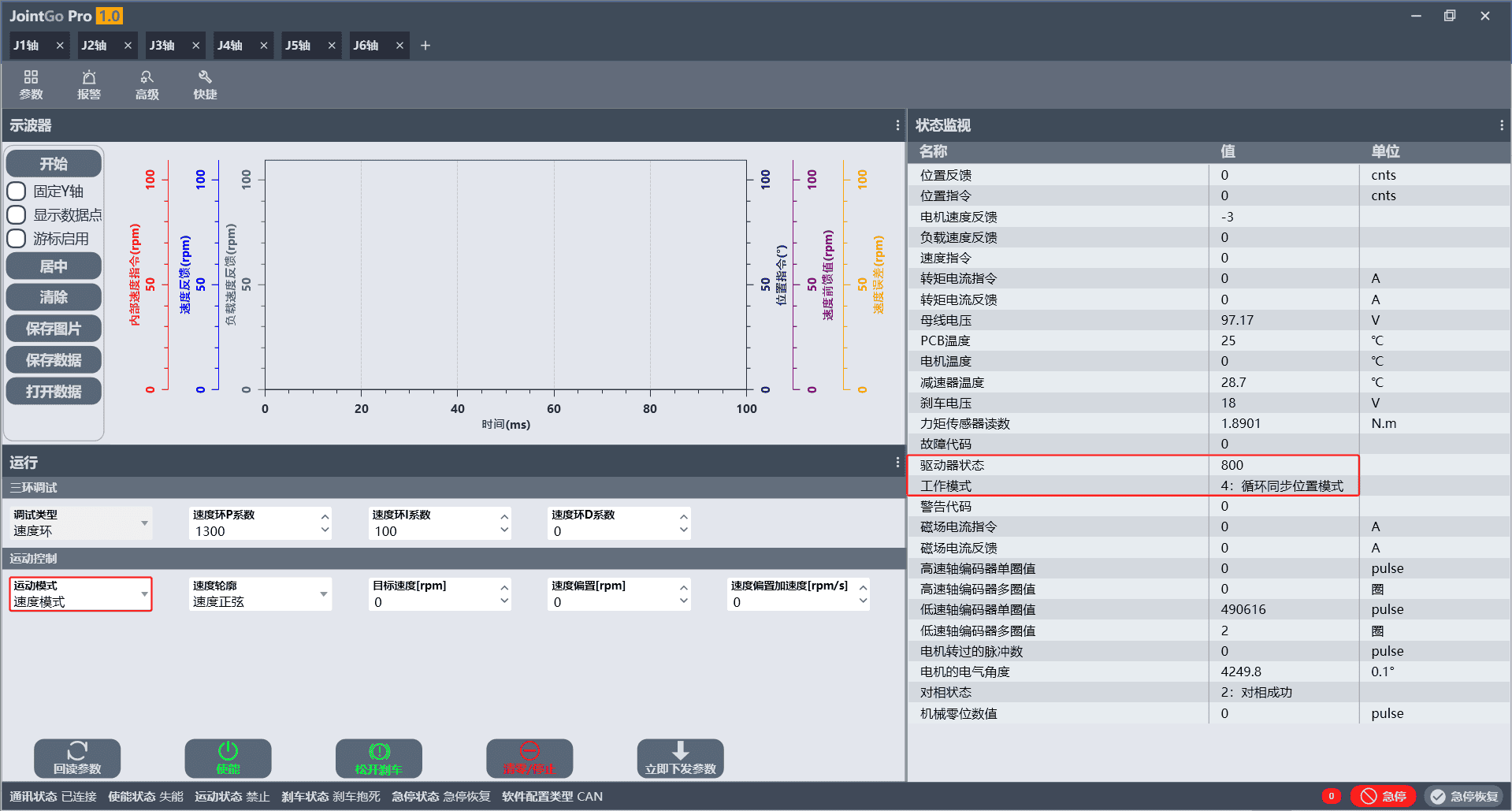 Figure 4-16 Status Interface Before Speed Mode Switching
Click [Send Parameters Now]. At this point, [Drive Status] in the status monitoring pane changes to 672 and [Operation Mode] changes to [2: Speed Mode], indicating that the mode switch is successful.
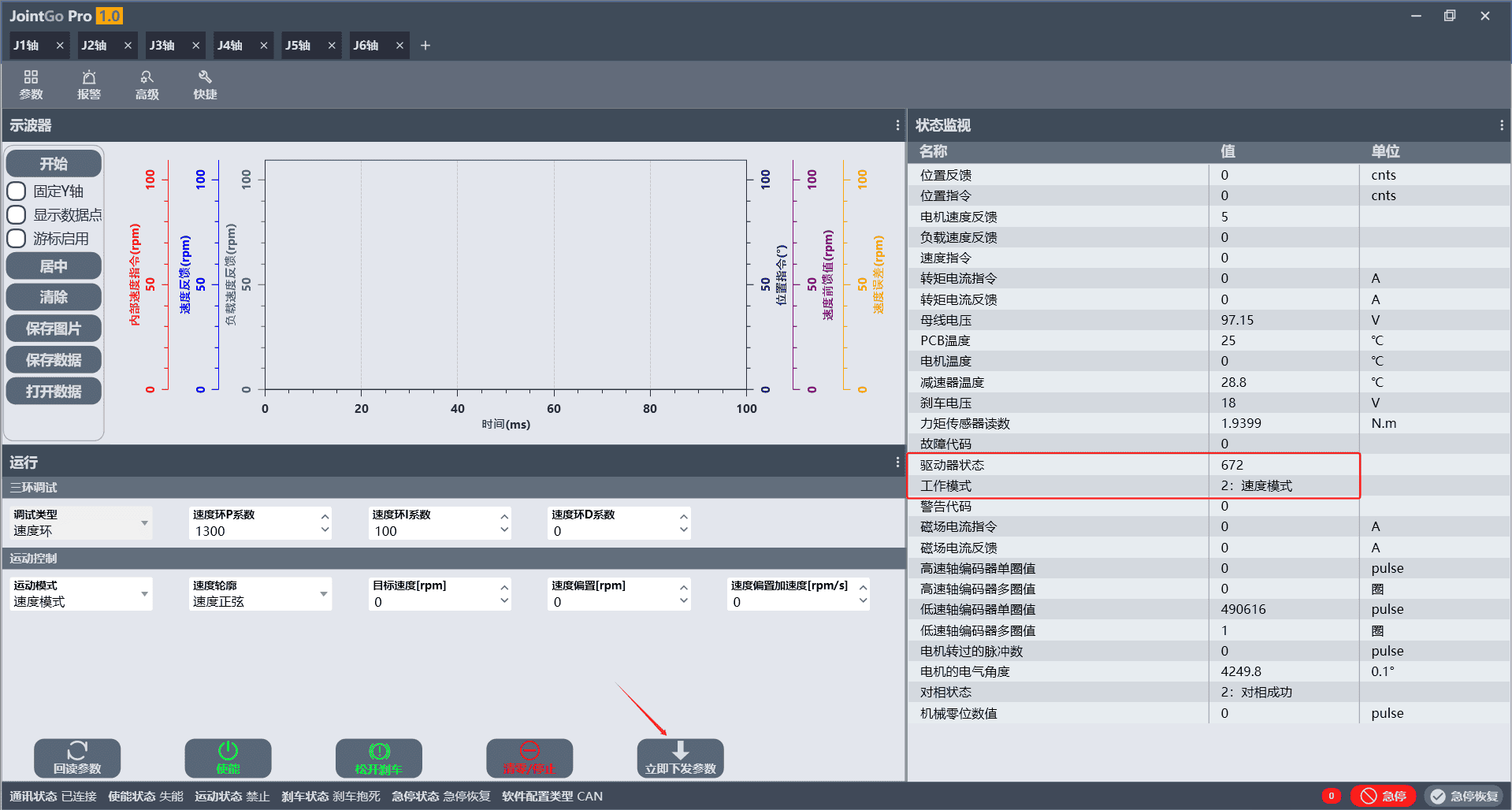 Figure 4-17 Interface of Successful Speed Mode Switching
Click the [Enable] button at the bottom of the interface. After successful enabling, the [Enable] button changes to the [Disable] state, and the [Run] button appears.
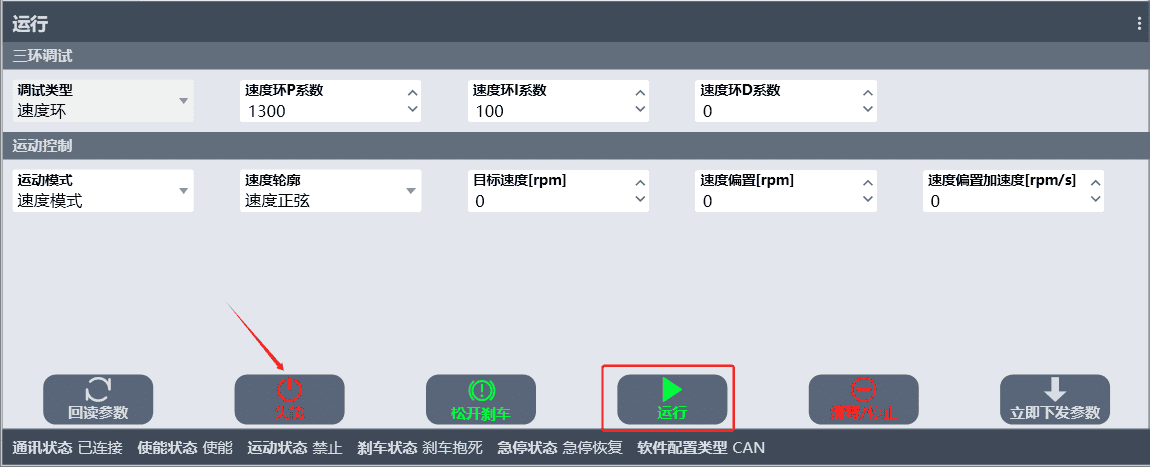 Figure 4-18 Interface of Successful Joint Enabling
Click the [Release Brake] button. The button switches from [Release Brake] to [Lock Brake].
R series joint modules have no built-in brake. [Release Brake]/[Lock Brake] and the "Brake Status" item at the bottom of the interface are generic controls of JointGO Pro.
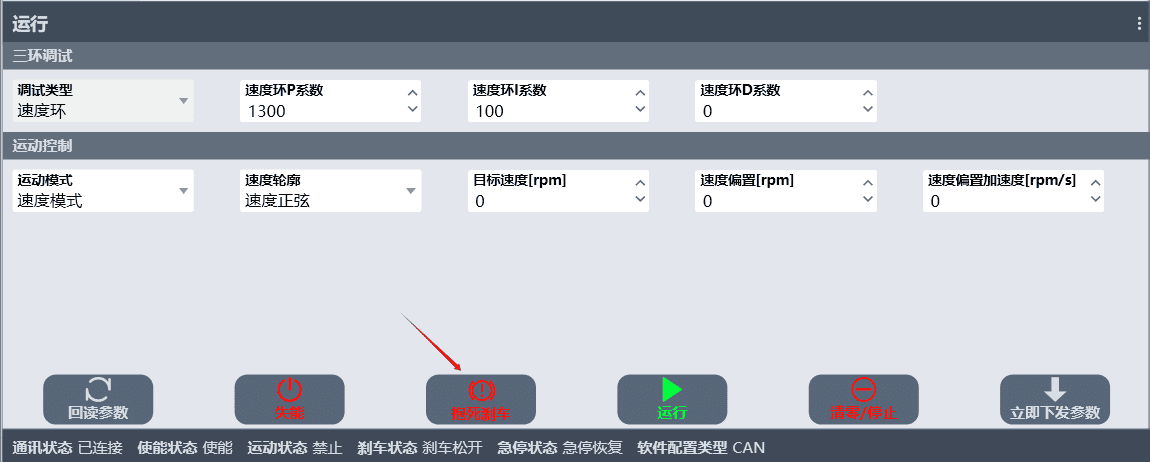
At this point, set the [Target Speed] in the [Motion Control] interface, and then click [Run] to make the motor rotate at the set speed.
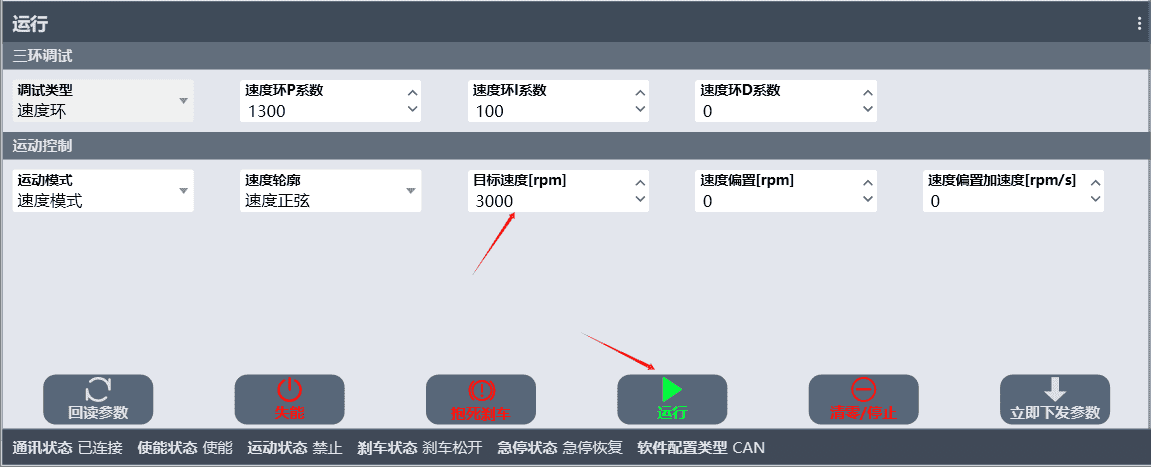 Figure 4-20 Speed Mode Operation Parameter Setting Interface
After the motor rotates normally, the [Run] button disappears, and the values of the corresponding data in the status monitoring pane change in real time.
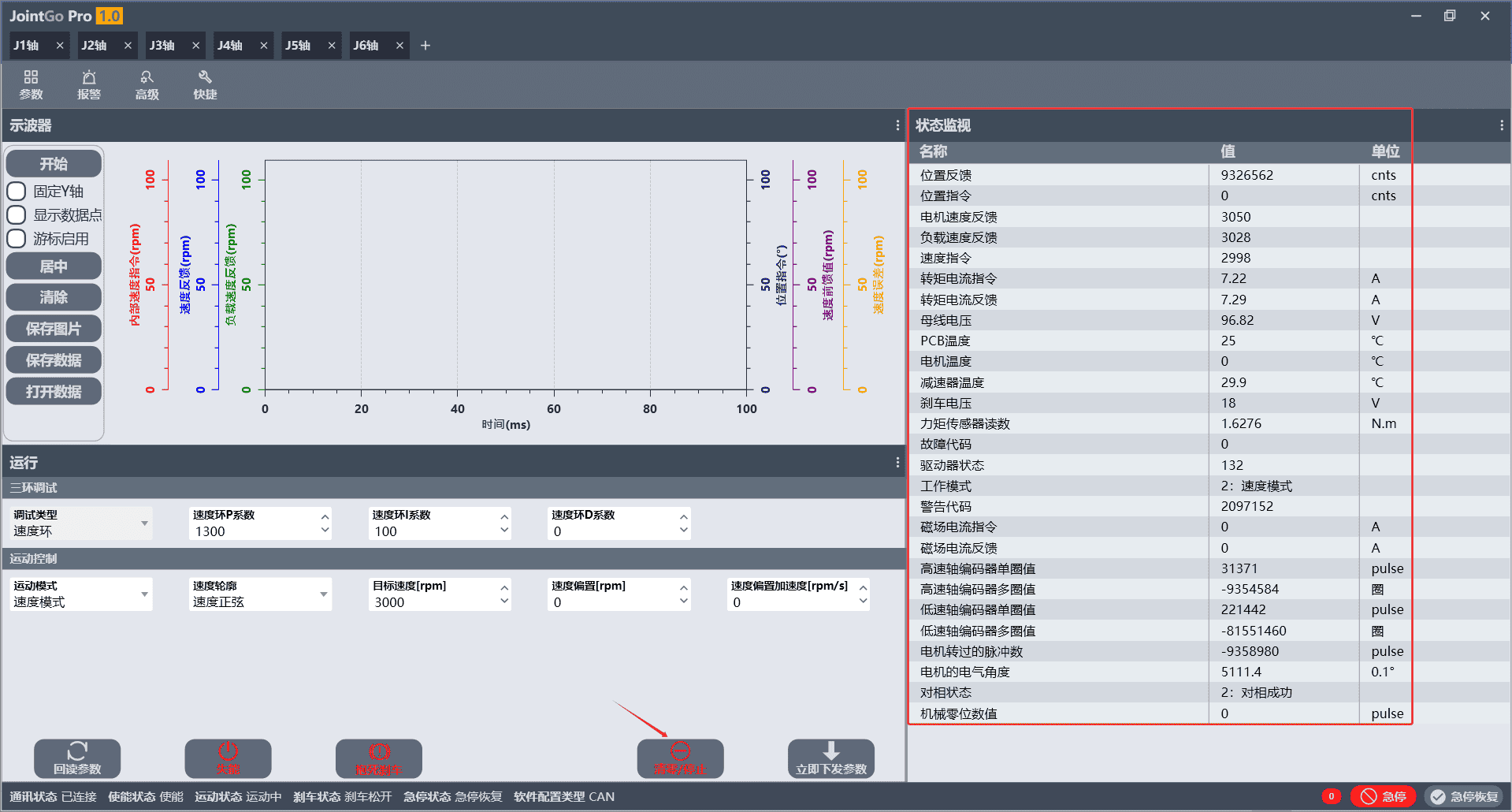 Figure 4-21 Speed Mode Running Status Interface
Click the [Clear/Stop] button, and the motor stops immediately, the target speed is cleared to 0, and the [Run] button reappears.
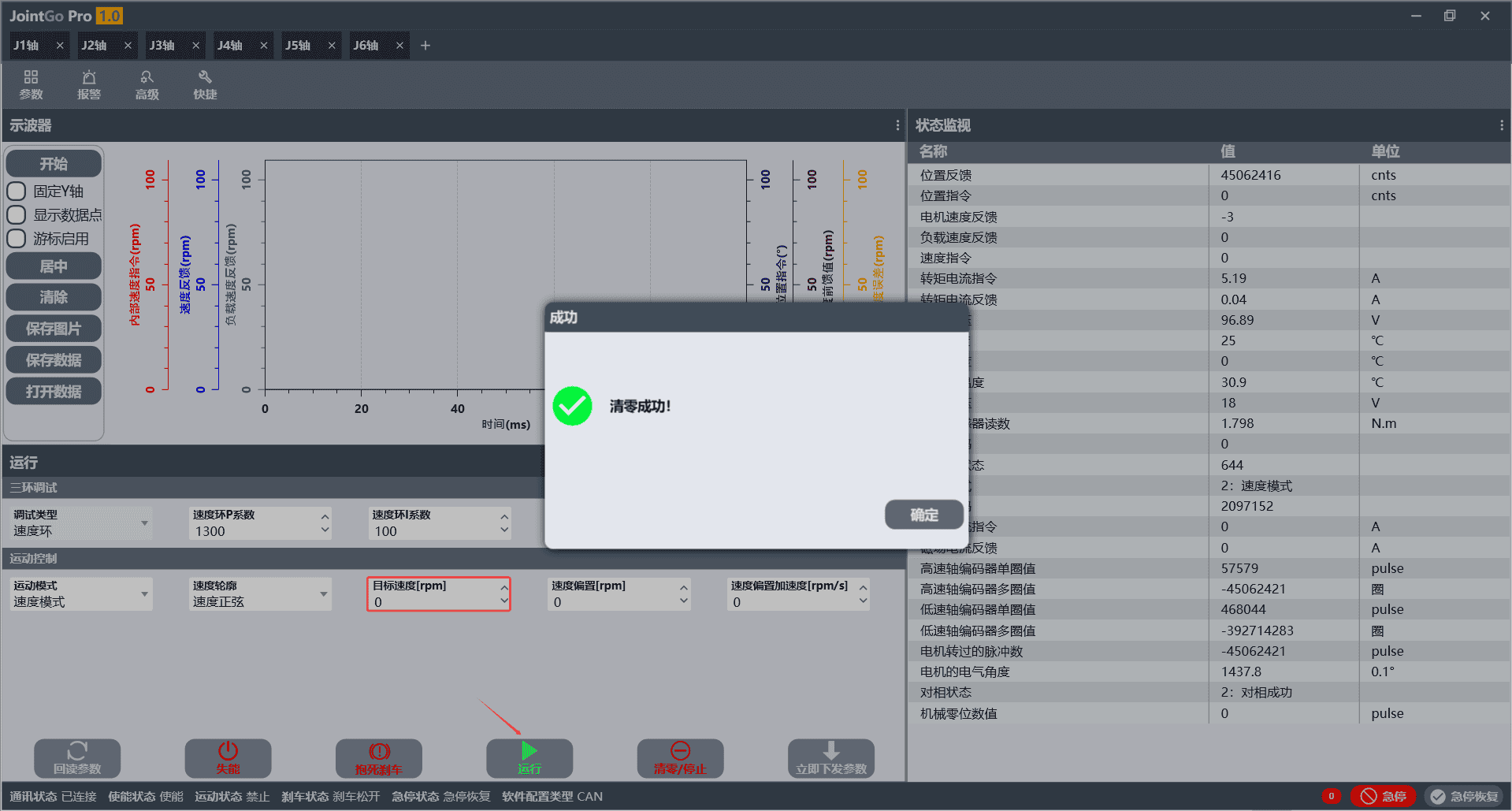 Figure 4-22 Speed Mode Stop Interface
To adjust the [Speed Loop P Coefficient] and [Speed Loop I Coefficient], first adjust the coefficients, then click the [Send Parameters Now] button to write the modified coefficients, and finally click the [Read Back Parameters] button again to confirm whether the parameter adjustment is successful.
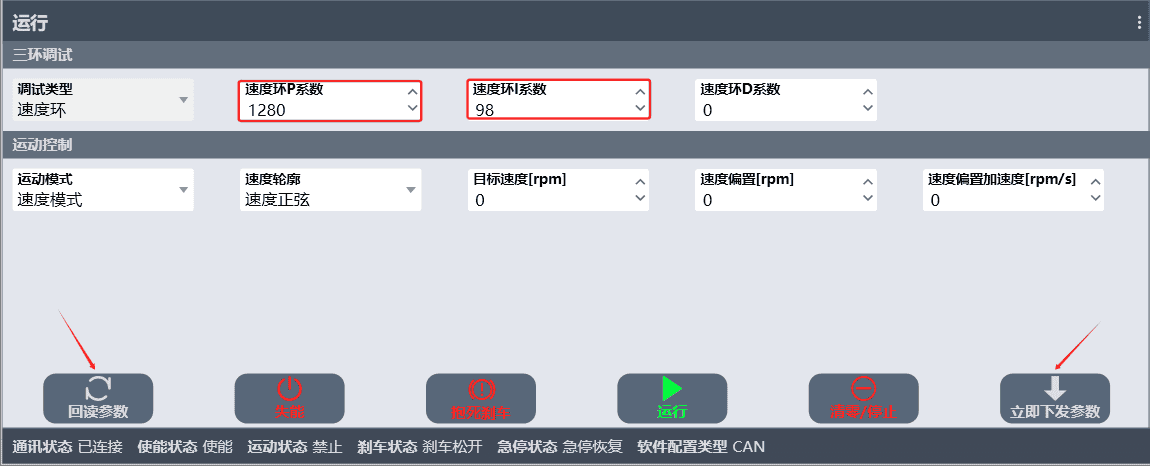 Figure 4-23 Speed Loop Parameter Adjustment Interface
4.5.2 Position Mode
Relying on three-loop closed-loop control, the joint can be precisely controlled to rotate to the target angle, with smooth start/stop and accurate positioning, and built-in multiple safety protections. It is suitable for most conventional operations such as material picking, posture adjustment, and trajectory motion.
When the motion mode is switched to [Position Mode], click [Send Parameters Now]; [Drive Status] in the status monitoring pane is 736 and [Operation Mode] is [3: Position Mode], indicating that the mode switch is successful.
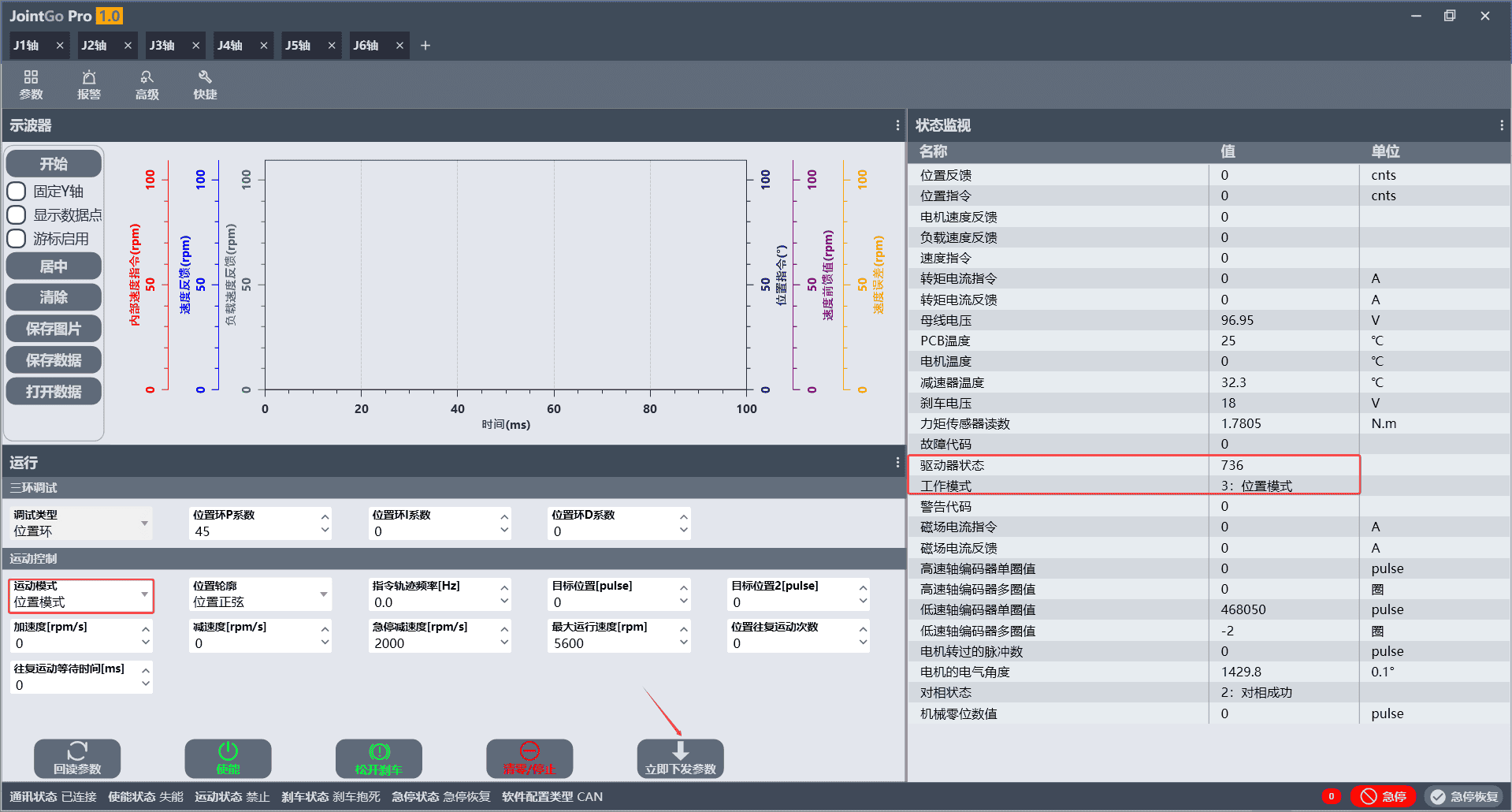 Figure 4-24 Interface of Successful Position Mode Switching
The remaining configuration is similar to that of speed mode. Click [Enable] and [Release Brake] (no brake is installed) in sequence, set the target position parameters, and then click the [Run] button to make the joint rotate to the target position.
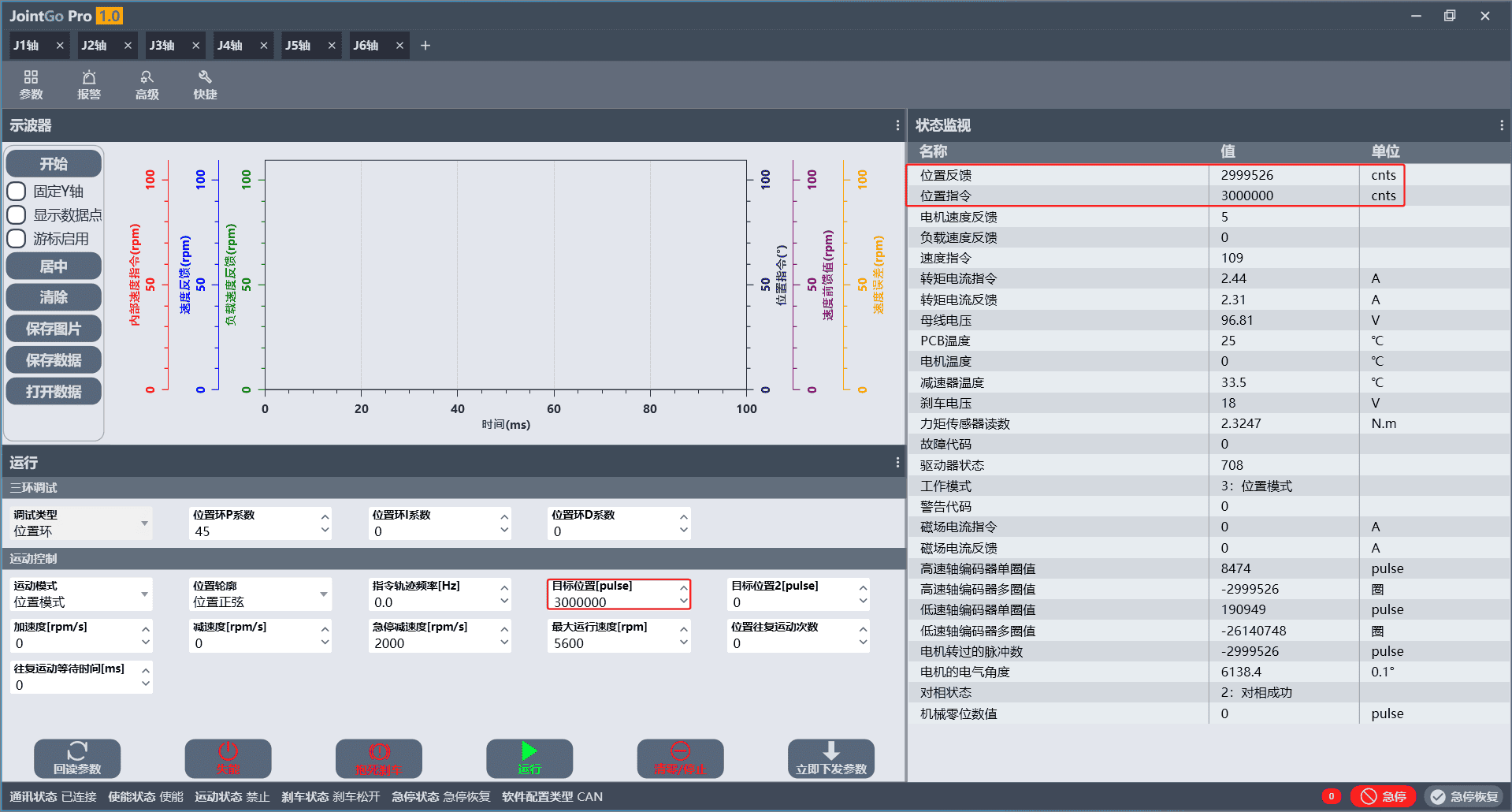 Figure 4-25 Position Mode Running Interface
4.5.3 Current Mode
This mode directly controls the motor output torque with the fastest response speed; it cannot hold the joint position and can continuously output a constant torque, delivering excellent compliant interaction performance. It is mainly used in R&D scenarios such as drag teaching, compliant grinding, and force control parameter tuning, and is rarely used in daily automated operations.
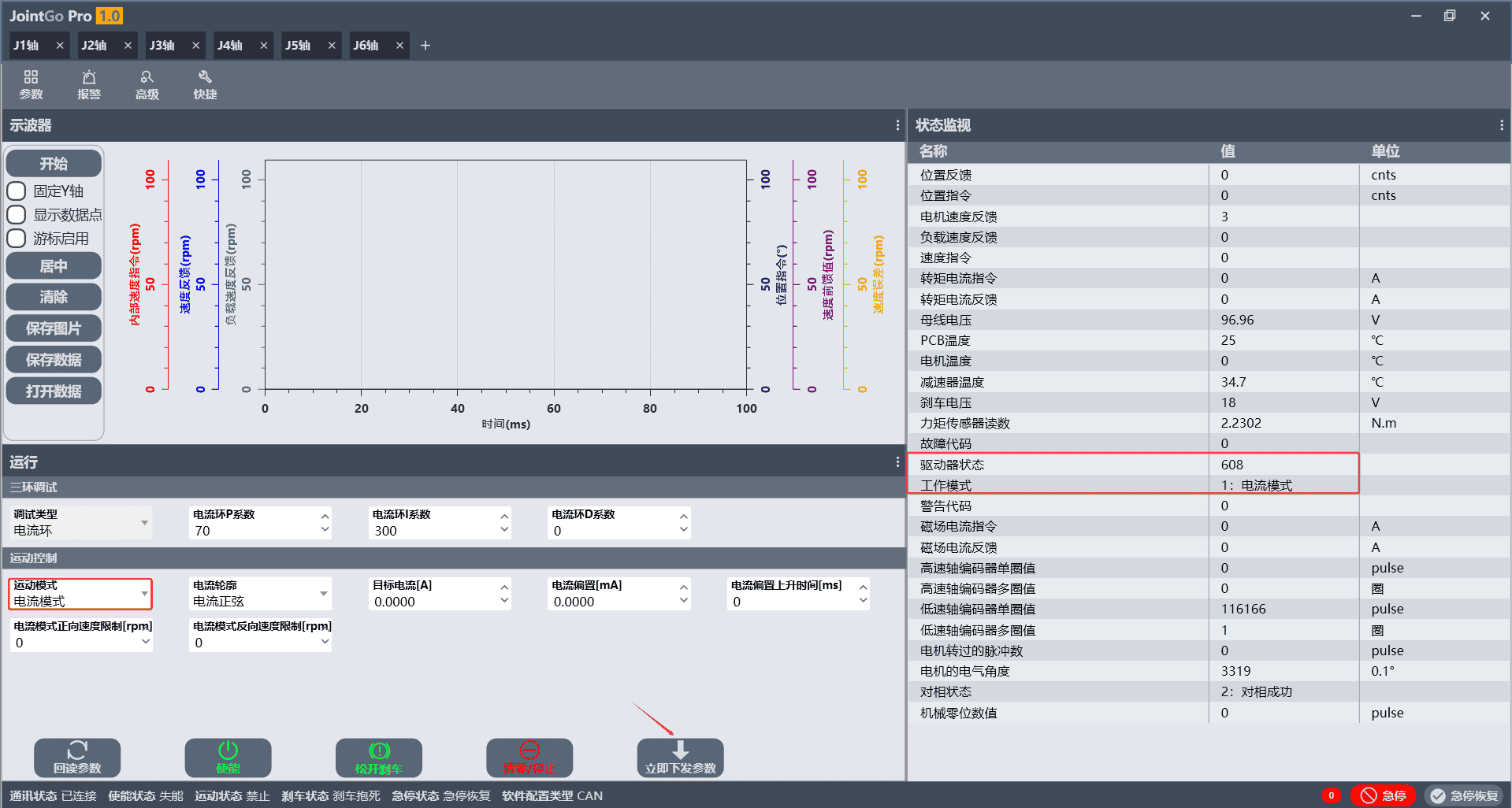
Select Current Mode as the motion mode and click Send Parameters Now. In the status monitoring pane, the drive status changes to 608 and the operation mode changes to [1: Current Mode], indicating that the mode switch is successful.
5 EtherCAT Bus Communication Specification
5.1 Bus Overview
This series of intelligent joint modules is equipped with CANFD + EtherCAT dual communication interfaces.
The CANFD bus is mainly used together with the JointGO Pro software for local commissioning of a single joint. The EtherCAT bus is oriented to synchronized control of complete machines with multiple joints, implementing cyclic synchronous servo control based on CoE (CiA402 servo device protocol) to meet the needs of multi-joint collaborative development.
The EtherCAT bus can be used to remotely switch the motion control modes described in Section 4.5. Currently, CSP Cyclic Synchronous Position Mode and CST Cyclic Synchronous Torque Mode are supported. The correspondence between the two bus control modes and the local control modes is as follows:
| EtherCAT Operation Mode | Local Control Mode | Typical Application Scenarios |
|---|---|---|
| CSP Cyclic Synchronous Position Mode | Position Mode | Multi-joint synchronous trajectory motion, point-to-point handling, repeat positioning operations |
| CST Cyclic Synchronous Torque Mode | Current Mode | Compliant force control, human-machine drag teaching, torque interaction, collision detection |
EtherCAT cyclic commands are sent and received via PDO; aperiodic parameter read/write can be performed by accessing the object dictionary via SDO.
5.2 CSP Cyclic Synchronous Position Mode
In CSP mode, the host computer issues target position commands at a fixed period, and the drive follows the position commands through three-loop closed-loop control, supporting superimposed velocity feedforward and torque feedforward to optimize dynamic performance.
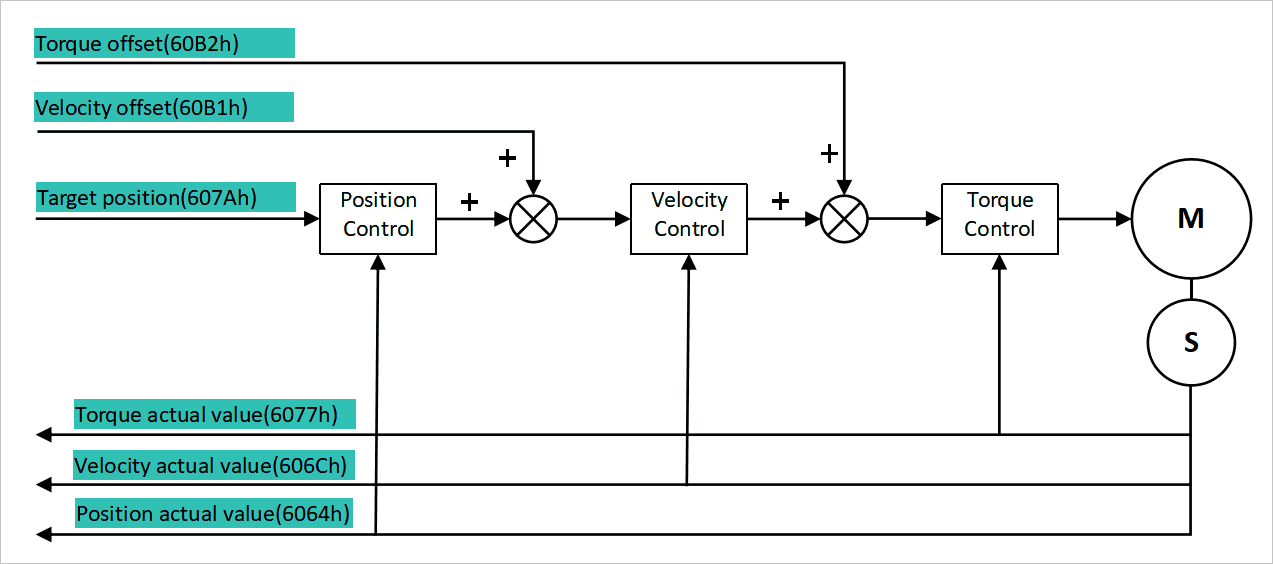
CSP Mode Servo Control Steps (PDO Communication)
Position feedback initialization
Read the motor's actual position
Position actual value(0x6064h), and assign the value to the target position commandTarget position(0x607Ah).Velocity feedforward initialization
Set the initial velocity feedforward value according to the working conditions. The normal initial value is 0, written to
Velocity offset (0x60B1h).Operation mode configuration
Write
0x08hto the object dictionaryModeOfOperation (0x6060h)to switch to CSP Cyclic Synchronous Position Mode.CiA402 servo enable sequence
Write the control word
Control Word (0x6040h)step by step according to the standard state machine; after each command is issued, ensure the effective time is ≥ 1 ms before executing the next step.- Write
0x06h(ready to enable) - Write
0x07h(switch on) - Write
0x0Fh(enable operation)
Disable the joint: write
0x06htoControl Word (0x6040h).- Write
Cyclic position control
Within the PDO communication cycle, continuously write the motion-planned position command to
Target position(0x607Ah).Dynamic velocity feedforward configuration
Multiply the planned velocity value (unit: rpm) by the scaling factor 10, and write it to
Velocity offset (0x60B1h).Fault handling mechanism
When the servo triggers a stop, read the fault code
Error Code(0x603Fh)and troubleshoot against the fault definitions; to clear the fault flag, write0x80hto the control word.
| No. | Index | Sub-index | Name | Data Type | Length (bit) | Unit | Description |
|---|---|---|---|---|---|---|---|
| 1 | 0x607A | 0 | Target Position | DINT | 32 | Counts | Target position |
| 2 | 0x60B1 | 0 | Velocity offset | DINT | 32 | 0.1 rpm | Velocity feedforward command issued cyclically by the master in CSP mode |
| 3 | 0x60B2 | 0 | Torque offset | INT | 16 | 0.1% Tn | 0.1% of motor rated torque |
| 4 | 0x6077 | 0 | Torque actual value | INT | 16 | 0.1% Tn | Actual torque, 0.1% of motor rated torque |
| 5 | 0x606C | 0 | Velocity actual value | DINT | 32 | 0.1 rpm | Motor-end actual velocity |
| 6 | 0x6064 | 0 | Position actual value | DINT | 32 | Counts | Output-end actual position |
5.3 CST Cyclic Synchronous Torque Mode
In CST mode, the host computer periodically issues the target joint torque, and the drive performs torque closed-loop control, which can be superimposed with torque feedforward, making it suitable for force interaction scenarios.
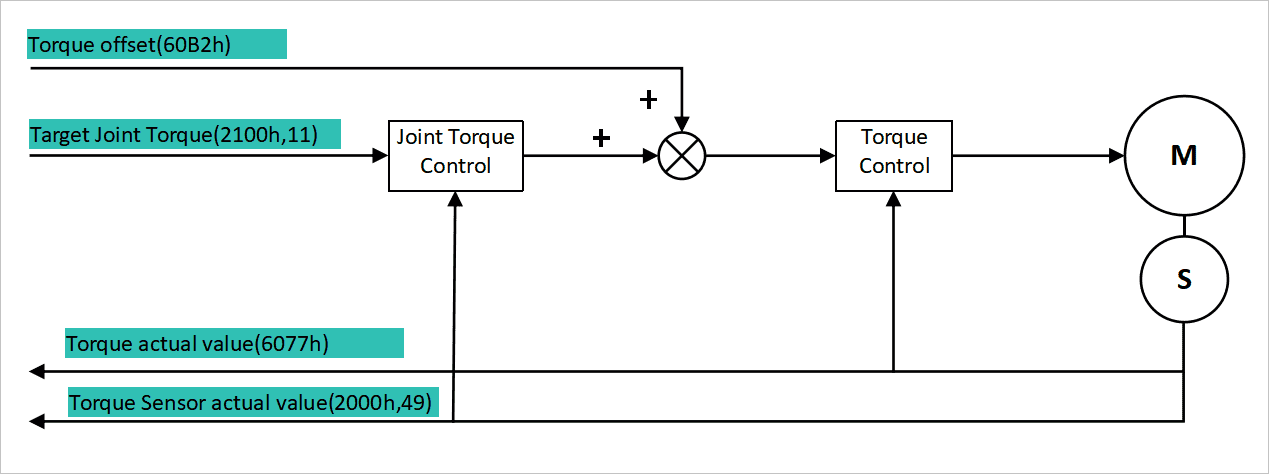
CST Mode Servo Control Steps (PDO Communication)
Operation mode configuration
Write
0x0AhtoModeOfOperation (0x6060h)to switch to CST Cyclic Synchronous Torque Mode.Torque feedforward initialization
Set the initial torque feedforward value as required. The default value is 0, written to
Torque offset (0x60B2h).CiA402 servo enable sequence The same as the CSP mode enable procedure:
- Write
0x06h(ready to enable) - Write
0x07h(switch on) - Write
0x0Fh(enable operation)
Command interval ≥ 1 ms; write
0x06hto disable.- Write
Cyclic torque control
Within the PDO communication cycle, write the planned torque command to
Target Joint Torque (0x2100h,11).Dynamic torque parameter adjustment
During operation, the torque feedforward parameter
Torque offset (0x60B2h)can be updated in real time within the PDO cycle.Fault handling mechanism
When the servo stops, read the fault code
Error Code(0x603Fh); to clear the fault: write0x80hto the control wordControl Word.
| No. | Index | Sub-index | Name | Data Type | Length (bit) | Unit | Description |
|---|---|---|---|---|---|---|---|
| 1 | 0x2100 | 11 | Target Joint Torque | REAL | 32 | Nm | Target torque command (floating-point type) |
| 2 | 0x60B2 | 0 | Torque offset | INT | 16 | 0.1% Tn | Torque feedforward |
| 3 | 0x6077 | 0 | Torque actual value | INT | 16 | 0.1% Tn | Actual torque, 0.1% of motor rated torque |
| 4 | 0x2000 | 49 | Torque Sensor Value | REAL | 32 | Nm | Floating-point torque sensor reading |
5.4 General Real-Time Feedback Object Dictionary
The EtherCAT bus relies on PDOs (Process Data Objects) to achieve cyclic real-time data interaction.
- RxPDO: issued by the master to the joint module, carrying various motion control commands;
- TxPDO: uploaded by the joint module to the master, feeding back real-time operating status such as position, temperature, faults, and torque.
For the complete list of RxPDO and TxPDO object indexes, data formats, and unit definitions, see Section 5.5 Joint Module PDO List. Aperiodic parameter read/write can be performed by accessing the object dictionary through the SDO channel.
5.5 Joint Module PDO List
RXPDO refers to the commands and data sent from the master to the servo:
Table 5-4 RXPDO ListNo. Index Sub-index Name Data Type Length(bit) Unit Description 1 0x6040 0 Control Word UINT 16 Control word 2 0x607A 0 TargetPosition DINT 32 Counts Target position 3 0x60FF 0 TargetVelocity DINT 32 0.1 rpm Target velocity 4 0x6071 0 TargetTorque INT 16 0.1% Tn Target torque 5 0x2000 57 TargetCurrent INT 16 Target current 6 0x2000 183 FeedForwardSpeed INT 16 Vendor-specific parameter that sets the velocity feedforward weight, configured during commissioning 7 0x605A 0 QuickStopOptionCode INT 16 Quick stop option code 8 0x605D 0 halt option code INT 16 Halt option code 9 0x2000 143 FrictionCompensate INT 16 Friction compensation 10 0x2100 11 Target Joint Torque REAL 32 Nm Target torque command, floating-point type 11 0x6060 0 ModeOfOperation SINT 8 Operation mode setting 12 0x60B1 0 Velocity offset DINT 32 0.1 rpm CiA402 standard object; velocity feedforward command issued cyclically by the master in CSP mode 13 0x60B2 0 Torque offset INT 16 0.1% Tn 0.1% of motor rated torque TXPDO refers to the data sent from the slave to the master:
Table 5-5 TXPDO ListNo. Index Sub-index Name Data Type Length(bit) Unit Description 1 0x6041 0 Status Word UINT 16 Status word 2 0x2000 12 Status Word 1 UINT 16 Custom status word 1 3 0x6064 0 ActualPosition DINT 32 Counts Output-end actual position 4 0x606C 0 ActualVelocity DINT 32 0.1 rpm Motor-end actual velocity 5 0x60F4 0 FollowingErrorActualValue DINT 32 Counts Output-end following error actual value 6 0x6078 0 CurrentActualValue INT 16 Actual current 7 0x603F 0 Error Code UINT 16 Error code 8 0x2000 49 Torque Sensor Value REAL 32 Nm Torque sensor, floating-point type 9 0x2000 31 systemp UINT 16 0.1 ℃ PCB temperature 10 0x2000 32 geartemp UINT 16 0.1 ℃ Gear temperature 11 0x2100 3 acc INT 16 10 * rpm / s Acceleration 12 0x6061 0 ModeOfOperationDisplay USINT 8 Operation mode display 13 0x2000 30 Voltage USINT 8 0.01 V Voltage 14 0x2100 6 errorpara UDINT 32 Error parameter 15 0x2100 7 chip_temperature UINT 16 0.1 ℃ Chip temperature 16 0x2100 8 ChannelOut1 INT 16 Reserved 17 0x2100 9 ChannelOut2 INT 16 Reserved 18 0x2100 10 ChannelOut3 INT 16 Reserved 19 0x6077 0 Torque actual value INT 16 0.1% Tn Actual torque, 0.1% of motor rated torque
6 Quality Assurance
6.1 Product Warranty
AUBO-R series joint modules enjoy a 12-month limited warranty period.
If new equipment and its components develop defects caused by poor manufacturing or materials within 12 months after being put into use, AUBO (Beijing) Intelligent Technology Co., Ltd. shall provide the necessary spare parts to replace or repair the relevant components.
The ownership of equipment or components that are replaced or returned to AUBO (Beijing) Intelligent Technology Co., Ltd. shall belong to AUBO (Beijing) Intelligent Technology Co., Ltd.
If the product is no longer within the warranty period, AUBO (Beijing) Intelligent Technology Co., Ltd. reserves the right to charge the customer for replacement or repair.
Outside the warranty period, if the equipment exhibits defects, AUBO (Beijing) Intelligent Technology Co., Ltd. shall not be liable for any damages or losses arising therefrom, such as production losses or damage to other production equipment.
6.2 Disclaimer
If equipment defects are caused by improper handling or failure to follow the relevant information described in the user manual, the "Product Warranty" shall become void.
Faults caused by the following conditions are not covered by this warranty:
- Products purchased through channels not approved by AUBO;
- Failure to meet industrial standards or failure to install, wire, or connect other control equipment as required by the user manual;
- Use beyond the specifications or standards stated for the product;
- Use of this product for purposes other than those specified;
- Use in environmental conditions beyond the product's rated specifications;
- Use in a grinding environment or in special environments without product protection;
- Product damage caused by improper transportation;
- Faults, damage, or indirect damage caused by accidents or human factors;
- Faults, damage, or indirect damage caused by modification;
- Installation of non-genuine parts or accessories;
- Damage caused by modification, debugging, or repair of original parts by third parties other than AUBO (Beijing) Intelligent Technology Co., Ltd. or its designated integrators;
- Faults, damage, or indirect damage caused by natural disasters or other force majeure;
- Faults arising from circumstances other than those above and not caused by the responsibility of AUBO (Beijing) Intelligent Technology Co., Ltd.
The following conditions are not covered by the warranty:
- The product traceability number cannot be identified.
- The production date or warranty start date cannot be identified.
- Changes to software or internal data.
- The fault cannot be reproduced or cannot be identified by AUBO (Beijing) Intelligent Technology Co., Ltd.
- Use of this product in radioactive equipment, biological test equipment, or uses judged by AUBO (Beijing) Intelligent Technology Co., Ltd. to be hazardous.
- Appearance parts and consumable parts. According to the product quality assurance agreement, AUBO (Beijing) Intelligent Technology Co., Ltd. only provides warranty commitments for defects and deficiencies in products and components sold to distributors.
For any other express or implied warranties or liabilities, including but not limited to any implied warranties of merchantability or fitness for a particular purpose, AUBO (Beijing) Intelligent Technology Co., Ltd. assumes no warranty liability. In addition, AUBO (Beijing) Intelligent Technology Co., Ltd. assumes no liability for any form of indirect damage or consequence arising from the relevant products.
7 Appendix
7.1 Terminology
Integrator: An integrator is the organization that designs the final robot installation. The integrator is responsible for performing the final risk assessment and must ensure that the final installation complies with local laws and regulations.
Risk assessment: Risk assessment is the entire process of identifying all hazards and reducing risks to an appropriate level. The risk assessment shall be documented and archived. For details, please refer to ISO 12100.
Performance Level: Performance Level (PL) is a discrete level used to describe the ability of individual safety-related parts of a control system to perform a safety function under predictable conditions. PLd is the second-highest reliability classification, meaning that the safety function is quite trustworthy. For more information, please refer to EN ISO 13849-1:2008.
7.2 Revision History
| Version | Date | Revision |
|---|---|---|
| v1.0.0* | 2026-10-10 | Released v1.0.0* trial version. |