AUBO Fenghe Series FARM200 Agricultural Picking Robot Electrical Interface Manual
1 Product introduction
1.1 Introduction
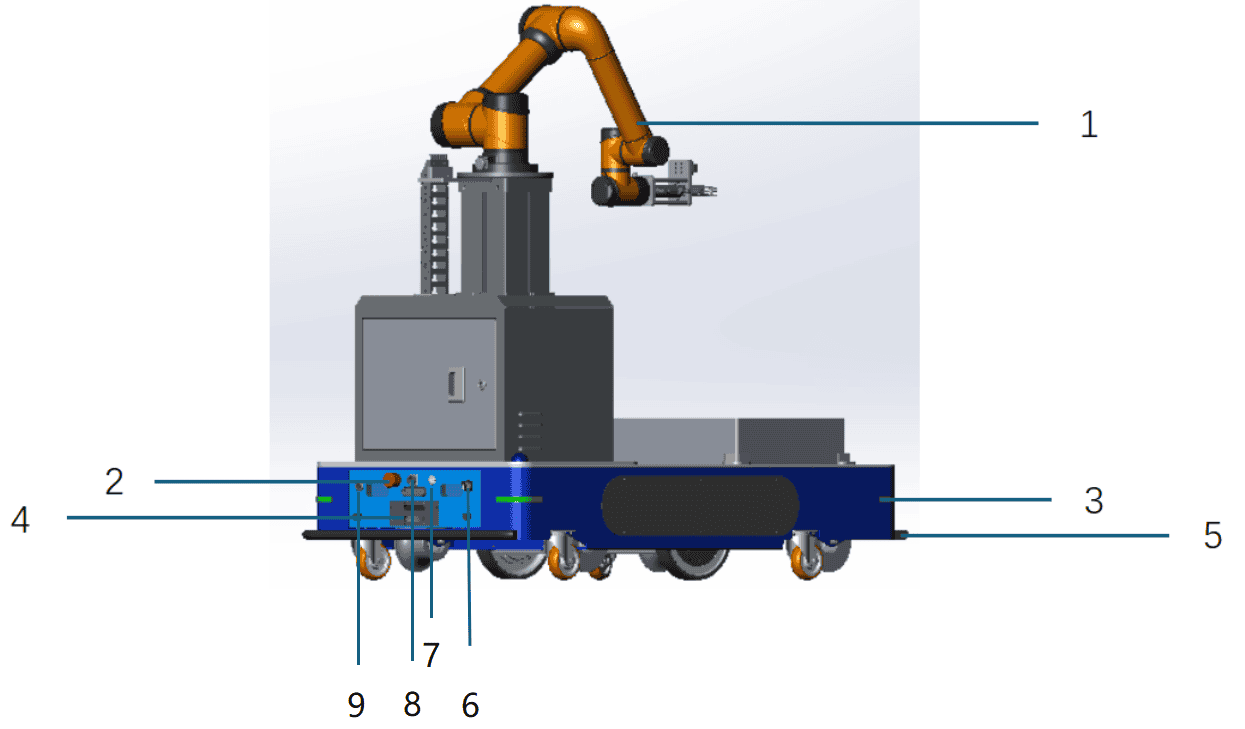
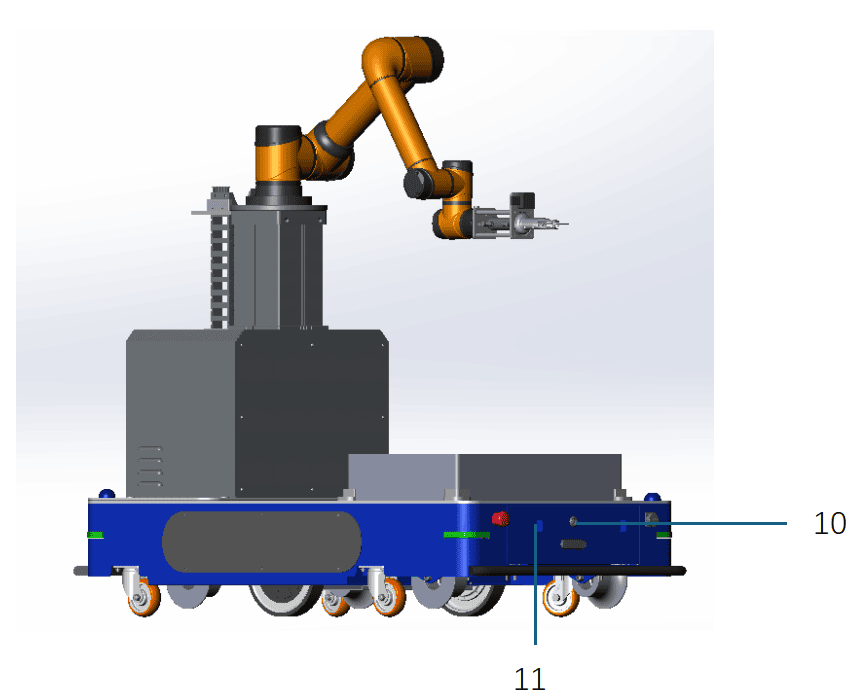
| No. | Button/Component | Description |
|---|---|---|
| 1 | AUBO collaborative robot | AUBO six-axis collaborative robot arm |
| 2 | Emergency Stop button | Press to achieve an emergency stop of the robot. To restore to normal mode, rotate this button in the direction shown on it |
| 3 | Ambient light | Indicates the robot's current status and battery level |
| 4 | Automatic charging port | Port for connecting to the automatic charger |
| 5 | Anti-collision safety edge | Used for AGV collision protection |
| 6 | Brake release switch | Rotate the brake release switch clockwise to push the AGV manually |
| 7 | Power button | Press and hold this button to turn the AGV on or off |
| 8 | Manual charging port | Port for connecting to the manual charger |
| 9 | Compartment door keyhole | Used to open the AGV compartment door |
| 10 | Battery holder keyhole | Used to release or lock the battery holder latch |
| 11 | Battery holder handle | Used for battery replacement |
1.2 Status descriptions of the power button light
| Indicator lamp status | Robot status | Remarks |
|---|---|---|
| Solid green | Powered on and standby, motor not powered on | The green light turns on after pressing and holding the power button for 3 s |
| Flashing green | Powered on and standby, motor not powered on, and brake release knob is in ON position | |
| Solid blue | Powered on, and motor is powered on | |
| Flashing blue | Powered on, motor is powered on, and brake release knob is in ON position | |
| Solid red | Only the Emergency Stop button is pressed | |
| Flashing red | Brake release mode is enabled | The brake release knob is in ON position, and at least one Emergency Stop button is pressed |
1.3 Status descriptions of the ambient light
| Light status | Equipment status | Remarks |
|---|---|---|
| Rainbow gradient | Powering on/Battery communication not established | |
| Solid green | Powered on and standby, motor not powered on | |
| Flashing green | Powered on and standby, motor not powered on, and brake release knob is in ON position | |
| Solid blue | Motor is powered on | |
| Flashing blue | Powered on, motor is powered on, and brake release knob is in ON position, but the Emergency Stop button is not pressed | |
| Breathing blue | Executing a task | |
| Solid red | Only the Emergency Stop button is pressed | |
| Flashing red | Brake release mode is enabled | The indicator light flashes red |
| Flashing pink | Brake release knob is in OFF position, and the Emergency Stop button is pressed; | The indicator light is solid red |
| Solid yellow | Battery level is below 50% and above 30% | |
| Breathing red | Battery level is below 30% | |
| Breathing orange | Charging | |
| Breathing red | Motor error | |
| Breathing pink | Equipment is stopped by an obstacle |
1.4 Electrical interfaces
Front panel:
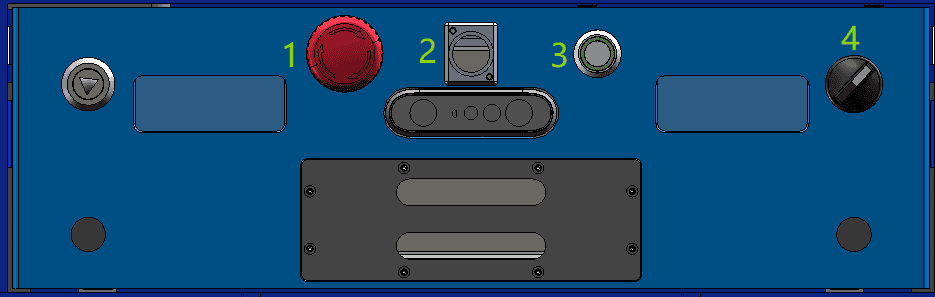
Rear panel:

| No. | Button/Component | Description |
|---|---|---|
| 1 | Emergency Stop button 1 | Used when the equipment needs an emergency stop/brake release |
| 2 | Debugging network port | Led out from the WAN port of the AGV's internal router, communication rate: 100 Mb/ms |
| 3 | Power button with light | Used to power the equipment on or off. The LED indicator shows red, green, and blue to represent different states; see the status descriptions of the button light for details |
| 4 | Brake release knob | External brake release knob, used together with the Emergency Stop button when the equipment needs brake release |
| 5 | Emergency Stop button 2 | Used when the equipment needs an emergency stop/brake release |
| 6 | Manual charging port | Used for manual charging; connected to the output plug of the charger |
Adapter box:
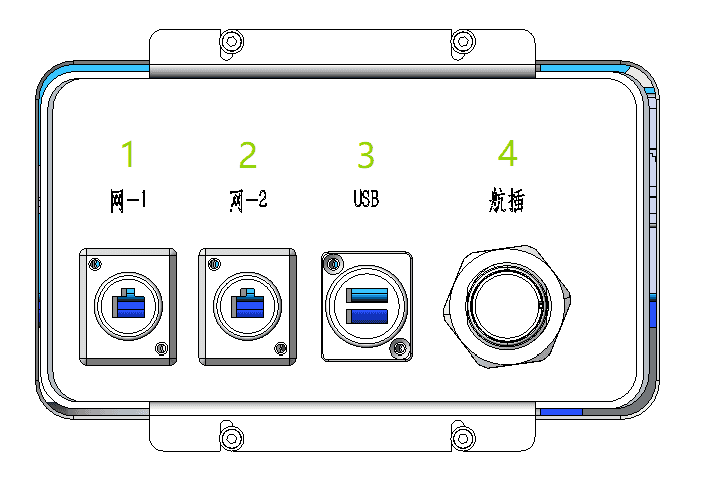
| No. | Button/Component | Description |
|---|---|---|
| 1 | Adapter box network port 1 | Led out from the LAN3 port of the AGV's internal IPC, communication rate: 1000 Mb/ms |
| 2 | Adapter box network port 2 | Led out from the LAN4 port of the AGV's internal router, communication rate: 100 Mb/ms |
| 3 | Adapter box dual USB ports | Led out from the USB 3.0 ports of the AGV's internal IPC |
| 4 | Adapter box aviation connector port | Provides DC 48 V power (maximum power 1000 W), safety interface board outputs, and the IPC COMH1 RS485 signal for customer-supplied equipment or second-layer equipment |
2. Powering on and off the agricultural robot
2.1 Powering on
Steps to power on the equipment:
- The lithium battery switch is in the ON position;
- Press and hold the power button with light until the indicator lamp turns green, then release it (Note: Release the button quickly after the indicator lamp turns green, otherwise the equipment will enter the shutdown procedure). The equipment enters the power-on procedure. When the indicator lamp turns blue, the equipment has finished powering on, and the motors are powered on;
2.2 Powering off
Steps to power off the equipment:
- The equipment is in the powered-on or standby state;
- Press and hold the power button with light until the indicator lamp flashes green, then release it. The equipment enters the shutdown procedure;
- When the button indicator lamp goes off, the equipment shutdown is complete;
- If the equipment will not be used for a long time after shutdown, the metal button switch on the side of the battery must also be turned off (in the popped-out state), otherwise it may easily cause over-discharge of the lithium battery. If the lithium battery level is already low at shutdown, it is recommended to fully charge the lithium battery before turning off the side metal button. It is required to perform a charge-discharge cycle for the battery pack every 28 days.
2.3 Emergency stop
Red Emergency Stop buttons are installed on the front and rear compartment doors of the agricultural robot's mobile chassis. When the equipment needs an emergency stop, press either of these two buttons to bring the composite robot to an emergency stop.
After the equipment fault is cleared, rotate the Emergency Stop button clockwise until it springs back to its normal position to complete the reset and release the equipment from the emergency stop state.
2.4 Brake release
The brake release of the agricultural chassis AGV includes brake release in the powered-off state and brake release in the powered-on state.
After the brake release, the brakes of the drive motors on both sides are disengaged, and the AGV can be pushed by a single person.
Brake release in the powered-off state: The following three conditions must be met:
- The lithium battery switch is in the ON position;
- Turn the brake release knob to the right;
- Press at least one Emergency Stop button;
Brake release in the powered-on state: The following three conditions must be met:
- The AGV is in the powered-on state;
- Turn the brake release knob to the right;
- Press at least one Emergency Stop button;
As can be seen, to release the brake of the chassis AGV, at least one Emergency Stop button must be pressed while turning the brake release knob to the right.
3. Charging the robot
The lithium battery of the agricultural robot must be charged manually using a compatible charger.
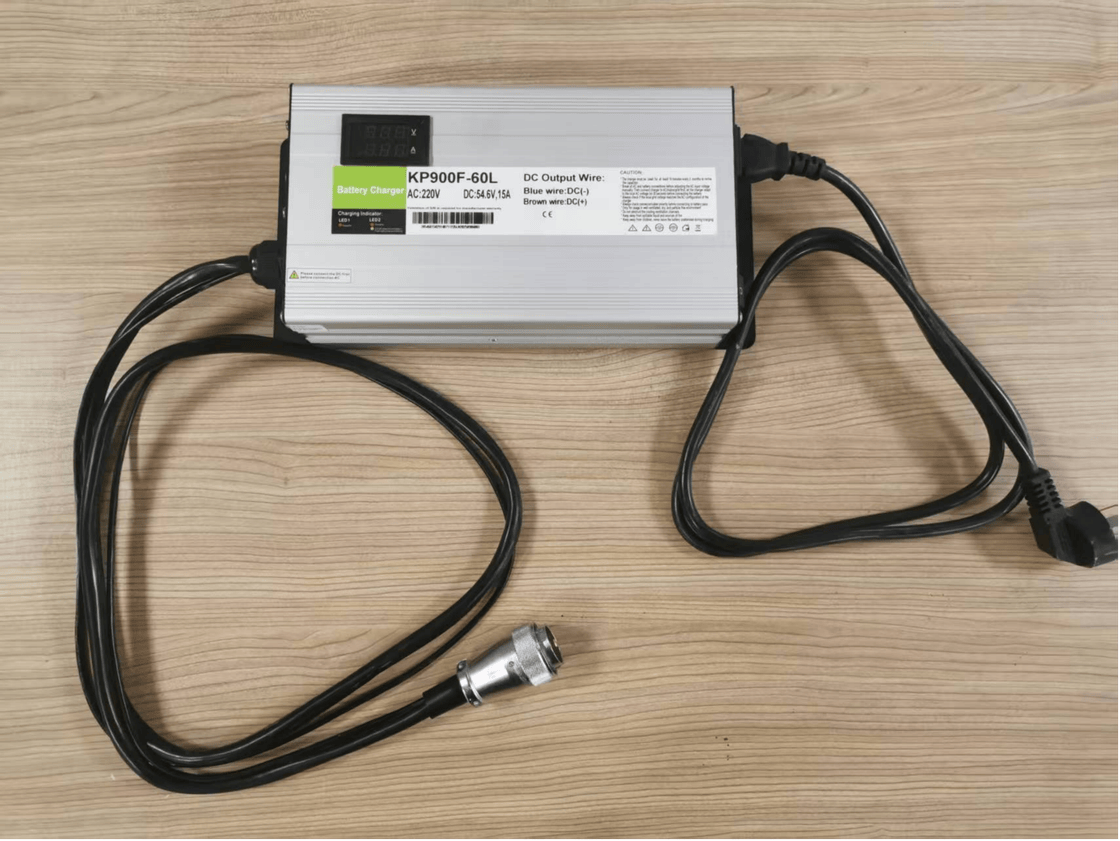
Charger model: KP900F-60L-1h
Refer to the table below for the technical parameters of the charger:
| No. | Product | Remarks |
|---|---|---|
| 1 | Maximum output voltage | 54.6 V±0.2 V |
| 2 | Output current | 15 A±5% |
| 3 | Maximum output power | 900 W |
| 4 | Input voltage | 180~260 Vac |
| 5 | Rated input voltage | 220 Vac |
| 6 | Rated output | 15 A |
| 7 | Input frequency | 50~60 Hz |
| 8 | Conversion current | 0.75 A |
Environmental condition requirements:
| No. | Parameter type | Technical parameter |
|---|---|---|
| 1 | Operating temperature | -20~45 °C. |
| 2 | Relative humidity | 5%~95% |
| 3 | Storage temperature | -40~70 °C. |
| 4 | Cooling method | Forced air cooling |
| 5 | Altitude | 0~3000 m |
The actual charger is shown in the figure below:
Manual charging
The mobile chassis AGV of the agricultural robot is charged manually by the operator using a charger.
The location of the manual charging port is shown in the figure:

When charging, ensure that the plug and socket are fully and tightly connected. Poor connections are strictly prohibited to avoid serious consequences such as sparking, melting of the port, or even equipment damage.
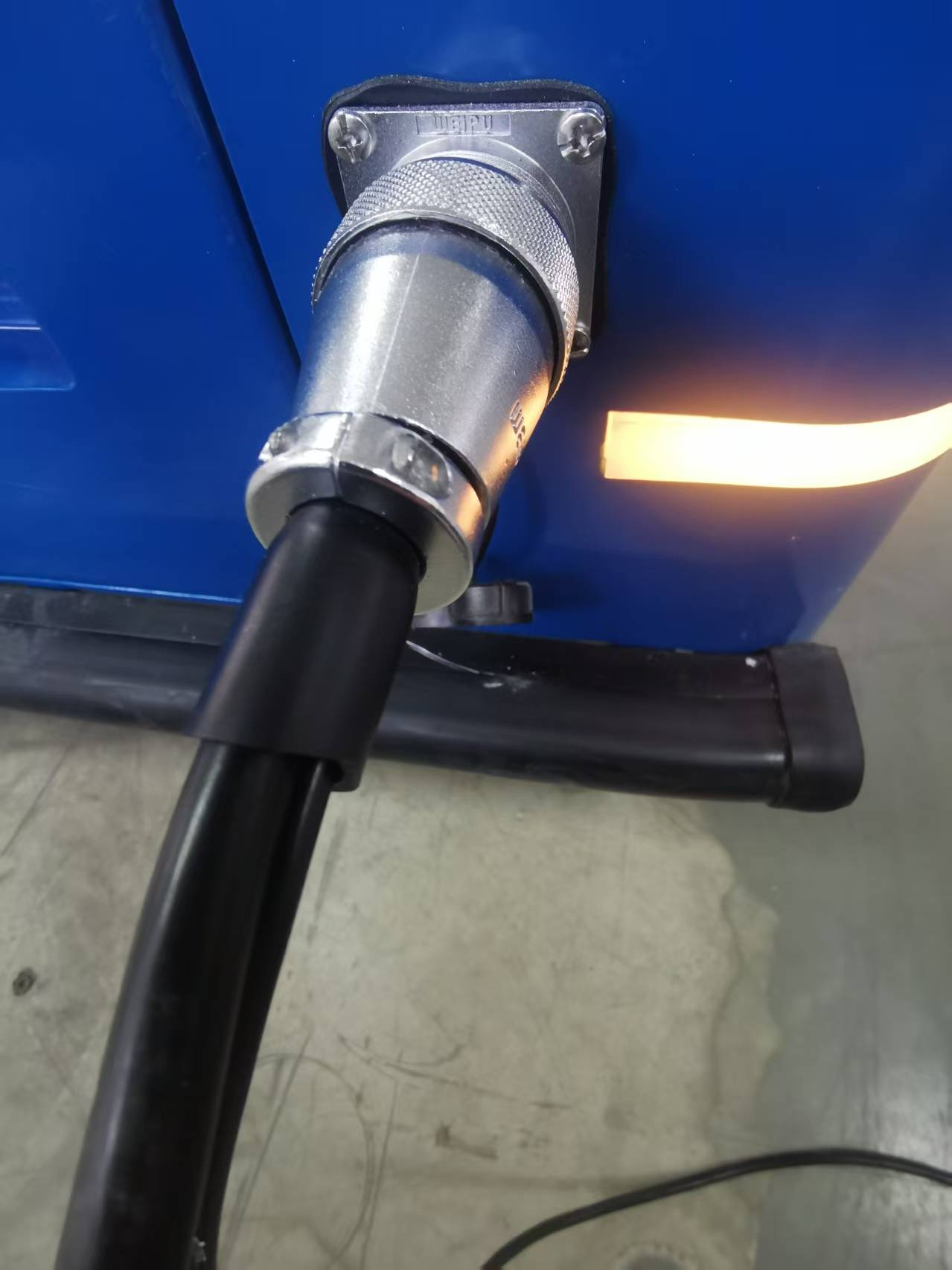
When performing manual charging, ensure that the charger plug and the charging port socket are fully connected to prevent dangers and losses caused by poor connections.
| Warning | Safety regulations for charging |
|---|---|
 | 1. Please use the original charger. Do not use chargers from other brands, as this may cause irreversible damage to the battery. 2. The battery poses risks of fire, explosion, etc. Do not disassemble, crush, incinerate, heat, or throw the battery into a fire. 3. Do not immerse the battery in water or get it wet. 4. Do not allow the positive and negative terminals of the battery to come into contact with the metal casing at the same time. 5. Do not short-circuit, overcharge, or over-discharge the battery. 6. Do not use or store the battery near heat sources (such as fire and heaters). 7. Do not reverse the positive and negative terminals of the battery. 8. Do not pierce the battery casing with nails or other sharp objects. Do not hammer or step on the battery. 9. Do not disassemble or modify the battery in any way without authorization. 10. Do not hit, throw, or subject the battery to mechanical vibrations or drops. 11. Do not mix batteries of different types or brands. 12. If the battery emits an unusual odor, becomes hot, deforms, changes color, or exhibits any other abnormal phenomena, stop using it and move it away from the operating environment. 13. If the battery catches fire, use a dry powder or foam fire extinguisher, sand, etc., to extinguish the fire and move the battery away from the operating environment. |
4. Second-layer mechanism
4.1 Introduction to the mechanism
The second-layer mechanism of the agricultural robot consists of two parts: the two-stage lifting column and the scissor gripper. The scissor gripper is available in pneumatic and electric versions.
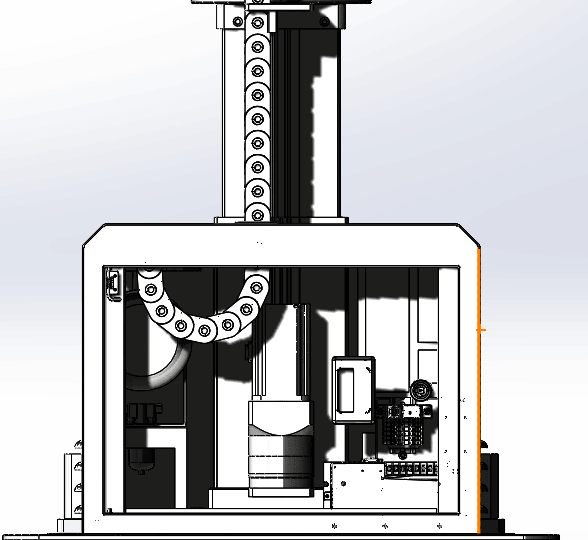
The agricultural robot connects the chassis and the second-layer mechanism electrically through the second-layer adapter box:
The functions of the interfaces on the second-layer adapter box are as follows:
| No. | Button/Component | Description |
|---|---|---|
| 1 | Network port 1 | Led out from the LAN3 port of the AGV's internal IPC, communication rate: 1000 Mb/ms; connected to the X1 network port of the lifting column driver through a network cable for EtherCAT communication; |
| 2 | Network port 2 | Led out from the LAN4 port of the AGV's internal router, communication rate: 100 Mb/ms; this network port is used as a debugging port |
| 3 | USB port | Led out from the USB 3.0 port of the AGV's internal IPC, reserved |
| 4 | Aviation connector port | Provides DC 48 V power (maximum power 1000 W), safety interface board outputs, and the IPC COMH1 RS485 interface to the second-layer equipment through the aviation connector harness |
4.2 Lifting column
Refer to the table below for the technical parameters of the lifting column:
| No. | Product | Remarks |
|---|---|---|
| 1 | Maximum output power | 750 W |
| 2 | Input voltage | DC 48 V |
| 3 | Protection rating | IP54 |
| 4 | Operating temperature | -35~65 °C. |
4.3 Pneumatic scissors and gripper
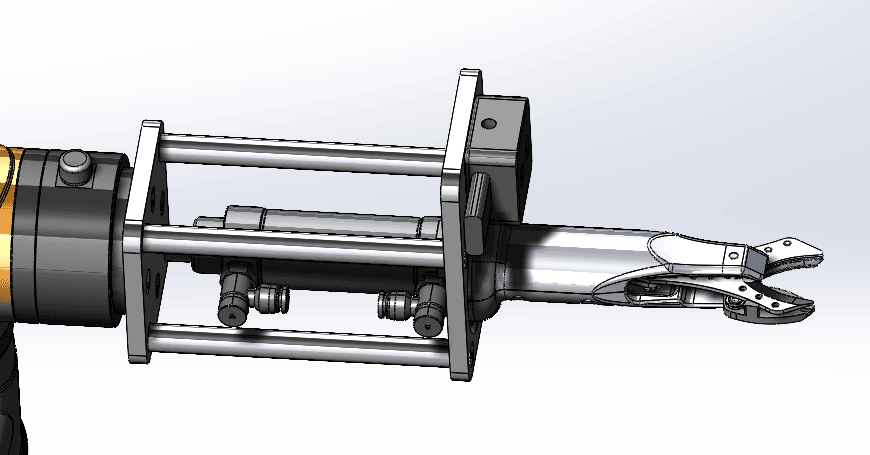
The pneumatic scissors and gripper are supplied with air by an air pump:
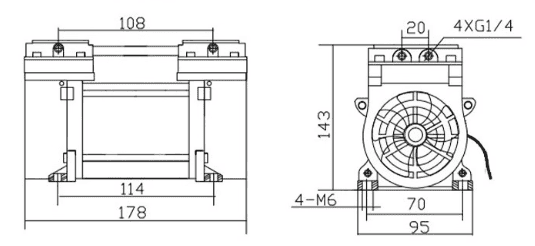
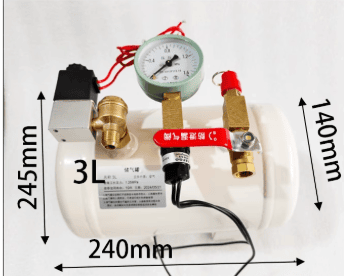
The technical parameters of the air pump are as follows:
| No. | Product | Remarks |
|---|---|---|
| 1 | Maximum output power | 240 W |
| 2 | Input voltage | DC 12~48 V |
| 3 | Insulation class | B |
| 4 | Rated pressure | 0.8 MPa |
| 5 | Operating temperature | -35~50 °C |
| 6 | Withstand voltage strength | 1500 V/50 Hz, no breakdown within 1 minute |