
Configure Tab
The settings in the [Configure] tab will affect the overall performance of the robotic system. All settings are stored in the installation profile. Users can customize the configuration in the [Configure] tab or import the existing installation profile.
Tip
After completing the settings for all functions under the [Configure] tab, please save the installation profile promptly to avoid losing configuration information. To ensure that the new settings take effect in the program, write the program file after saving the profile.
If you do not save the installation profile, the system will alert you that the installation profile is not saved before shutdown. If you proceed with the shutdown, any unsaved installation configuration information will be lost after restart.
If the configuration file is modified and is bound with a program file, be sure to save the configuration file first and then the program file to avoid errors during program operation.
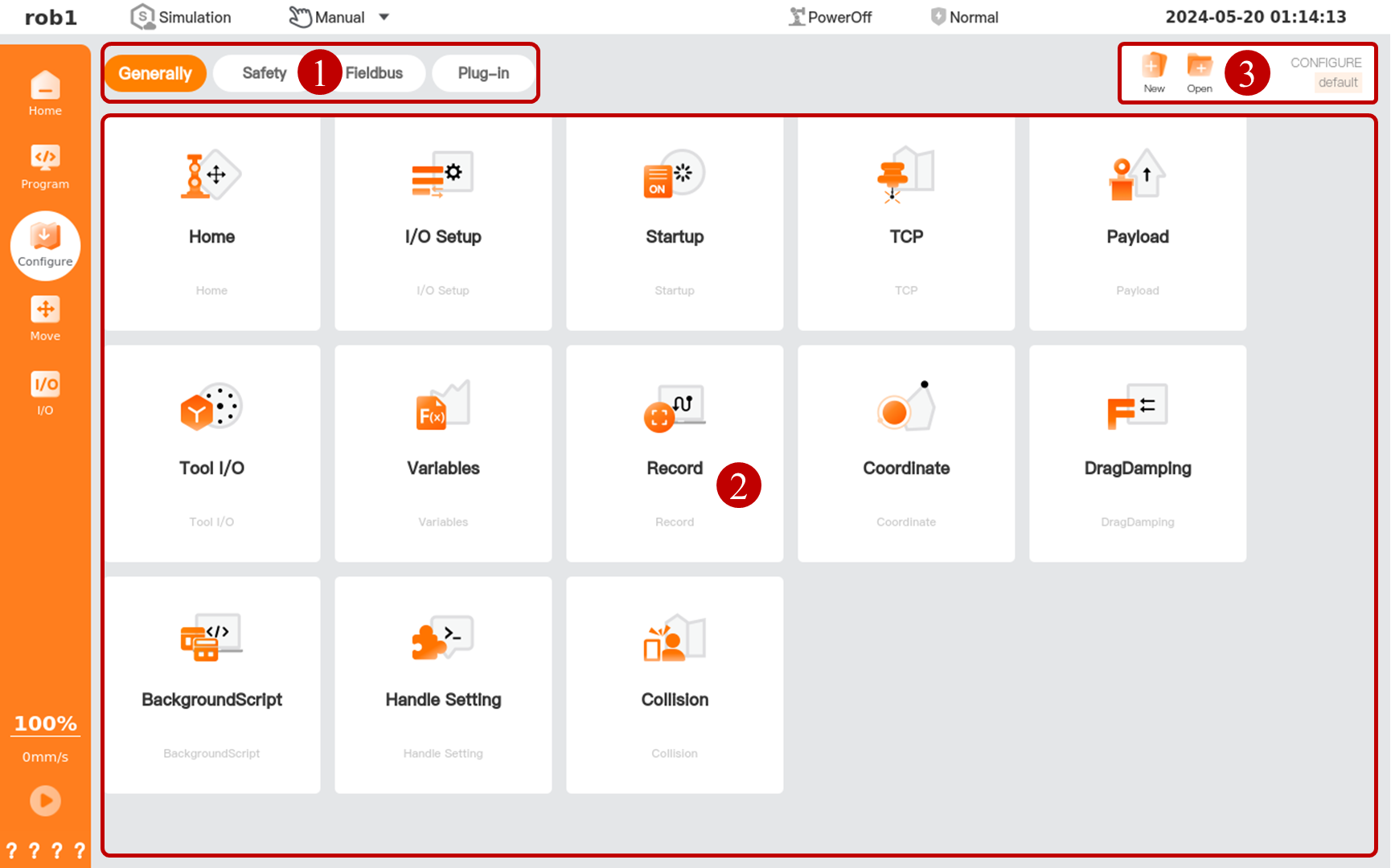
| Serial number | Name | Description |
|---|---|---|
| 1 | Configure menu | - |
| 2 | Configure settings page | - |
| 3 | Configuration manager tool bar | Manage the installation profile, with the name of the current installation profile displayed on the far right. * New: When creating a new installation profile, you can retain the current configuration in the new profile or reset all configurations. * Open: Open the installation profile stored in the controller. * Save: Save the installation profile in the controller. * Save > Save As: Rename the file and save it in the controller. |