
aubo_control Log Analysis
The aubo_control logs are stored at: /root/arcs_ws/log/
1. Log Structure Analysis

Using the above figure as an example:
Log level
TRACE_L3: Indicates the most detailed log level, typically used for debugging purposes.
TRACE_L2: Indicates the second most detailed log level, typically used for debugging purposes.
TRACE_L1: Indicates the least detailed log level, typically used for debugging purposes.
DEBUG: Indicates the debug information level, used to output debug information while the program is running.
INFO: Indicates the information level, used to output general information while the program is running.
WARNING: Indicates the warning level, used to output warning information while the program is running.
ERROR: Indicates the error level, used to output error information while the program is running.Log category
rob1: robot
legacy_robot1: hardware abstraction layer
RuntimeMachine: runtime state
aubo_script: script
aubo_comm: rpc server
core: core
SimHW: simulation
rob1::alg: algorithm layer
2. Getting the Version Number
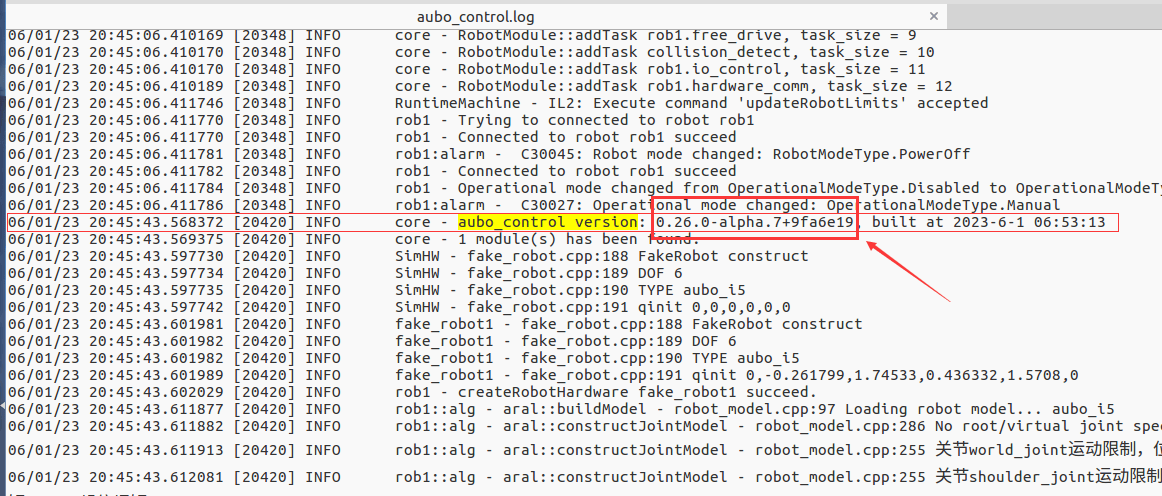
Keyword aubo_control version
As shown in the figure below, 0.26.0-alpha.7+9fa6e19 is the version number.
3. Safety State
Keyword SafetyModeType
SafetyModeType.Undefined // Safety state pending
SafetyModeType.Normal // Normal operating mode
SafetyModeType.ReducedMode // Reduced operating mode
SafetyModeType.Recovery // If the robot is outside the safety limits at startup, it will enter recovery mode
SafetyModeType.Violation // Safety limits exceeded (according to the safety configuration, e.g., speed limit exceeded)
SafetyModeType.ProtectiveStop // Software-triggered stop (keeps the trajectory, no brake, no power off)
SafetyModeType.SafeguardStop // IO-triggered safeguard stop (does not keep the trajectory, brake, no power off)
SafetyModeType.SystemEmergencyStop // System emergency stop: the emergency stop signal is input externally (configurable input), and no emergency stop signal is output externally
SafetyModeType.RobotEmergencyStop // Robot emergency stop: triggered by the control cabinet emergency stop input or the teach pendant emergency stop button, and outputs an emergency stop signal externally
SafetyModeType.Fault // Robot arm hardware fault or system fault
eg.
06/02/23 09:11:34.024340 [20425] INFO      rob1:alarm -  C30039: Safety mode changed: SafetyModeType.Normal
06/02/23 11:25:19.127938 [20425] INFO      rob1:alarm -  C30039: Safety mode changed: SafetyModeType.Undefined
4. Robot State
Keyword RobotModeType
RobotModeType.Disconnected // Not connected to the robot arm body (the robot arm body's aviation plug cable is disconnected)
RobotModeType.ConfirmSafety // Safety configuration in progress, performed in the power-off state
RobotModeType.Booting // The robot arm body is powering on and initializing
RobotModeType.PowerOff // The robot arm body is in the power-off state
RobotModeType.PowerOn // The robot arm body has powered on successfully, the brake is not yet released (locked), and the joint initial state has not been acquired
RobotModeType.Idle // The robot arm has powered on successfully, the brake is not yet released (locked), the motor is not energized, and the joint initial state acquisition is complete
RobotModeType.BrakeReleasing // The robot arm has powered on successfully, and the brake is being released
RobotModeType.BackDrive // Back-drive: brake released, motor not energized
RobotModeType.Running // The robot arm brake is released, running mode, control is transferred from hardware to software
RobotModeType.Maintaince // Maintenance mode: including firmware upgrade, parameter writing, etc.
eg.
05/31/23 20:40:29.878073 [64825] INFO      rob1:alarm -  C30045: Robot mode changed: RobotModeType.PowerOff
05/31/23 20:40:40.092940 [64825] INFO      rob1:alarm -  C30045: Robot mode changed: RobotModeType.ConfirmSafety
05/31/23 20:40:40.153198 [64825] INFO      rob1:alarm -  C30045: Robot mode changed: RobotModeType.Booting
05/31/23 20:40:41.155260 [64825] INFO      rob1:alarm -  C30045: Robot mode changed: RobotModeType.PowerOn
05/31/23 20:40:42.152681 [64825] INFO      rob1:alarm -  C30045: Robot mode changed: RobotModeType.Idle
05/31/23 20:40:52.433359 [64825] INFO      rob1:alarm -  C30045: Robot mode changed: RobotModeType.BrakeReleasing
05/31/23 20:40:53.433309 [64825] INFO      rob1:alarm -  C30045: Robot mode changed: RobotModeType.Running
5. Runtime State Transitions
Keyword Runtime machine mode
RuntimeState.Running // Running
RuntimeState.Retracting // Retracting
RuntimeState.Pausing // Pausing
RuntimeState.Paused // Paused
RuntimeState.Stepping // Single-step executing
RuntimeState.Stopping // Stopping in a controlled manner (keeping the original trajectory)
RuntimeState.Stopped // Stopped
RuntimeState.Aborting // Stopping (joint motion stop at maximum speed)
eg.
06/01/23 19:29:27.986594 [1387] INFO      RuntimeMachine - Runtime machine mode changed from RuntimeState.Stopped to RuntimeState.Running
06/01/23 19:29:28.151599 [1387] INFO      RuntimeMachine - Runtime machine mode changed from RuntimeState.Running to RuntimeState.Stopping
06/01/23 19:38:00.422546 [1378] INFO      RuntimeMachine - Runtime machine mode changed from RuntimeState.Running to RuntimeState.Pausing
06/01/23 19:38:00.577581 [1378] INFO      RuntimeMachine - Runtime machine mode changed from RuntimeState.Pausing to RuntimeState.Paused
06/01/23 19:38:41.692580 [1378] INFO      RuntimeMachine - Runtime machine mode changed from RuntimeState.Paused to RuntimeState.Stopped
6. ALARM Alarms
Keyword rob1:alarm
eg.
06/01/23 19:38:00.412963 [1378] ERROR     rob1:alarm -  C10022: joint3 error: collision
06/02/23 08:54:20.642999 [1378] ERROR     rob1:alarm -  C10021: joint3 error: target speed out of range
7. Script Execution Logic Analysis
The following project is used as an example:
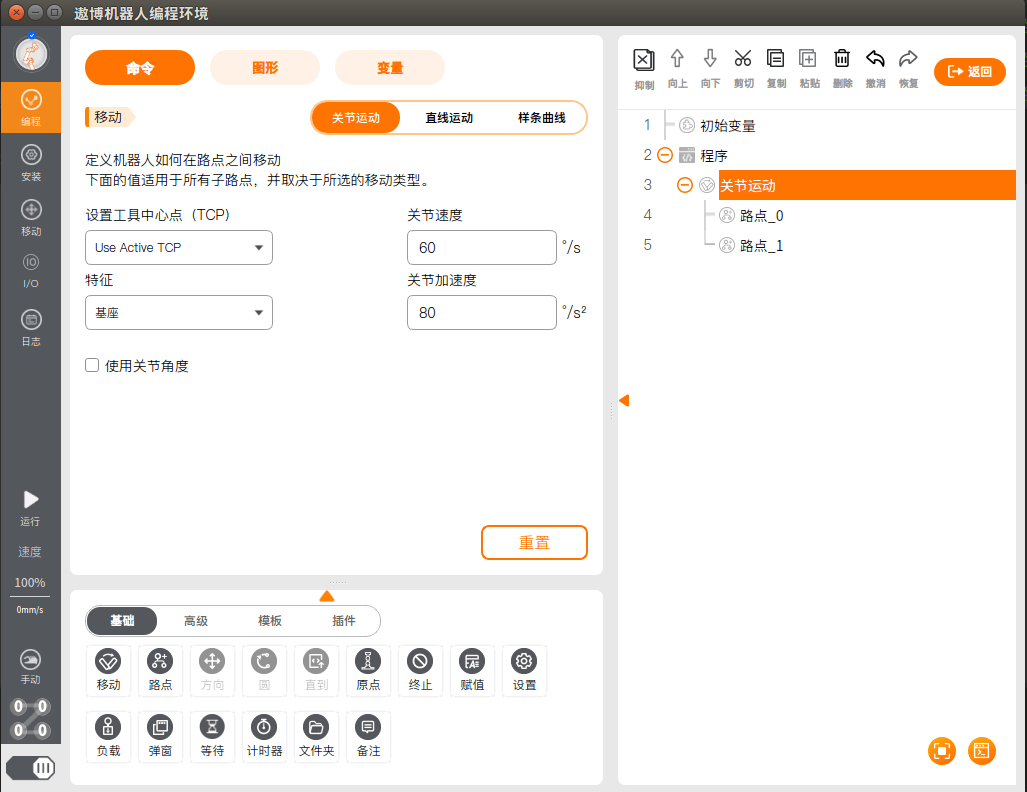
First, the script thread is started.
install_dir: /root/arcs
01/02/70 22:41:26.964153 [39278] WARNING   RuntimeMachine - runtime_machine.cpp:718 AAAAAAbort...
01/02/70 22:41:26.964172 [39278] INFO      aubo_script - script_executor.h:26 Start script thread...
01/02/70 22:41:26.965349 [39274] TRACE_L1  RuntimeMachine - runtime_machine.cpp:566 Runtime machine mode RuntimeState.Stopped not changed. Event RuntimeEventType.Abort ignored.
01/02/70 22:41:26.965521 [39275] INFO      rob1 - motion_control.cpp:1822 MotionControl abort
01/02/70 22:41:26.965547 [39275] INFO      rob1::alg - trajectory_plan.hpp:1125 tpStop(StopType::EMERGENCY) ignored while PlanStatus is IDLE
01/02/70 22:41:26.965608 [39275] INFO      rob1::alg - aral::updatePlanStartPoint - trajectory_setup.cpp:300 设置规划器下一段路径起始关节角为:  0.463262 -0.156283   1.43775 0.0233074    1.5708  0.463262 关节速度为: 0 0 0 0 0 0 关节加速度为: 0 0 0 0 0 0
01/02/70 22:41:26.965644 [39275] INFO      rob1::alg - aral::initiateRobotModel - trajectory_setup.cpp:94 默认设置的关节最大速度: [2.5964 2.5964 2.5964 3.1105 3.1105 3.1105] 关节最大加速度: [15.7 15.7 15.7 15.7 15.7 15.7] 笛卡尔空间最大速度: [   2 3.14] 笛卡尔空间最大加速度: [ 5 22]
01/02/70 22:41:26.965862 [39275] INFO      rob1::alg - aral::scaleVelAndAcc - trajectory_speed_adjust.cpp:12 用户设置的速度比例: 1 加速度比例: 1 缓冲点个数: 0
01/02/70 22:41:26.965881 [39275] DEBUG     rob1::alg - trajectory_plan.hpp:174 Init last target 0.463262,-0.156283,1.43775,0.0233074,1.5708,0.463262
01/02/70 22:41:26.966459 [39344] INFO      aubo_script - script_executor.h:46 Run script:
Then the script is sent to the controller.
local aubo = require('aubo')
local sched = sched or aubo.sched
local math = aubo.math or math

local sleep = sched.sleep
local thread = sched.thread
local sync = sched.sync
local run = sched.run
local kill = sched.kill
local halt = sched.halt
function p_Untitled_1()
    _ENV = sched.select_robot(1)
    setCollisionStopType(1)
    setCollisionLevel(6)
    setHomePosition({0,-0.2617993877991494,1.74532925199433,0.4363323129985824,1.570796326794897,0}    )
    modbusDeleteAllSignals()
    setDigitalInputActionDefault()
    setDigitalOutputRunstateDefault()
    setStandardDigitalInputAction(5, StandardInputAction.SlowDown1)
    setStandardDigitalInputAction(6, StandardInputAction.SlowDown2)
    setPayload(0, {0,0,0}, {0,0,0}, {0,0,0,0,0,0,0,0,0})
    setTcpOffset({0,0,0,0,0,0})
    setPlanContext(sched.current_thread_id(), 1, "初始变量")
    u57fau5ea7 = {0,0,0,0,0,0}
    u5de5u5177 = {0,0,0,0,0,0}
    u8defu70b9_0_p = {0.5390862712266159,0.133468772007148,0.422298607209269,3.141531022869428,-3.489163597303444e-05,1.570796327999991}
    u8defu70b9_0_q = {0.463262,-0.156283,1.43775,0.0233074,1.5708,0.463262}
    u8defu70b9_1_p = {0.5390862712266159,0.1334687720071478,0.2316999396105196,3.141531022869428,-3.489163597303869e-05,1.570796327999991}
    u8defu70b9_1_q = {0.4632619999999994,-0.2827666499844659,1.81194934240131,0.523990392385776,1.5708,0.4632619999999999}


    function str_cat(str1, str2)
        return tostring(str1) .. tostring(str2)
    end

    local function calculate_point_to_move_towards(feature, direction, position_distance)
        local posDir={direction[1], direction[2], direction[3]}
        if (math.norm(posDir) < 1e-6) then
            return getTargetTcpPose()
        end
        local direction_vector_normalized=math.normalize(posDir)
        local displacement_pose={direction_vector_normalized[1] * position_distance,direction_vector_normalized[2] * position_distance,direction_vector_normalized[3] * position_distance,0,0,0}

        local wanted_displacement_in_base_frame=poseSub(poseTrans(feature, displacement_pose), feature)
        return poseAdd(getTargetTcpPose(), wanted_displacement_in_base_frame)
    end
    setPlanContext(sched.current_thread_id(), 2, "程序")
    setPlanContext(sched.current_thread_id(), 3, "关节运动")
    setPlanContext(sched.current_thread_id(), 4, "路点_0")
    moveJoint(inverseKinematics(u8defu70b9_0_q, u8defu70b9_0_p), 1.39626, 1.0472, 0, 0)

    setPlanContext(sched.current_thread_id(), 5, "路点_1")
    moveJoint(inverseKinematics(u8defu70b9_1_q, u8defu70b9_1_p), 1.39626, 1.0472, 0, 0)
end

local app = {
  PRIORITY = 1000, -- set the app priority, which determines app execution order
  VERSION = "0.1",
  VENDOR = "Aubo Robotics",
}

function app:start(api)
  --
  self.api = api
  print("start---")
  p_Untitled_1()
end

function app:robot_error_handler(name, err)
  --
  print("An error hanppen to robot "..name)
end

-- return our app object
return app
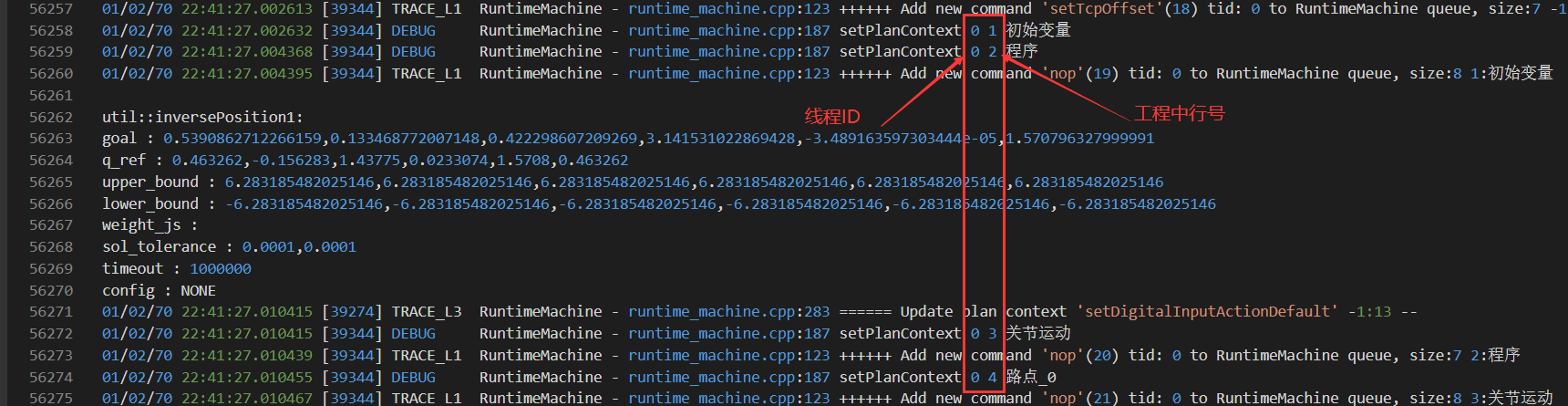
You can view the line number of the script within the project.
8. Crash Logs
Crash logs are stored at: /root/arcs_ws/log/.crash/
9. Diagnostic Data
Diagnostic data is stored at: /root/arcs_ws/log/.trace
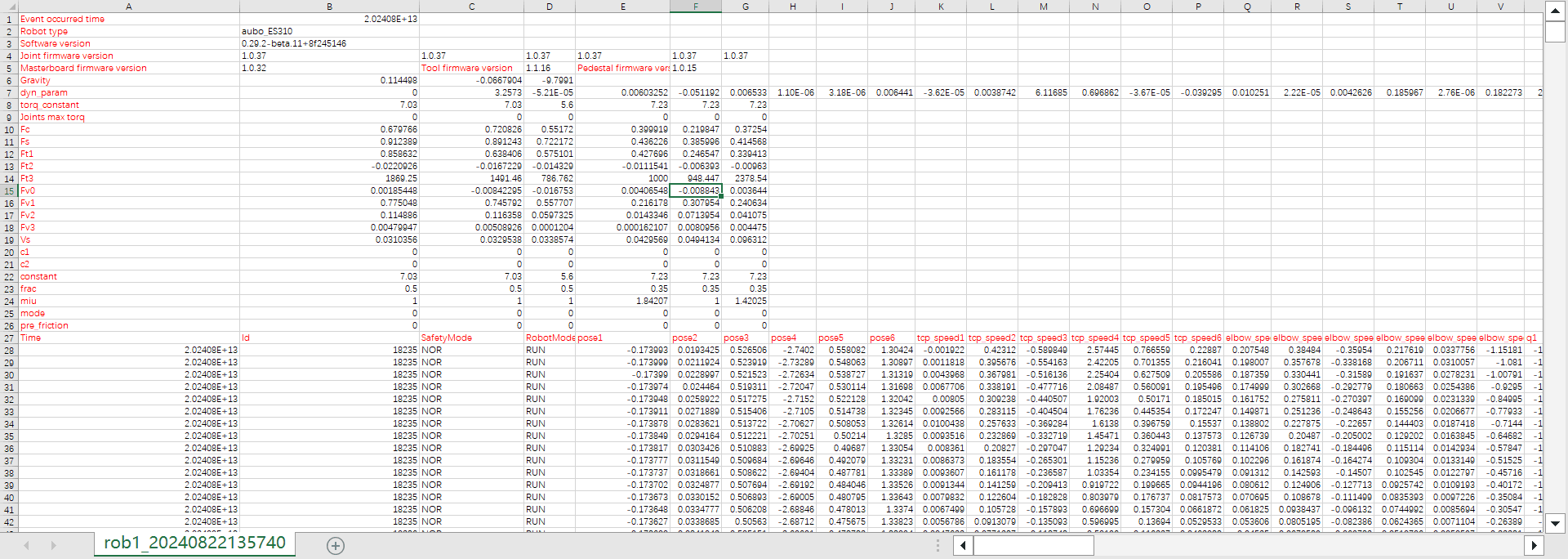
Data content:
- Event occurred time: the time the event occurred
- Robot type: robot model
- Software version: software version
- Joint firmware version: joint driver version
- Masterboard firmware version: interface board version
- Tool firmware version: tool firmware version
- Pedestal firmware version: pedestal firmware version
- Gravity: gravity (represented by three parameters, which are the components of gravity along the x, y, and z directions respectively)
- dyn_param: dynamics parameters
- torq_constant: torque coefficient
- Joints max torq: maximum joint torque
- Fc, Fs, Ft1, Ft2, Ft3, Fv0, Fv1, Fv2, Fv3, Vs, c1, c2, constant, frac, miu, mode, pre_friction are all friction parameters
- qmix: joint minimum limit value
- qman: joint maximum limit value
- Time: time
- Id: trajectory ID
- SafetyMode: safety state
- UNDEF: Undefined (undefined mode)
- NOR: Normal (normal mode)
- RED: ReducedMode (reduced mode)
- REC: Recovery (recovery mode)
- VIO: Violation (violation)
- PS: ProtectiveStop (protective stop)
- SS: SafeguardStop (safeguard stop)
- SES: SystemEmergencyStop (system emergency stop)
- RES: RobotEmergencyStop (robot emergency stop)
- FAULT: Fault (fault)
- RobotMode: robot state
- NC: NoController (no controller)
- DC: Disconnected (not connected)
- CONF: ConfirmSafety (safety configuration in progress, performed in the powered-off state)
- BOOT: Booting (the robot arm body is powering on and initializing)
- POFF: PowerOff (the robot arm body is in the powered-off state)
- PON: PowerOn (the robot arm body has powered on successfully, the brake is not yet released (locked), and the initial joint state has not been obtained)
- IDLE: Idle (the robot arm has powered on successfully, the brake is not yet released (locked), the motor is not energized, and the initial joint state has been obtained)
- REL: BrakeReleasing (the robot arm has powered on successfully, the brake is being released)
- BKD: BackDrive (back drive: brake released, motor not energized)
- RUN: Running (the robot arm brake is released, running mode, control is handed over from hardware to software)
- MT: Maintaince (maintenance mode: including firmware upgrade, parameter writing, etc.)
- ERR: Error
- pose1 ~ pose6: actual TCP position (described in the base coordinate system)
- tcp_speed1~tcp_speed6: actual TCP speed
- elbow_speed1~elbow_speed6: actual ELBOW speed
- q1, q2, q3, q4, q5, q6: actual joint angles
- qd1, qd2, qd3, qd4, qd5, qd6: actual joint speeds
- qdd1, qdd2, qdd3, qdd4, qdd5, qdd6: actual joint accelerations
- current1, current2, current3, current4, current5, current6: joint currents
- voltage1, voltage2, voltage3, voltage4, voltage5, voltage6: joint voltages
- temperature1, temperature2, temperature3, temperature4, temperature5, temperature6: joint temperatures
- torq1~torq6: joint torques
- target_q1, target_q2, target_q3, target_q4, target_q5, target_q6: target joint angles
- target_qd1, target_qd2, target_qd3, target_qd4, target_qd5, target_qd6: target speeds
- target_qdd1, target_qdd2, target_qdd3, target_qdd4, target_qdd5, target_qdd6: target accelerations
- target_curr1~target_curr6: target joint currents
- plan_pose1~plan_pose6: planned TCP positions
- plan_q1~plan_q6: planned joint positions
- plan_qd1~plan_qd6: planned joint speeds
- plan_qdd1~plan_qdd6: planned joint accelerations
- plan_curr1~plan_curr6: command currents calculated by the drag algorithm
- Mass: load mass
- Com_x, Com_y, Com_z: load center of mass
- inertia1~inertia6: load inertia, respectively [Ixx, Iyy, Izz, Ixy, Ixz, Iyz]
- friction1~friction6: friction torques
- forces1~forces6: force sensor readings
- freedrive: whether the drag function is enabled