
95 Guide to Handling Singularity Issues in the ARCS System
1 Singularity
1.1 Introduction to Singularities
During the motion of a six-axis robot, the robotic arm can move to any position and orientation in space through the coordinated operation of its 6 joints. However, when the robotic arm moves to certain special poses, the motion effects of two or more joints may cancel out or overlap, causing the robot end to be unable to continue moving in a certain direction. This is a singularity (Singularity).
1.2 AUBO Robotic Arm Joint Classification
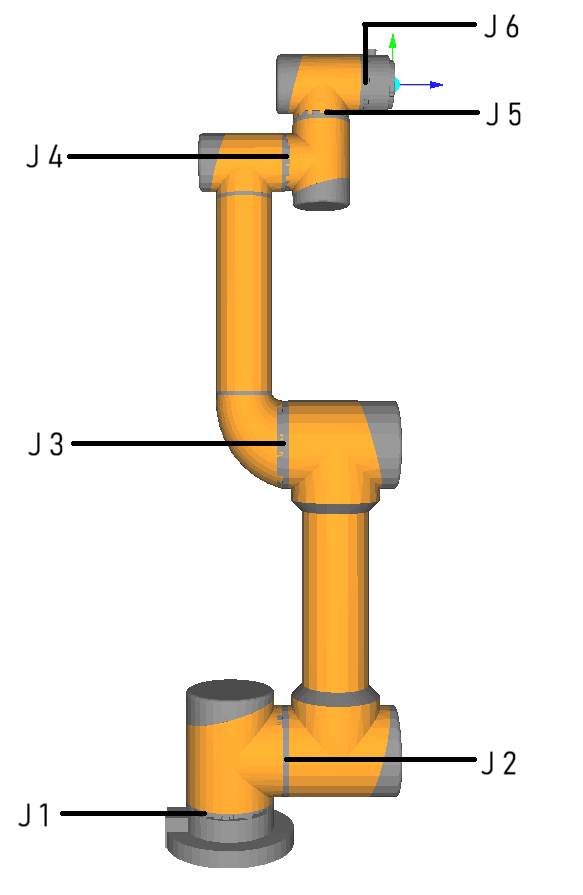
| Joint | Motion behavior | Singularity trigger conditions and notes |
|---|---|---|
| J1 | Rotates horizontally around the vertical axis | Shoulder singularity is likely to be triggered when the J5 rotation axis is directly above the J1 rotation axis. |
| J2 | Drives the upper arm to lift and pitch | Used to adjust the operating height; generally does not independently form a singularity pose. |
| J3 | Controls forearm extension and folding | When the joint angle approaches 0° or 180° (forearm fully extended / fully folded), an elbow singularity will be triggered. |
| J4 | Drives the overall rotation of the wrist | In a singular pose, this joint is highly prone to instant uncontrolled high-speed rotation and is the most significantly affected joint. |
| J5 | Controls the pitch motion of the end tool | When the joint angle approaches 0° or ±180° (wrist fully flattened), a wrist singularity is likely to be triggered. |
| J6 | Drives the end flange to rotate about itself | When its own rotation axis is collinear with the J4 rotation axis, a wrist singularity is likely to be triggered. |
1.3 Singularity Types and Formation Conditions
For AUBO six-axis industrial robotic arms, singularities are mainly divided into the following three types.
Shoulder singularity
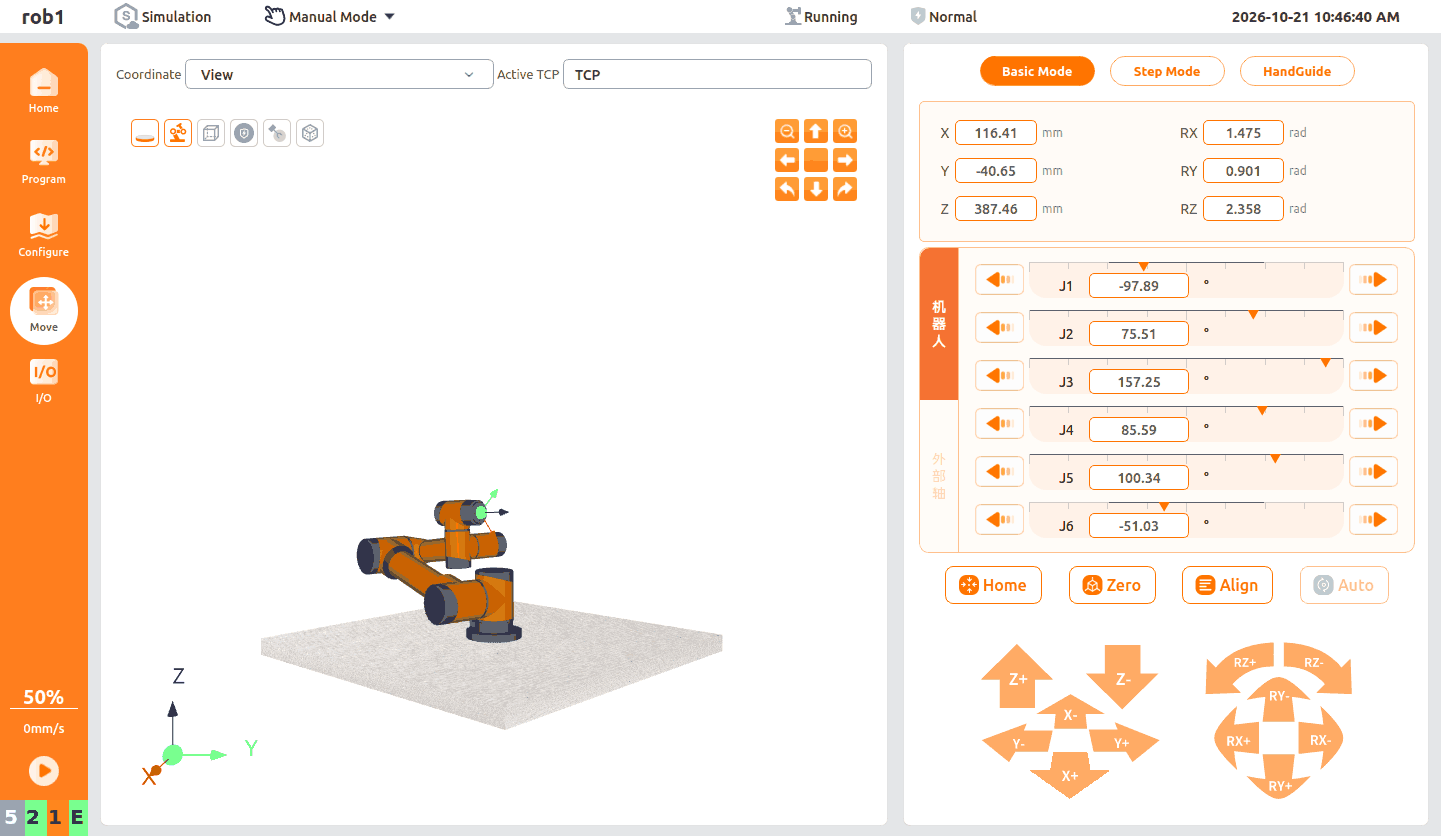
- Trigger condition: Triggered when the J5 rotation axis and the J1 rotation axis are on the same vertical line.
- Likely poses: Not related to a single joint angle. It usually occurs when the robotic arm is "upright and pointing upward" or "folded inward" so that the wrist is exactly above the base.
- Behavior: During robotic arm motion, when the wrist center J5 hovers directly above the base J1 axis, rotating J1 can only make the robotic arm spin in place and cannot drive the end to translate forward or backward. To maintain the original straight-line trajectory, the system forces the J1 joint to compensate for the displacement at an extremely high speed (that is, algorithmic "velocity divergence"), causing it to reverse instantly at extremely high speed and ultimately triggering an overload alarm and emergency stop.
Elbow singularity
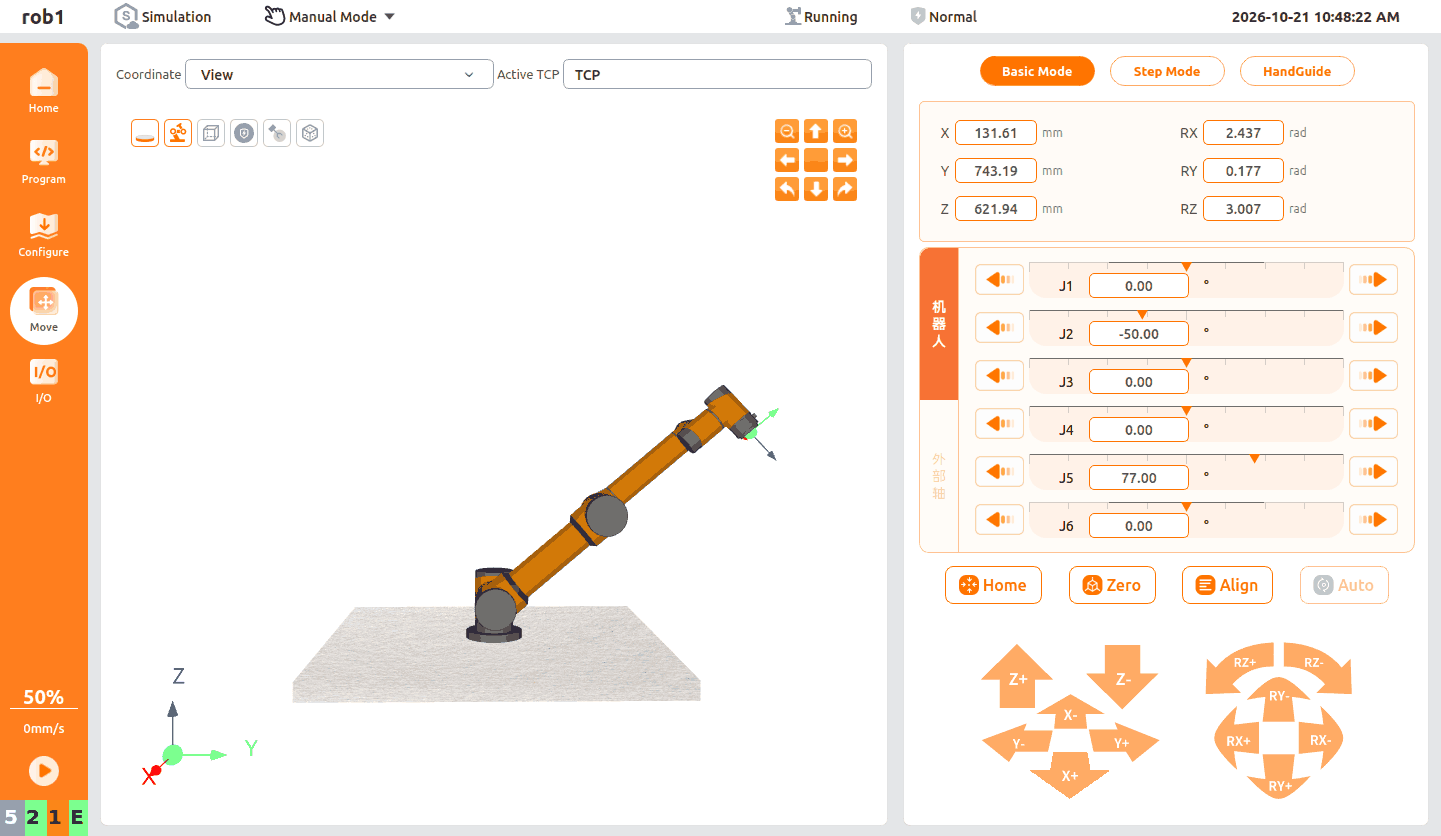
- Trigger condition: Triggered when the robotic arm is in a "fully extended" or "fully folded" state. That is, the J2 joint, J3 joint, and wrist center point are aligned in a straight line.
- Likely angle: J3 joint angle = 0° or 180°.
- Behavior: At this time, the robotic arm has reached the physical limit of its working radius and cannot continue linear motion along the arm extension direction.
Wrist singularity
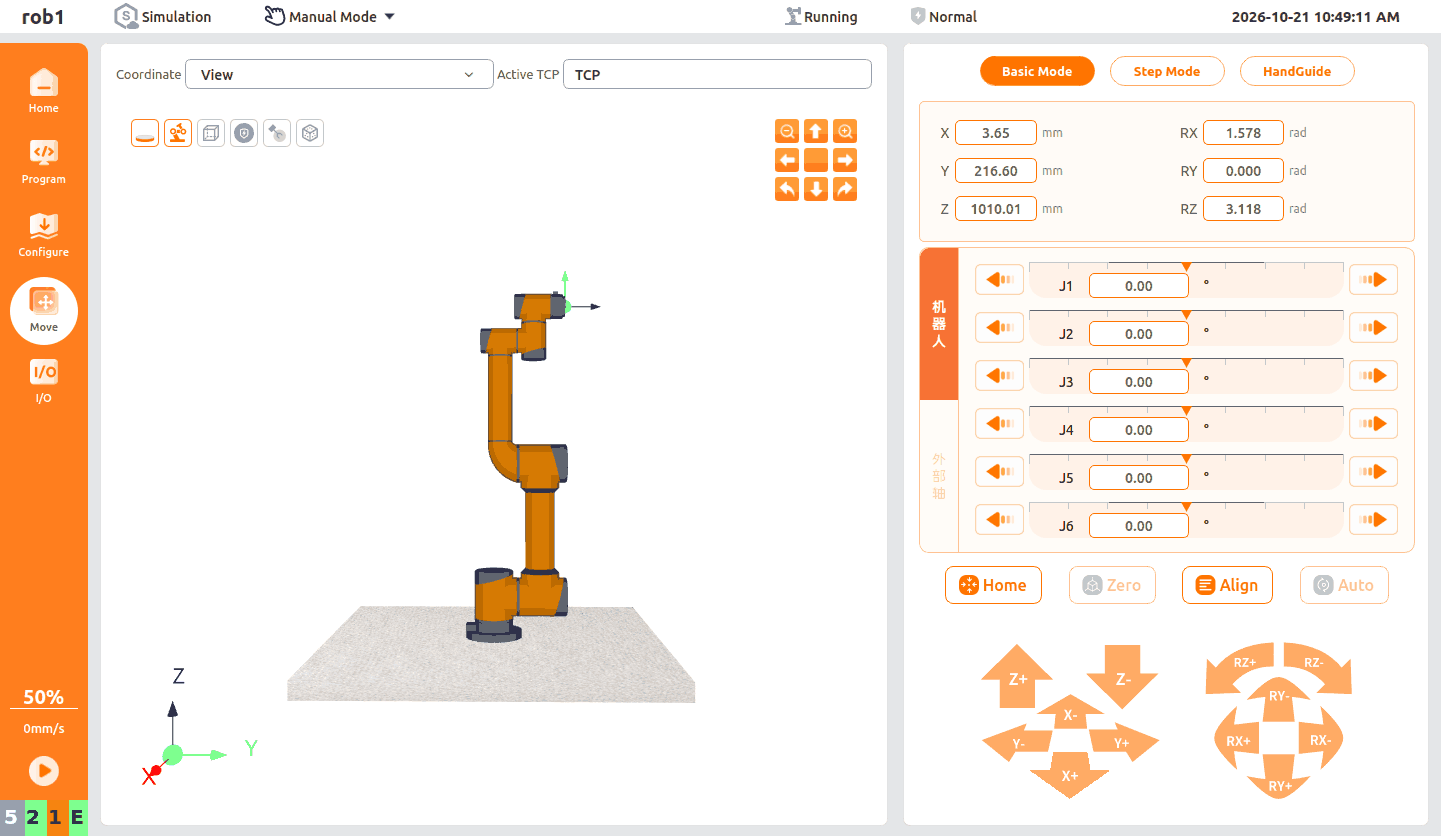
- Trigger condition: Triggered when the rotation axis of the J4 joint is collinear with (coincides with) the rotation axis of the J6 joint.
- Likely angle: J5 joint angle = 0° or ±180°.
- Behavior: At this time, the rotation effects of J4 and J6 completely overlap in space (rotating J4 is equivalent to rotating J6), causing the robotic arm to lose one rotational degree of freedom in this pose and making the J4 joint highly prone to instant reversal at extremely high speed.
1.4 Hazards of Singularities
Joint overspeed and motor overload: Near a singularity, the system inverse-kinematics calculation causes individual joints (such as J4 or J6) to receive abnormally high speed commands (theoretically reaching infinity), forcing the motor to instantly exceed its physical limits and directly causing overload alarms or even burning out the drive (if no protection mechanism is in place).
Severe mechanical impact on the reducer: Abnormal instantaneous overspeed and the subsequent emergency stop generate huge torque, directly impacting the precision reducer and easily causing severe gear wear, reduced accuracy, or even direct breakage.
Trajectory mutation and severe collision risk: To forcibly maintain a straight-line trajectory in space, the robotic arm pose may undergo unpredictable and violent "flipping" or "twisting", greatly increasing the safety risk of severe collisions with surrounding tooling fixtures and on-site personnel.
2 Singularity Handling Mechanism of the AUBO ARCS System
When the ARCS system detects that a singularity is about to be triggered during robotic arm motion, it immediately stops the robotic arm motion to avoid damage and reminds the user via a pop-up that the waypoint settings are incorrect.
2.1 Simulation Test Steps
The following uses an elbow singularity as an example to introduce a scenario of controlling a robotic arm with the ARCS system.
Write a motion program on the program editing interface to simulate the robotic arm moving from a safe normal pose to a singularity position.
Note:
- To reproduce the singularity trigger scenario, select [Spline Curve] as the movement method, which strictly follows Cartesian space trajectory constraints (that is, requiring the tool end to follow an absolutely precise path in space).
- In this mode, the TCP accurately follows the preset spatial trajectory throughout the entire process. Inverse-kinematics calculation (the ARCS system calculates how many degrees each joint must rotate to coordinate with this path) can easily trigger a singularity.
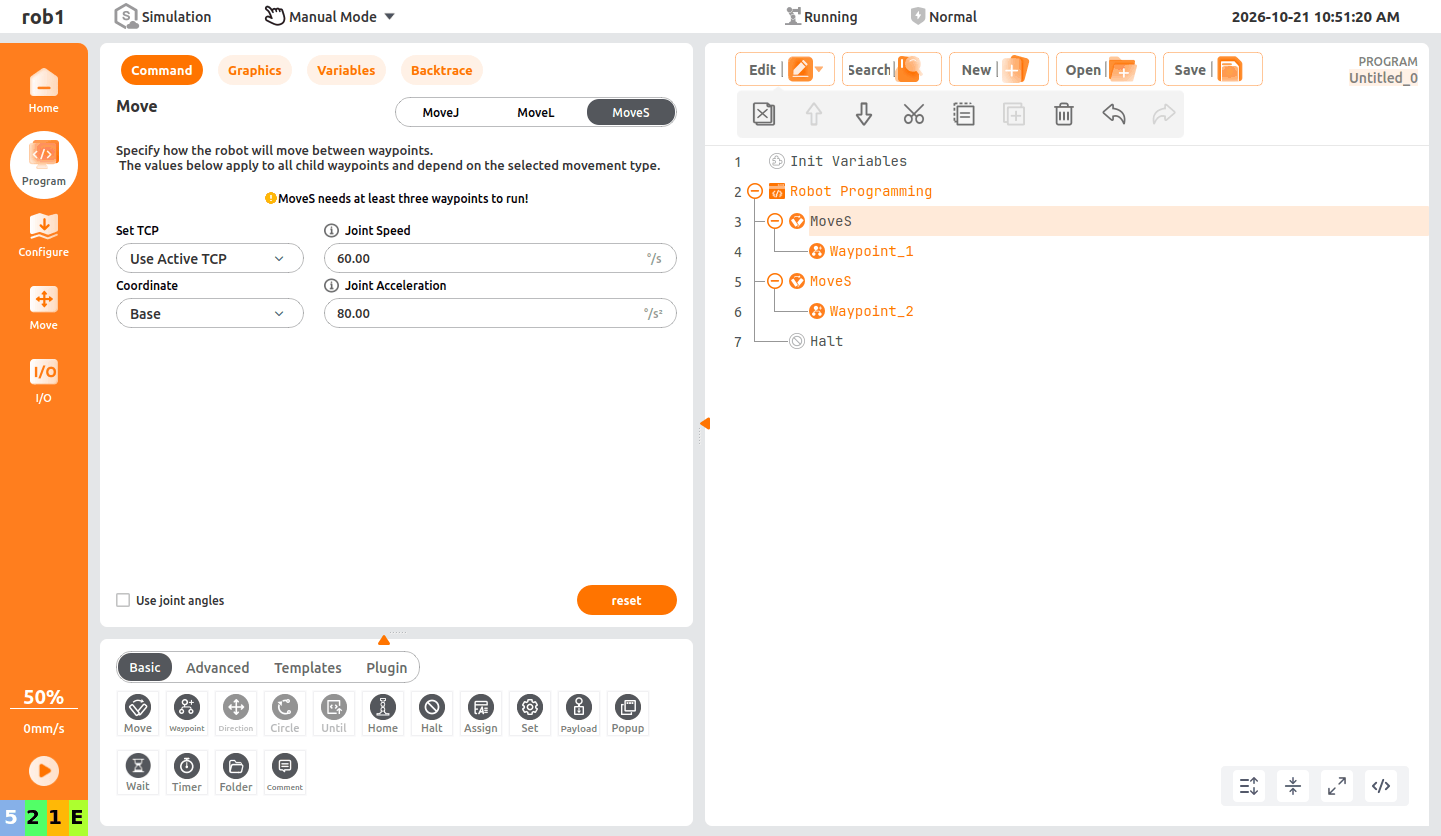
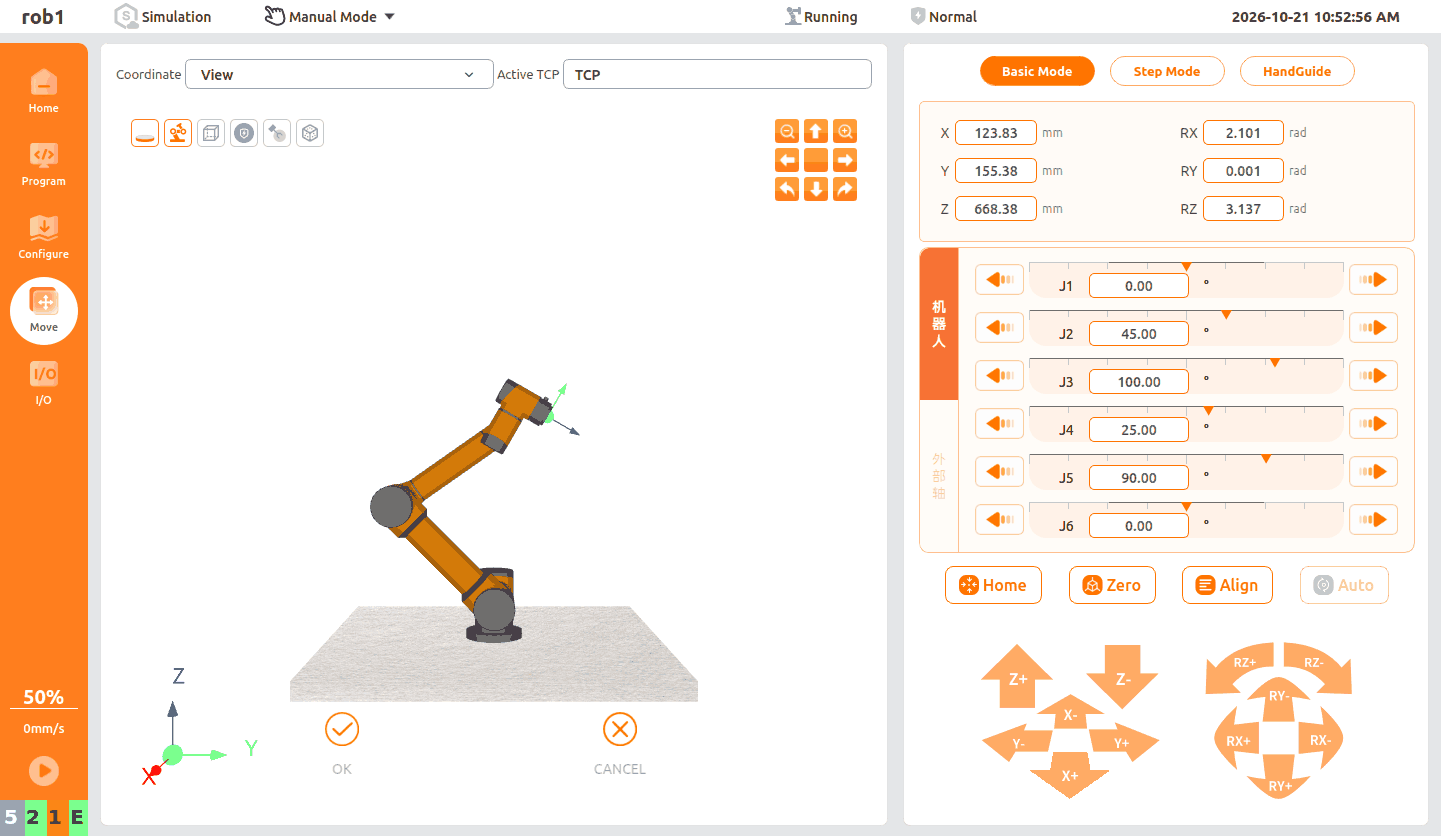
Set waypoint 1 in the program.
Note:
This point is the normal working pose of the robotic arm. The J1 ~ J6 joint parameters are as shown on the interface, with no singularity risk.
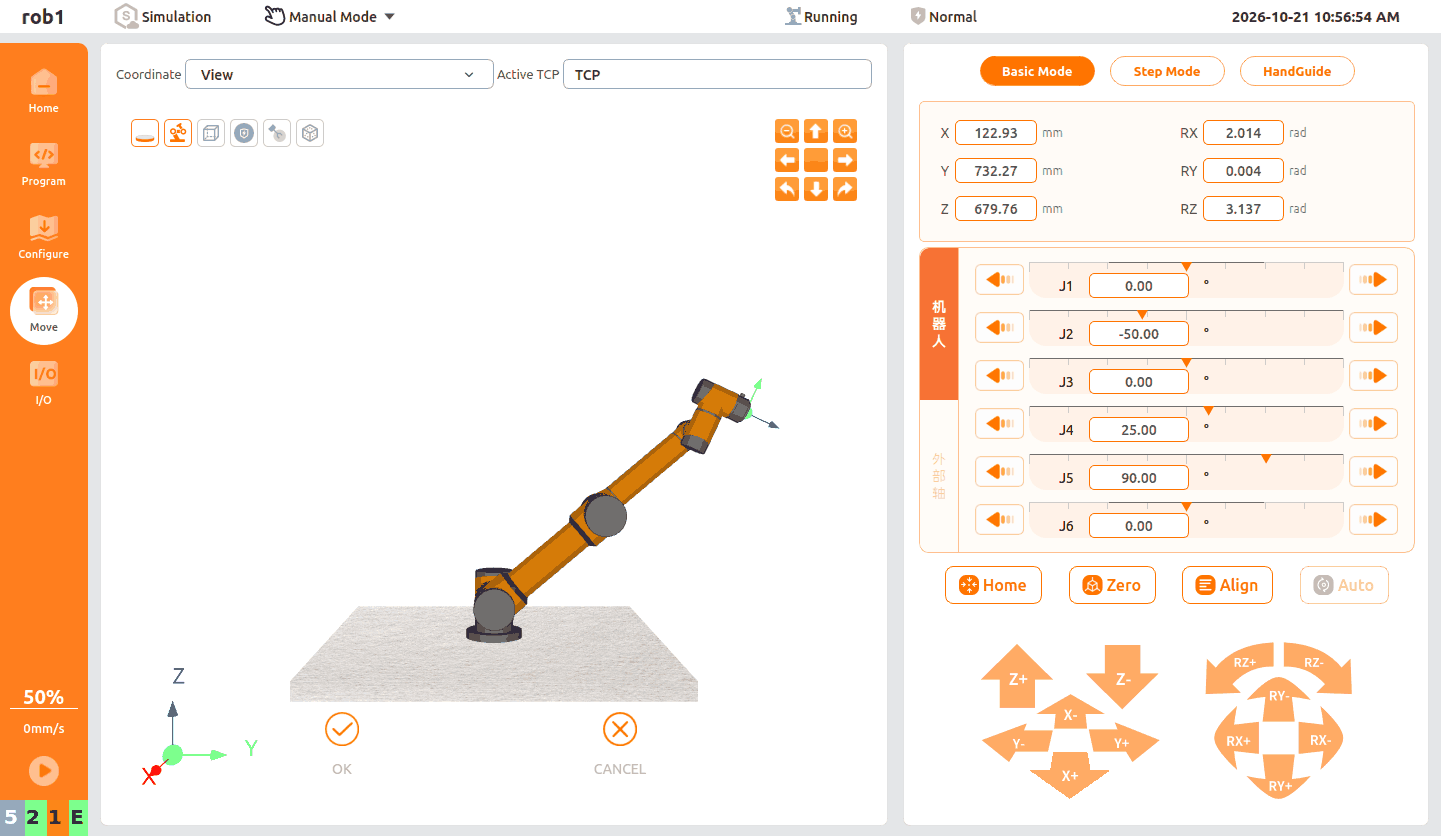
Set waypoint 2 in the program.
Note:
At this waypoint, J3 is 0°. The robotic arm will trigger an elbow singularity while moving to waypoint 2.
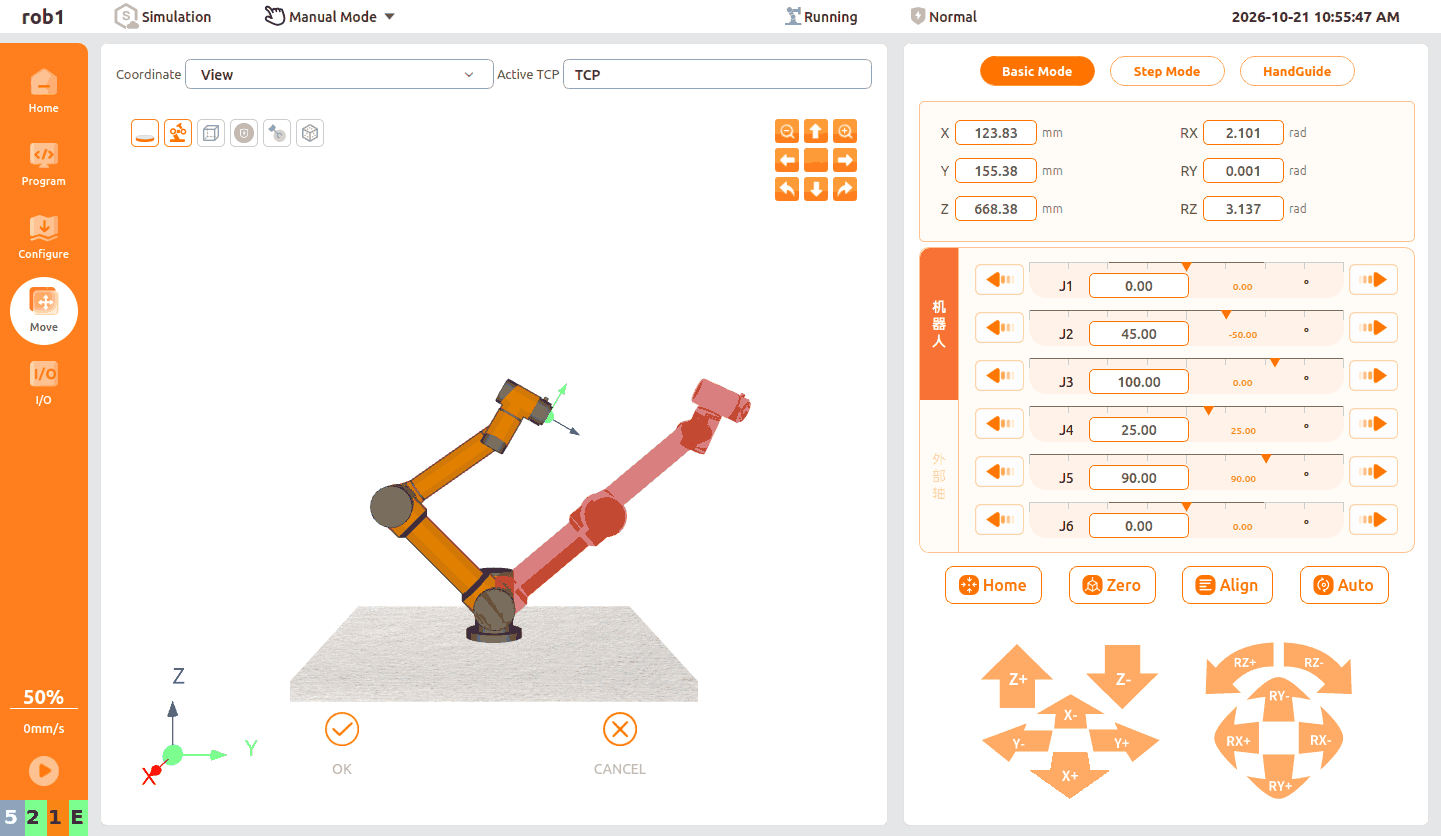
After setup is complete, the solid model in the interface is located at waypoint 1, and the red ghost image indicates the target pose of waypoint 2.
After saving the program, click
 in the lower-left corner of the software to start the program. The ARCS system verifies the path in real time, predicts that the travel path will pass through a singularity, and triggers the safety protection logic: it immediately terminates program execution and displays an abnormal alarm pop-up.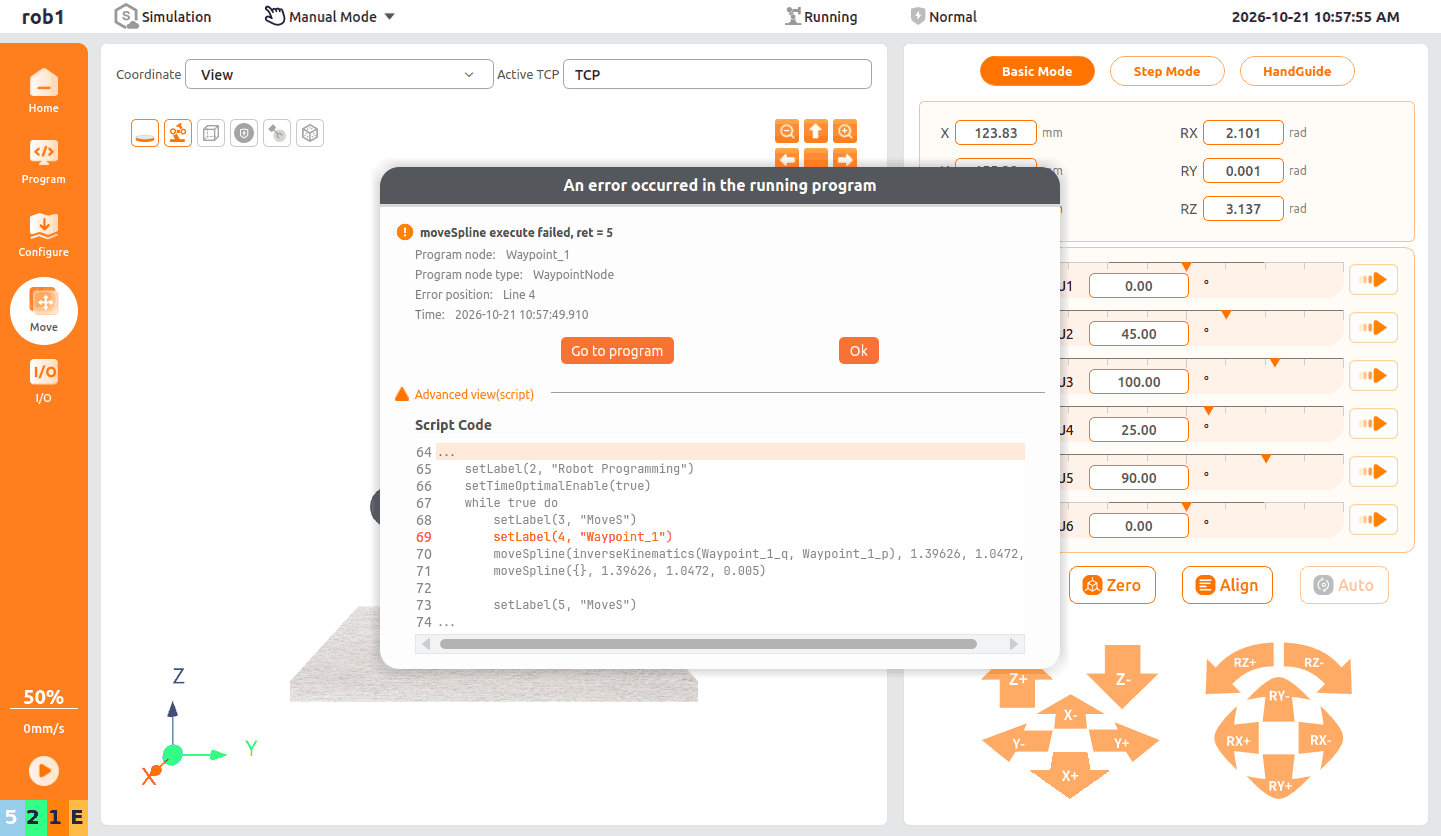
2.2 How to Avoid Singularities When Using the ARCS System
Changing the movement method to [Joint Motion] or using the algorithm optimization of [Linear Motion] can effectively avoid or mitigate shutdown issues caused by singularities.
Change the movement method to [Joint Motion]
In this mode, the system does not require the tool center point (TCP) to strictly follow a Cartesian space trajectory. Instead, it directly calculates and executes the angular changes of each joint from the start point to the end point. Because real-time inverse kinematics solving is not required, this completely avoids the requirement for instantaneous joint overspeed caused by spatial dead zones, making it the safest and most thorough singularity avoidance solution.
Change the movement method to [Linear Motion]
Compared with the strict pose-continuity requirements of spline curves, the trajectory constraints of linear motion are relatively simple. When the underlying interpolation algorithm of the ARCS system handles linear motion between two points, if it detects that the motion is approaching a singularity, the underlying interpolation algorithm automatically fine-tunes the TCP pose and smoothly reduces speed to optimize the trajectory, thereby effectively mitigating sudden speed changes and avoiding abnormal interruption.
At this time, although the J3 joint angle of waypoint 2 in the example program is set to 0°, in Linear Motion mode, the underlying interpolation algorithm of the ARCS system fine-tunes it to 0.33° when the motion ends, successfully avoiding the singularity.
Warning:
This movement method cannot completely avoid singularities. When editing a program, avoid setting waypoints to angles where singularities are likely to occur whenever possible.