
Firmware Update Command-Line Tool Guide
1. Introduction
Perform firmware upgrade operations via the command line. Through simple command-line parameters, users can specify the firmware file path, the target robot node, the firmware version to upgrade to, and so on. The tool can handle firmware upgrades for specific nodes and provides an error feedback mechanism to ensure users are promptly informed of issues that may occur during the upgrade.
This tool supports running on Linux and Windows; users only need to select the corresponding executable file according to their operating system.
2. Command-Line Options and Parameters
| Option | Description | Example |
|---|---|---|
| -h|--help | Display help information, introducing detailed descriptions of all available options and parameters. | -h |
| -f|--file | Specify the path to the firmware file. This parameter is required, and the specified firmware file must exist in the control cabinet. | -f /tmp/firmware_update-1.0.42-rc.10+9030ebb.firm |
| -n|--node | Specify the nodes to upgrade. Node names are separated by commas. In the example, master_mcu, slave_mcu, joint1, joint2, joint3, joint4, joint5, joint6, base, and tool represent the robot's main board, slave board, joint 1, joint 2, joint 3, joint 4, joint 5, joint 6, base, and tool nodes, respectively. all means that all nodes will be upgraded. | -n master_mcu,slave_mcu,joint1,joint2,joint3,joint4,joint5,joint6,base,tool |
| -i|--ip | Set the target robot's IP address. | -i 192.168.1.46 |
| -F|--force | Force all nodes to upgrade to the specified target version, even if some nodes are already at that version. | -F |
3. Preparation Before the Upgrade
- SDK development kit:
- Download link Index of /sdk (aubo-robotics.cn)
- Note: version v0.25.0-rc.1 or later must be installed.
- Download the firmware installation package .firm file and copy it into a directory on the control cabinet:
- Pre-release version download link: Index of /pre-release/firmware (aubo-robotics.cn)
- Stable version download link: Index of /firmware (aubo-robotics.cn)
4. Running Operations
4.1 Operations in the Linux Environment
The steps are as follows:
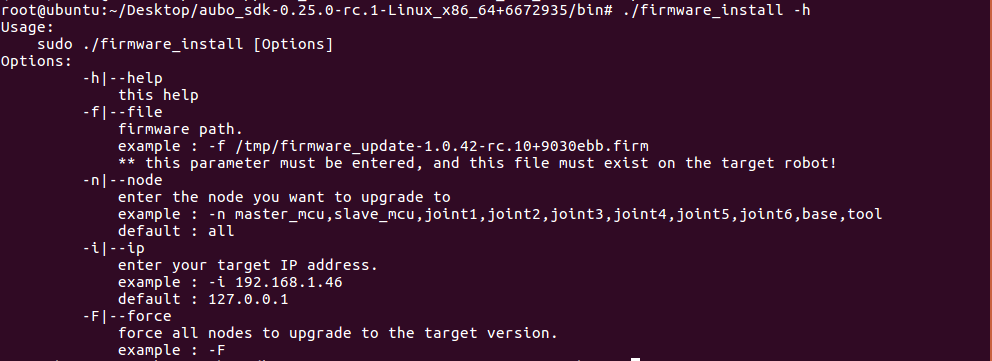
Open a terminal and change to the bin directory of the SDK development kit.
Run firmware_install by entering the following command:
./firmware_install -hThe output shown below indicates successful execution.
4.2 Operations in the Windows Environment
The steps are as follows:
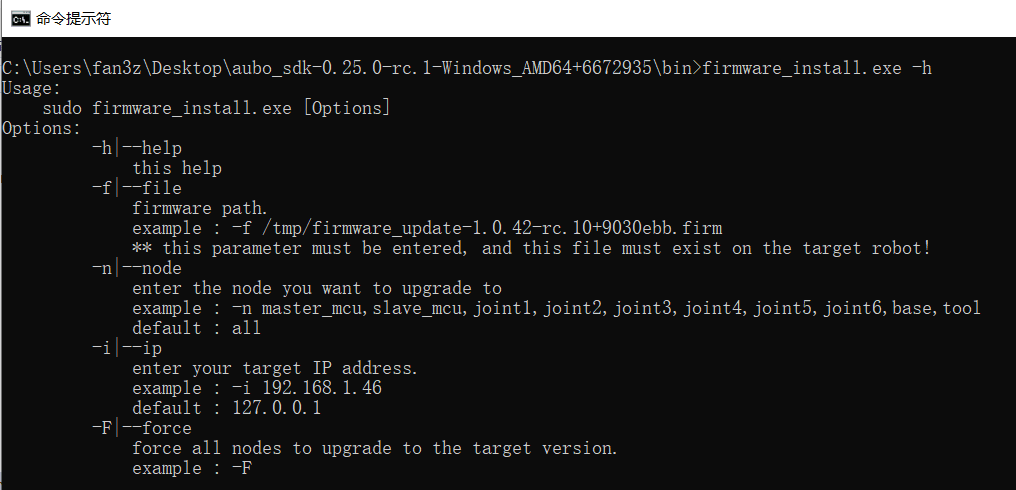
Open CMD and change to the bin directory of the SDK development kit.
Enter the following command:
set PATH=..\lib;%PATH%Run firmware_install.exe by entering the following command:
firmware_install.exe -hThe output shown below indicates successful execution.
5. Upgrade Command Examples
5.1 Linux Environment
Assume the robot's IP address is 172.16.26.203, and the firmware installation package .firm file is located in the control cabinet at /tmp/firmware_update-1.0.44-rc.1+8127e8d.firm.
Upgrade nodes with version check: before upgrading a node, it first checks whether the current version is the same as the target version; if they are the same, that node is not upgraded.
Force upgrade all firmware nodes (without version check): before upgrading a node, it does not check whether the current version is the same as the target version, but upgrades directly by force.
5.1.1 Example 1: Upgrade all firmware nodes with version check
Upgrade command:
./firmware_install -i 172.16.26.203 -f /tmp/firmware_update-1.0.44-rc.1+8127e8d.firm -n all5.1.2 Example 2: Force upgrade all firmware nodes (without version check)
Upgrade command:
./firmware_install -i 172.16.26.203 -f /tmp/firmware_update-1.0.44-rc.1+8127e8d.firm -n all!5.1.3 Example 3: Upgrade specific firmware nodes with version check
If only the main board node is upgraded, the upgrade command is as follows:
./firmware_install -i 172.16.26.203 -f /tmp/firmware_update-1.0.44-rc.1+8127e8d.firm -n master_mcu5.1.4 Example 4: Force upgrade specific firmware nodes (without version check)
Upgrade command:
./firmware_install -i 172.16.26.203 -f /tmp/firmware_update-1.0.44-rc.1+8127e8d.firm -n master_mcu!5.2 Windows Environment
Assume the robot's IP address is 172.16.26.203, and the firmware installation package .firm file is located in the control cabinet at /tmp/firmware_update-1.0.44-rc.1+8127e8d.firm.
Upgrade nodes with version check: before upgrading a node, it first checks whether the current version is the same as the target version; if they are the same, that node is not upgraded.
Force upgrade all firmware nodes (without version check): before upgrading a node, it does not check whether the current version is the same as the target version, but upgrades directly by force.
5.2.1 Example 1: Upgrade all firmware nodes with version check
Upgrade command:
firmware_install.exe -i 172.16.26.203 -f /tmp/firmware_update-1.0.44-rc.1+8127e8d.firm -n all5.2.2 Example 2: Force upgrade all firmware nodes (without version check)
Upgrade command:
firmware_install.exe -i 172.16.26.203 -f /tmp/firmware_update-1.0.44-rc.1+8127e8d.firm -n all!5.2.3 Example 3: Upgrade specific firmware nodes with version check
If only the main board node is upgraded, the upgrade command is as follows:
firmware_install.exe -i 172.16.26.203 -f /tmp/firmware_update-1.0.44-rc.1+8127e8d.firm -n master_mcu5.2.4 Example 4: Force upgrade specific firmware nodes (without version check)
If only the main board node is upgraded, the upgrade command is as follows:
firmware_install.exe -i 172.16.26.203 -f /tmp/firmware_update-1.0.44-rc.1+8127e8d.firm -n master_mcu!6. Running Results
Firmware upgrade success: the terminal prints
firmware update success, as shown below: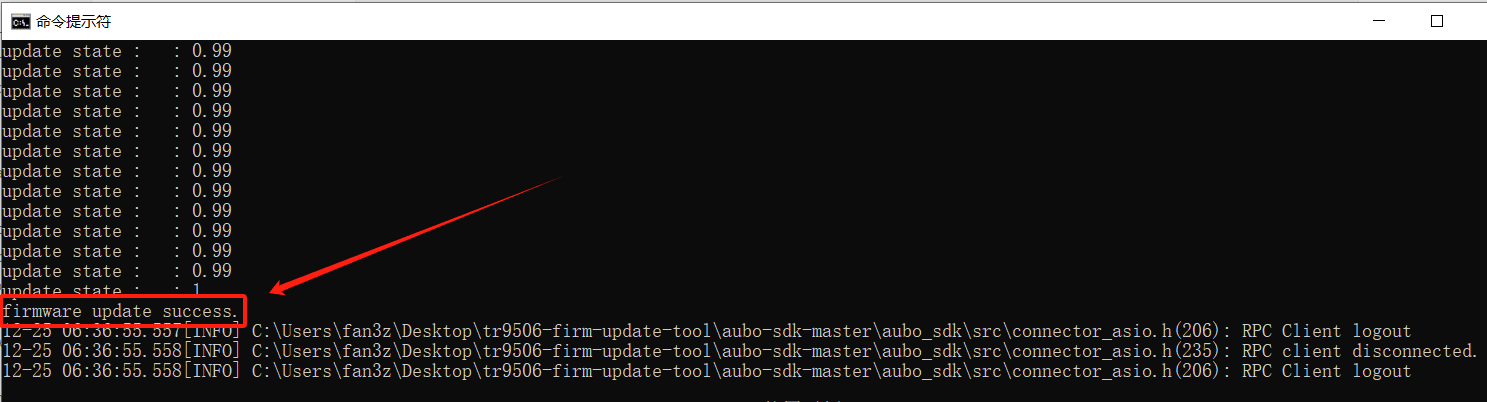
Program failure: the terminal prints the corresponding error message. The failure cases are listed below:
- RPC connection failed: prints
rpc connect error, reconnect now - RPC login failed: prints
rpc login error - Firmware package path not provided: prints
firmware update ERROR! please enter the - f parameter - Firmware upgrade request failed: prints
update firmware error!ret : - Firmware upgrade failed: prints
firmware update failed! - Failed to obtain the firmware upgrade progress: prints
getFirmwareUpdateProcess error - Firmware installation failed: prints
firmware update failed
- RPC connection failed: prints