
96 Wi-Fi Connection and Management Guide
1. Overview
In the ARCS system, we recommend directly using the system's built-in command-line tool nmcli for wireless network connection and daily management. This tool is easy to configure, and settings are automatically saved and take effect after configuration.
2. Basic Operations: Scanning and Connecting
2.1 Scan Nearby Wi-Fi Networks
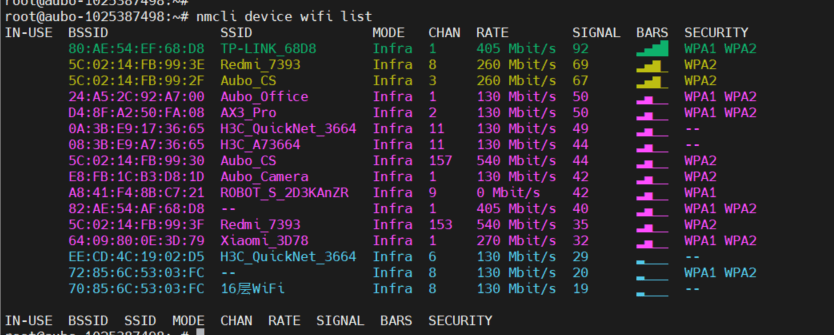
Before connecting, first check which wireless networks are available nearby:
nmcli device wifi list(The SSID in the list is the Wi-Fi name.)
2.2 Connect to Wi-Fi
After finding the Wi-Fi name you need to connect to, enter the following command to connect:
# Syntax: nmcli device wifi connect "Wi-Fi name" password "password"
nmcli device wifi connect "ARCS_WIFI" password "12345678"
(Note: If the Wi-Fi name contains spaces, be sure to enclose it in double quotation marks.)

3. Daily Management: Disconnecting, Auto-Start, and Deleting
After a successful connection, the system automatically saves the Wi-Fi configuration. You can manage saved networks with the following commands.
3.1 Disconnect the Current Connection
If you need to temporarily disconnect a Wi-Fi connection:
# Syntax: nmcli connection down "Wi-Fi name"
nmcli connection down "ARCS_WIFI"
3.2 Reconnect
Manually reconnect to a Wi-Fi network whose password has already been saved:
# Syntax: nmcli connection up "Wi-Fi name"
nmcli connection up "ARCS_WIFI"
3.3 Set Automatic Connection on Boot (Auto-Start)
By default, a successfully connected Wi-Fi network will automatically connect the next time the system starts. If you need to manually enable or disable the "auto-start on boot" feature for a Wi-Fi network:
# Enable automatic connection
nmcli connection modify "ARCS_WIFI" connection.autoconnect yes

# Disable automatic connection
nmcli connection modify "ARCS_WIFI" connection.autoconnect no
3.4 Forget / Delete Wi-Fi
If the password changes, or if you no longer need to connect to a network, you can delete it from the system:
# Syntax: nmcli connection delete "Wi-Fi name"
nmcli connection delete "ARCS_WIFI"